
特别推荐
[全家桶]Toontrack EZKeys 虚拟钢琴扩展音色 [WiN, MacOSX](50GB)
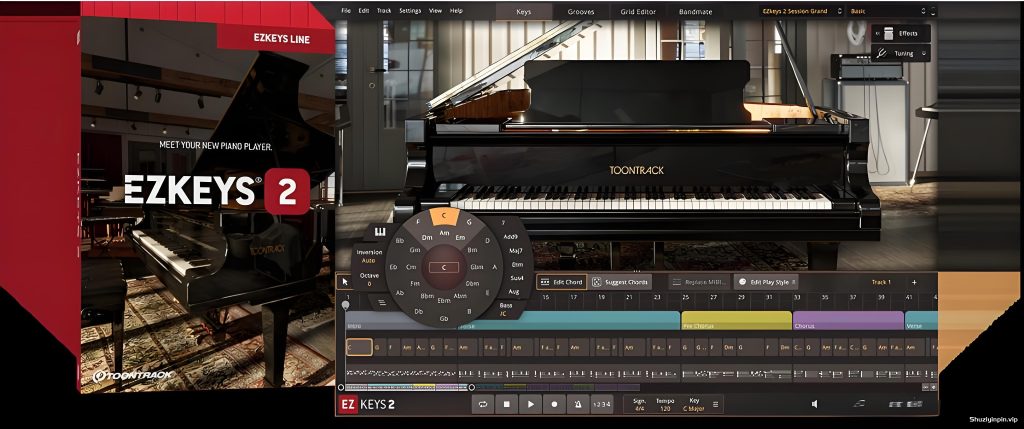
Team V.R | 17 March 2026 | WiN: 769 | MAC: 707 MB
安装方法:
EZkeys 2 不仅仅是一款软件,它还是一款歌曲创作工具和新想法的创意中心。准备好创作、演奏和创作了吗?今天就来认识您的新钢琴演奏者吧。
* 完全可调整大小和可扩展的界面
* Bandmate:根据您自己的音频或 MIDI 获取和弦和节奏
* 具有人性化、音阶匹配、时间功能等的板载网格编辑器
* Tap2Find:根据您输入的节奏和音符获取节奏
* 使用各种麦克风和环境音录制的全新大钢琴
* 适用于各种风格和声音的混音预设
* 全新的 MIDI 库,涵盖不同的演奏风格和音乐流派
已经有歌曲创意了吗?只需将您的音频或 MIDI 放入 Bandmate,EZkeys 2 就会列出伴奏钢琴的最佳匹配。
想不出主意?使用“建议和弦”功能,EZkeys 2 将根据风格和感觉提出音乐和弦进程。
需要更多灵感?使用“歌曲创作音阶”功能,让情绪或音阶为您的新创意定下基调。如果这还不够,请浏览涵盖丰富流派和演奏风格的全新 MIDI 库。
除此之外,EZkeys 2 还提供了几乎无限的可能性来编辑、编排和自定义您的表演– 让您完全掌控创意。
需要世界一流的采样钢琴吗? EZkeys 2 还包括一个全新的核心音色库,其中录制了令人惊叹的大钢琴,以提供最大的多功能性和无与伦比的可玩性。
结合所有这些,EZkeys 2 将让您比以往更轻松地编写、演奏、创作和将钢琴添加到您的歌曲中。 EZkeys 2 不仅仅是一个软件,它还是一个歌曲创作工具、一个编曲器以及一个灵感和新音乐想法的创意中心。
2.1.5 版本更新说明
(2026年3月17日)
变更
说明常规
* 新增对 Transistor Organ EKX 的支持。
* 在 Mac 系统上,独立图标和项目图标已更新为 macOS Tahoe 风格。
音频引擎
* 改进了使用多个 CPU 核心时的性能(在“设置”的“高级”选项卡中),尤其是在 Mac 系统上。
键盘选项卡
* 在 String Machine EKX 中,“乐器控制”视图现在包含一个用于控制表情踏板的旋钮。
错误修复
常规
* 导入某些 EZkeys 1 项目可能会导致崩溃。
音频引擎
* 在播放过程中,某些情况下 MIDI 音符的渲染会提前或延迟几个采样点。
歌曲轨道
* 以 44.1 kHz 以外的采样率导出音频时,打击乐的时序不准确。
* 在某些 DAW 中,录制 CC(踏板)可能会导致该 CC 数据覆盖轨道上所有先前 MIDI 块中的相应数据。
编辑演奏风格
* 将“数量”设置为零以下在某些情况下可能会导致崩溃。
律动标签页
* 当 Tap2Find 可见时,关闭分离的律动标签页窗口将不再在 Tap2Find 上方显示律动浏览器。
网格编辑器
* 使用指针工具在 CC 编辑器中双击将不再添加节点(如果此时已存在节点)。
* 在 Mac 上,网格编辑器中缩放按钮的工具提示显示了与鼠标滚轮一起使用的错误修饰符。
独立模式
* Windows 独立版没有响应“调整缩放以适应屏幕”设置中 Windows 显示缩放的更改,而是由 Windows 重新缩放。
EZkeys 2 is more than a piece of software, it’s a songwriting tool and a creative hub for new ideas. Ready to write, play and create? Meet your new piano player today.
* Fully resizable and scalable interface
* Bandmate: Get chords and grooves based on your own audio or MIDI
* Onboard grid editor with humanization, scale matching, timing features and more
* Tap2Find: Get grooves based on the rhythm and notes you input
* An all-new grand piano recorded using a wide range of microphones and ambiences
* Mix-ready presets for a broad range of styles and sounds
* An all-new MIDI library covering different playing styles and music genres
Already got a song idea? Simply drop your audio or MIDI in the Bandmate and have EZkeys 2 list its best matches for an accompanying piano.
Struggling to come up with an idea? Use the Suggest Chords feature and EZkeys 2 will come up with a musical chord progression based on style and feel.
Need even more inspiration? Use the Songwriting Scales feature and let a mood or scale set the tone for your new idea. If that’s not enough, browse the extensive, new MIDI library covering a wealth of genres and playing styles.
Beyond that, EZkeys 2 offers near endless possibilities for editing, arranging and customizing your performances – leaving you in total creative control.
Need a world class sampled piano? EZkeys 2 also includes an all-new core sound library featuring a breathtaking grand piano recorded to offer maximum versatility and an unrivaled playability.
With all this combined, EZkeys 2 will let you write, play, create and, more effortlessly than ever, add piano to your songs. EZkeys 2 is more than a piece of software, it’s a songwriting tool, an arranger and a creative hub for inspiration and new musical ideas.
Release notes for EZkeys 2.1.5
2026-03-17
CHANGES
General
* Added support for Transistor Organ EKX.
* On Mac, the standalone icon and the project icon have been updated to macOS Tahoe style.
Audio Engine
* Improved performance when using multiple CPU cores (in the Advanced tab in Settings), especially on Mac.
Keys Tab
* In String Machine EKX, the Instrument controls view now includes a knob that controls the expression pedal.
BUG FIXES
General
* Importing certain EZkeys 1 projects could cause a crash.
Audio Engine
* During playback, MIDI notes would in some cases be rendered several samples too early or too late.
Song Track
* Audio export at sample rates other than 44.1 kHz did not have accurate timing of the hits.
* Recording CC (pedals) could in some DAWs cause data for that CC to be overwritten in all preceding MIDI blocks on the track.
Edit Play Style
* Setting Amount below zero could cause a crash in certain cases.
Grooves Tab
* Closing a detached Grooves tab window when Tap2Find is visible no longer shows the grooves browser on top of Tap2Find.
Grid Editor
* Double-clicking in the CC editor with the Pointer Tool will no longer add a node if one already exists at that time.
* On Mac, the tooltips for the zoom buttons in the Grid Editor said incorrect modifiers to use with the mouse wheel.
Standalone
* The Windows standalone did not respond to changes of the Windows display scale according to the “Adjust scale to screen” setting, instead it was rescaled by Windows.
![[免费高品质侧链压缩器] RUE Oppressor v1.5 STANDALONE VST3 AU [WiN, MacOSX]](https://www.shuziyinpin.vip/wp-content/uploads/2026/09/RUE-Oppressor.png)
![[专业DJ演奏工具] Algoriddim djay Pro 5.6.9-TNT [MacOSX]](https://www.shuziyinpin.vip/wp-content/uploads/2024/10/14122315_algoriddim-djay-pro.png)
![[SnowTec 全套效果器合集] SnowTec Full Bundle v2026.09.22-itUsed [WiN]](https://www.shuziyinpin.vip/wp-content/uploads/2026/09/SnowTec-Full-Bundle.png)
![[一体化模拟风格FX 插件完整版] SoniX Audio TONEFLX v1.2.4-V.R [WiN, MacOSX]](https://www.shuziyinpin.vip/wp-content/uploads/2026/09/SoniX-Audio-TONEFLX-v1.2.4.png)
![[新一代颗粒重采样音频插件] Exo Audio PRYSM v1.0.2 [WiN, MacOSX]](https://www.shuziyinpin.vip/wp-content/uploads/2026/09/Exo-Audio-PRYSM.png)
![[更新] Apple Logic Pro Creator Studio v12.3.1 FiXED ARM-EDiSO [MacOSX]](https://www.shuziyinpin.vip/wp-content/uploads/2026/09/Apple-Logic-Pro-Creator-Studio-v12.3.1.png)

评论0