
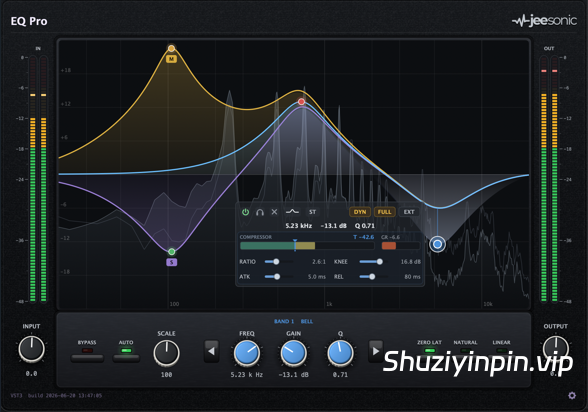
FREE | WiN Mac VST3 AU| 35 MB
安装方法:
精准设计,快速上手
从快速高通滤波到精准的齿音消除,EQ Pro 始终保持曲线、计算和声音的完美同步。
EQ Pro 所画即所听。
这款透明、精准的均衡器拥有多达 24 个动态频段,每个频段均可设置中/侧和左/右声道,相位可调,并配备实时分析器。告别模拟音染,无需猜测。
一键均衡
精准设计,快速上手
从快速高通滤波到精准的齿音消除,EQ Pro 始终保持曲线、计算和声音的完美同步。
互动曲线
双击添加频段,拖动调整频率和增益,滚动调整 Q 值或斜率。即使频段重叠,控制柄也不会跳动。
每个频段一个压缩器
每个钟形或搁架式滤波器都是一个独立的压缩器,拥有各自的频率和 Q 值:阈值、压缩比、拐点、启动时间和释放时间。仅在共振发生时才进行抑制。
中音/侧音和左右
将每个频段路由至立体声、中置、侧置、左声道或右声道。曲线会分成不同颜色的通道,方便您查看每个频段的分配情况。
三种相位模式
零延迟和自然相位用于跟踪和混音,线性相位用于母带处理,相位抹片必须保持在零。
实时分析仪
一个平滑的对数频谱,涵盖曲线前后和后期,这样你就能在伸手前找到问题所在。
仅音色动态自动
增益在每个动态频段的现场移动中以确定性方式折叠,因此动态均衡器改变频谱而不改变响度。从来没有第二个压缩机。
外部侧链
驱动来自外部源的任何动态频段,每个频段用于低沉和频率感知控制。
过采样 可选的2倍或4倍采样
在陡峭高频移动时于奈奎斯特附近实现干净行为,采用低延迟设计。
增益刻度
一个旋钮可以将整个均衡器从平直降到双倍。曲线和每个读数都会跟随,而你的每段值保持不变。
一条永不失真的曲线
绘制的响应曲线和处理后的音频使用完全相同的滤波器算法。移动旋钮,声音也会随之移动,精确到分贝。
最多可自由输入24个频段:
钟形滤波器、搁架式滤波器、低切/高切滤波器、陷波滤波器和真正的倾斜滤波器
对称恒定 Q 值:衰减与提升完全镜像
拖动数值或手动输入,包括 kHz 等单位
每个频段都配备压缩器
仅在需要时才起作用的控制
静态均衡器会使整个音轨变得沉闷。动态频段仅在超过其阈值时才会生效,并且它会精确监听您设置的频率和 Q 值,从而解决问题,而不会影响其他部分。启用“完全显示”后,该频段将成为一个完整的压缩器。
各频段的阈值、比率(至砖墙)、拐点、起音、释放
各频段的电平表:电平、阈值标记和实时增益衰减
增益范围;绝对阈值,独立显示
各频段的内部或外部侧链
保持合适的电平
频谱变化,响度不变
自动增益功能可匹配输出以实现真实的旁路,并确定性地将动态频段的变化纳入考量,因此动态变化只会改变音色而不会改变响度。您判断的是音色,而不是电平。
自动增益跟随动态变化,无需自身检测器
增益范围:0% 至 200%,曲线实时变化
输入和输出微调,带立体声电平表
真旁路,可即时进行 A/B 对比
规格
详细信息
频段
最多 24 个频段,可单独自动化
滤波器类型
钟形滤波器、低/高架滤波器、低/高切滤波器、陷波滤波器、倾斜滤波器
切频斜率
6 至 96 dB/倍频程
动态
每个频段全压缩器:阈值、比率、膝值、起音、释放、外侧链
路由
每个频段分别路由至立体声、中置、侧置、左声道、右声道
相位
零延迟、自然、线性
过采样
关闭、2倍、4倍(低延迟)
分析仪
前置/后置、对数频率、平滑
增益工具
增益范围、确定性自动增益(跟随动态变化)
格式
macOS(VST3,AU)、Windows(VST3)
EQ Pro 用户手册
https://www.jeesonic.de/manual/index.html
Built for precision, fast to use
From a quick high-pass to a surgical de-ess, EQ Pro keeps the curve, the maths and the sound in perfect lock-step.
EQ Pro What you draw is exactly what you hear.
A transparent, surgical equalizer with up to 24 dynamic bands, Mid/Side and Left/Right per band, selectable phase, and a real-time analyzer. No analog colouring, no guesswork.
Everything in one EQ
Built for precision, fast to use
From a quick high-pass to a surgical de-ess, EQ Pro keeps the curve, the maths and the sound in perfect lock-step.
Interactive curve
Double-click to add a band, drag for frequency and gain, scroll for Q or slope. The handle never jumps, even when bands overlap.
A compressor per band
Each bell or shelf is a full compressor on its own frequency and Q: threshold, ratio, knee, attack, release. Tame a resonance only when it rings.
Mid/Side & L/R
Route each band to Stereo, Mid, Side, Left or Right. The curve splits into colour-coded lanes so you see every placement.
Three phase modes
Zero Latency and Natural Phase for tracking and mixing, Linear Phase for mastering where phase smear must stay at zero.
Real-time analyzer
A smooth, log-frequency spectrum behind the curve, pre and post, so you find the problem before you reach for it.
Tone-only dynamics
Auto Gain folds in each dynamic band’s live move, deterministically, so the dynamic EQ changes the spectrum without changing the loudness. Never a second compressor.
External sidechain
Drive any dynamic band from an external source, per band, for ducking and frequency-conscious control.
Oversampling
Optional 2x or 4x for clean behaviour near Nyquist on steep, high-frequency moves, with a low-latency design.
Gain Scale
One dial scales the whole EQ from flat to double. The curve and every readout follow, while your per-band values stay intact.
A curve that never lies
The drawn response and the processed audio share the exact same filter maths. Move a handle and the sound moves with it, to the decibel.
Up to 24 freely typed bands
Bells, shelves, low/high cuts, notch and a true Tilt
Symmetric constant-Q: a cut mirrors the boost exactly
Drag values or type them in, kHz and all
A compressor in every band
Control that only acts when needed
Static EQ dulls the whole track. A dynamic band only engages over its threshold, and it listens to exactly the frequency and Q you drew, so it fixes the problem and leaves the rest of the performance alone. Reveal FULL and it is a complete compressor on that band.
Threshold, ratio (to brickwall), knee, attack, release per band
A per-band meter: level, threshold marker and live gain reduction
Gain is the range; absolute threshold, decoupled
Internal or external sidechain, per band
Stay at the right level
Spectrum changes, loudness doesn’t
Auto Gain matches the output for an honest bypass, and it folds in what the dynamic bands are doing, deterministically, so a dynamic move changes the tone without changing the loudness. You judge tone, not level.
Auto Gain follows the dynamics, with no detector of its own
Gain Scale: 0 to 200 %, the curve follows in real time
Input and output trim with stereo metering
True bypass for an instant A/B
Specifications
The details
Bands
Up to 24, individually automatable
Filter types
Bell, Low/High Shelf, Low/High Cut, Notch, Tilt
Cut slopes
6 to 96 dB/oct
Dynamics
Full compressor per band: threshold, ratio, knee, attack, release, ext sidechain
Routing
Stereo, Mid, Side, Left, Right per band
Phase
Zero Latency, Natural, Linear
Oversampling
Off, 2x, 4x (low latency)
Analyzer
Pre / Post, log frequency, smoothed
Gain tools
Gain Scale, deterministic Auto Gain (follows the dynamics)
Formats
macOS (VST3, AU), Windows (VST3)
EQ Pro User Manual
https://www.jeesonic.de/manual/index.html
![[新品:世界上首款音乐均衡器] Scaler Music Scaler EQ Pro v1.0.0 U2B-MORiA [MacOSX]](https://www.shuziyinpin.vip/wp-content/uploads/2026/09/Scaler-EQ-Pro.png)
![[免费高品质侧链压缩器] RUE Oppressor v1.5 STANDALONE VST3 AU [WiN, MacOSX]](https://www.shuziyinpin.vip/wp-content/uploads/2026/09/RUE-Oppressor.png)
![[专业DJ演奏工具] Algoriddim djay Pro 5.6.9-TNT [MacOSX]](https://www.shuziyinpin.vip/wp-content/uploads/2024/10/14122315_algoriddim-djay-pro.png)
![[SnowTec 全套效果器合集] SnowTec Full Bundle v2026.09.22-itUsed [WiN]](https://www.shuziyinpin.vip/wp-content/uploads/2026/09/SnowTec-Full-Bundle.png)
![[一体化模拟风格FX 插件完整版] SoniX Audio TONEFLX v1.2.4-V.R [WiN, MacOSX]](https://www.shuziyinpin.vip/wp-content/uploads/2026/09/SoniX-Audio-TONEFLX-v1.2.4.png)
![[新一代颗粒重采样音频插件] Exo Audio PRYSM v1.0.2 [WiN, MacOSX]](https://www.shuziyinpin.vip/wp-content/uploads/2026/09/Exo-Audio-PRYSM.png)

评论0