
P2P | December 2025 | 16.6/7.8 MB
安装方法:安装已注册的零售设置,没有任何限制。
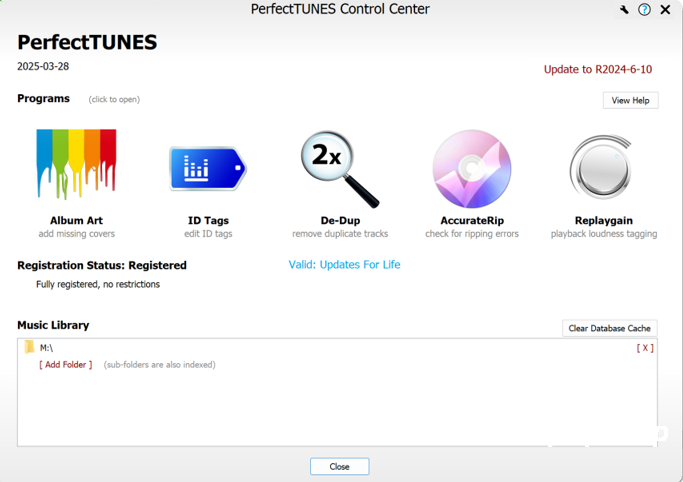
优化您的音乐收藏可能是一项艰巨的任务,例如专辑缺少封面、曲目重复或曲目损坏等问题。修复这些问题可能非常耗时。现在,有了 PerfectTUNES,您无需再为此烦恼,只需想象一位训练有素的专业人士随时为您提供帮助即可……
自动添加缺失的专辑封面
专辑封面不仅用于在浏览时识别专辑,还能在播放曲目时提升视觉效果。如今,人们通常会使用高分辨率平板电脑来管理音乐收藏,因此缺失或低分辨率的封面显然无法满足需求。
ID 标签编辑元数据
ID 标签器的设计理念是打造一款功能强大且易于使用的标签器,我们相信我们已经实现了这两个目标。它提供不同的视图和分析功能,让您可以快速修复整个音频库中的问题,而无需了解单个文件的位置。一个标签编辑器,四种编辑方式
– 按文件名和文件夹浏览您的收藏,以与电脑上完全相同的方式查看曲目。专辑编辑模式让您轻松为专辑中的常见元素添加标签。
– 按元数据浏览,使用 ID 标签显示您的收藏,与您的播放器完全一致。
– 列表和推荐功能将特定类型的所有值显示在一个长列表中,方便您轻松编辑。PerfectTUNES 可以智能地为半重复值提供更正建议。
– 排序标签功能会检查所有排序标签的一致性。
AccurateRip 会检查无损曲目是否存在抓取错误。
大约 2% 的抓取光盘存在错误,即使光盘没有划痕,也可能出现错误,例如制造缺陷。CD 驱动器本身无法确定抓取的曲目是否存在错误(使用 C2 指针或重新抓取),抓取错误可能表现为扬声器爆音或静音(驱动器对错误进行插值)。
有一种名为 AccurateRip 的技术,可以将您翻录的曲目与其他人的翻录曲目进行比较。匹配成功则意味着您的翻录曲目绝对无误,不匹配则可能表明您的翻录曲目存在错误。
PerfectTUNES AccurateRip 可以验证之前翻录的光盘,非常适合验证 iTunes 或其他无法进行 AccurateRip 检查的翻录软件。
何必满足于不完美的翻录?让您的音频收藏不再有任何疑虑,使用 AccurateRip 进行翻录吧!
DeDup 功能可以删除重复曲目。
De-Dup 会检测您的音乐收藏,并列出重复曲目。重复曲目通常是低质量版本(例如较低的 MP3 比特率),或者同一首曲目同时出现在合辑和原版专辑中。
检测到两首重复的 Bob Marley 曲目,您可以安全地删除低质量的 MP3 文件,从而移除重复曲目。
有时需要验证是否存在重复项,DeDup 允许播放相关曲目,在播放过程中可以在两个曲目之间交换流,真正节省时间。
Optimizing your music collection can be a daunting task, from albums missing artwork, duplicated tracks, to corrupted tracks. Correcting these issues can be a time consuming task. No longer, imagine a trained professional on hand to help, PerfectTUNES is that professional…
Album Art automatically add missing covers
Cover art is used both to identify albums when browsing, as well as for the visual appeal when playing a track. Missing or low resolution cover art, does not cut it these days when typically a collection might be controlled through a high resolution tablet.
ID Tags edit metadata
The design ethos behind ID Tagger was to create a powerful tagger, but one which is simple to use, we are confident we have delivered on both counts. Different views, or insights are offered into your music library, fixes can be made quickly across your entire audio library, without having to know where individual files are. One tag editor, 4 ways of editing
– Browse your collection by Filename and Folders, view the track exactly as they appear on your computer, Album Edit Mode makes it easy to tag common elements in albums.
– Browse by Metadata, shows your collection using ID Tags, exactly as your player does.
– Lists and Recommendations display every value of a certain type in one long list for easy editing, PerfectTUNES can smartly offer recommendations on corrections to semi-duplicate values.
– Sort Tags checks through all your sort tags looking for consistency.
AccurateRip check lossless tracks for ripping errors
Around 2% of all ripped discs have errors, discs do not even have to be scratched to give an error, such as from manufacturing defects. CD drives on their own cannot determine if a ripped track has errors (using c2 pointers, or re-ripping), ripping errors could be speaker-popping-noise, or silence (where the drive interpolates the error).
There exists a technology called AccurateRip which compares your ripped tracks against other peoples rips, a positive match says without question your rip is error free, a negative match can also inform the rip has errors.
PerfectTUNES AccurateRip verifies previously ripped discs, perfect for validating iTunes or other rippers not capable of checking AccurateRip.
Why settle for anything less than perfect rips? Take the doubt out of your audio collection, AccurateRip it.
DeDup remove duplicate tracks
De-Dup listens to your collection and presents a list of tracks which are duplicates. Often a duplicate is a lower quality copy of a track (such as a lower mp3 bitrate), or a track appearing on both a compilation and original album.
Two duplicate Bob Marley tracks have been detected, the lower quality MP3 can be safely deleted, removing the duplicate.
Sometimes a possible duplicate needs to be verified, DeDup allows the track(s) in question to be played, during playback the stream can be swapped between the two tracks, a real time saver.
![[免费高品质侧链压缩器] RUE Oppressor v1.5 STANDALONE VST3 AU [WiN, MacOSX]](https://www.shuziyinpin.vip/wp-content/uploads/2026/09/RUE-Oppressor.png)
![[专业DJ演奏工具] Algoriddim djay Pro 5.6.9-TNT [MacOSX]](https://www.shuziyinpin.vip/wp-content/uploads/2024/10/14122315_algoriddim-djay-pro.png)
![[一体化模拟风格FX 插件完整版] SoniX Audio TONEFLX v1.2.4-V.R [WiN, MacOSX]](https://www.shuziyinpin.vip/wp-content/uploads/2026/09/SoniX-Audio-TONEFLX-v1.2.4.png)
![[吉他谱与和弦学习工具] Songsterr Guitar Tabs and Chords v7.0.30 (Premium Version) [Android]](https://www.shuziyinpin.vip/wp-content/uploads/2025/06/Songsterr-Guitar.png)
![[新一代颗粒重采样音频插件] Exo Audio PRYSM v1.0.2 [WiN, MacOSX]](https://www.shuziyinpin.vip/wp-content/uploads/2026/09/Exo-Audio-PRYSM.png)
![[更新] Apple Logic Pro Creator Studio v12.3.1 FiXED ARM-EDiSO [MacOSX]](https://www.shuziyinpin.vip/wp-content/uploads/2026/09/Apple-Logic-Pro-Creator-Studio-v12.3.1.png)

评论0