
Team GUISEPPE | 05 February 2026 | 1.4 GB
安装方法:只需安装,尽情享受!
经典的板式混响插件。我们以精准细致的工艺对原版 Ecoplate I 板式混响进行建模,力求呈现真实逼真的音色。在保留原有界面的基础上,我们进行了改进,通过简洁明了的设计和现代化的功能,进一步提升了用户体验。
规格:
这款功能强大、性能卓越且音色丰富的板式混响插件,让工程师和制作人无需购置难以找到且笨重的模拟设备,即可在自己的工作室中轻松使用原版 Ecoplate I 的效果。
该插件新增了诸多软件专属功能,例如带速度同步的预延迟、低通和高通滤波器,以及包含 Ecoplate 原有噪声基底和新增饱和度控制的模拟模型配置文件。
Ecoplate 专为高分辨率音频素材而设计,可原生支持高达 192kHz 的采样率。混响尾音长度可从 1 秒到 12 秒
衰减
混响尾音长度可从 1 秒到 12 秒(该插件在最大设置下可实现超过 12 秒的衰减)。
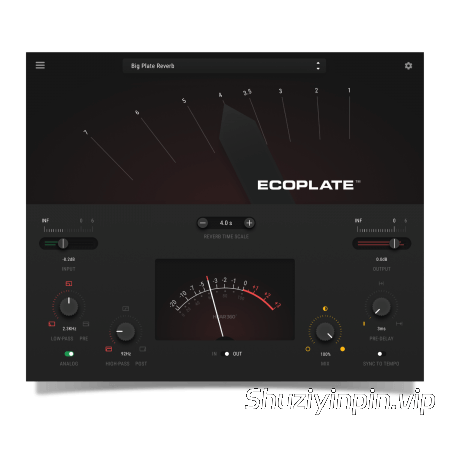
与原版硬件一样,向左或向右拨动拨杆即可改变混响衰减时间。数字代表秒数。
在“混响时间刻度”框中输入数值,或使用“-”和“+”按钮延长或缩短衰减时间。
输入和输出增益控制及计量:
向右或向左滑动输入和/或输出拨杆,以提升或衰减输入和输出信号的增益。输入增益调节混响引擎之前的输入音频。输出控制调节包含混响在内的完整信号。
使用中间的 VU 表查看输入或输出信号强度。
使用输入滑块处的绿色表头查看输入信号的增益。使用红色表头查看混响后信号的增益。
低通和高通滤波器:
调整输入和/或输出信号的频率带宽。
使用低通旋钮过滤输入(混响前)或输出(混响后)信号的频率带宽。
使用高通旋钮 调节(混响前)或输出(混响后)信号的频率带宽。
将鼠标悬停在“低通”或“高通”的“前”或“后”文本上并单击,即可在两者之间进行选择。对输入或输出信号进行滤波。选择“前置滤波”将对干信号进行滤波,选择“后置滤波”将对混响信号进行滤波。例如,此功能允许您衰减输入信号的高频部分,但保持混响的空气感和完整带宽,从而营造更开阔的音场,同时仅对所需的频率进行混响。
前置延迟:
通过选择干信号和湿信号之间的延迟量来控制混响的开始时间。
使用“预延迟”旋钮,您可以以毫秒为单位调整延迟时间。通过调整混响前的延迟时间,您可以拓宽空间感,并提升混音的清晰度。旋钮向右旋转得越远,混响的起始时间就越晚。
“同步速度”功能允许您使用音符来调整预延迟,并与 DAW 会话的 BPM 和速度设置同步。
附加设置菜单:
找到适合任何音轨的完美声音。在附加设置菜单中,您可以调整音调、模拟噪声电平、模拟饱和度和立体声宽度。增强低频,或微调立体声像,使其与您的会话风格相匹配。
混响电平控制:
当使用辅助返回接口连接 Ecoplate 时,您可能需要 100% 的混响电平;但当直接在乐器上使用 Ecoplate 时,我们提供了两种精确控制混响电平的方法。混音湿声百分比是标准选项,但如果您不希望在调整混响比例时改变精心混音的乐器音量,可以切换到 LVL 模式。在 LVL 模式下,音轨的输入音量始终保持不变,LVL 旋钮用作混响电平控制,因此您的混音将保持在您想要的位置,您可以更快、更精确地获得结果。
模拟模式:
通过模拟开关,您可以启用 Ecoplate 的噪声配置文件,该配置文件可以重现 Ecoplate 硬件的实际噪声。
作为一项自定义改进,我们还在插件中添加了一个输入电子管饱和级,这是原版 Ecoplate 硬件设备所不具备的。
启用模拟开关可获得复古氛围和额外的音色,或者将其关闭以保持超干净的信号路径。
The classic plate reverb plugin. We modeled the original Ecoplate I plate reverb with precision and care to deliver authentic true-to-life sound. Then we took the original interface and made it better, adding functionality through a simple, clean design with modern features.
Specifications
A wide, robust, and luxurious plate reverb plugin that allows engineers and producers access to the original Ecoplate I in the convenience of their own studios without having to acquire a hard-to-find and bulky analog unit.
New software-only features are included in the design such as pre-delay with tempo sync, low-pass & high-pass filters, and an analog model profile including Ecoplate’s original noise floor along with an added saturation control.
Modeled for use with high-resolution content, use Ecoplate natively at sample rates up to 192k.
Decay
Reverb tail lengths from 1 to 12 seconds (this unit actually produces over 12 seconds of decay at its max setting).
Just like the original hardware, move the lever to the left or to the right to change the reverb decay time. The numbers correspond to seconds in time.
Type in a value in the “Reverb Time Scale’ box, or use the “-“ “+” buttons to lengthen or shorten the decay time.
Input & Output Gain Control and Metering
Slide the input and/or output levers to the right or to the left to boost or attenuate the gain of the input and output signals. The input gain adjusts the incoming audio before the reverb engine. The output control adjusts the full signal including reverberation.
Use the VU meter in the middle to see the input or output signal strength.
Use the green meter at the input slider to see the gain of the input signal. Use the red meter
Low-Pass & High-Pass Filters
Adjust the frequency bandwidth of the input and/or output signal.
Use the Low-Pass knob to filter the amount of the frequency bandwidth of the input (pre reverb) or output signal (post reverb).
Use the High-Pass knob to adjust the amount of the frequency bandwidth of the (pre reverb) or output signal (post reverb).
Hover over and click on the Low or High-Pass PRE or POST text to choose between filtering the input or output signal. When selecting Pre it will filter the dry signal and when selecting Post it will filter the reverberated signal. As an example, this feature allows you to roll off the top end on your input, but maintain the air and full bandwidth of the reverb, creating a more open soundscape, while only reverberating the frequencies you want.
Pre-delay
Control the timing of when the reverb starts by choosing the amount of delay between the dry and wet signal.
With the Pre-Delay knob, you can adjust the delay time in milliseconds. By manipulating the delay time before the reverb, you can open up space and add clarity to your mix. The further you turn the knob to the right the later the reverb starts in time.
Sync To Tempo allows you to adjust the pre-delay with musical notes, synchronized with your DAW session’s BPM and tempo settings.
Additional Settings Menu
Find your perfect sound for any track. Inside the additional setting menu you can manipulate tone, analog noise level, analog saturation, and stereo width. Fatten up your bottom end, or fine tune your stereo image to match the personality of your session.
Reverb Level Control
When using an aux return for Ecoplate, you may want a 100% reverb level, but when using Ecoplate directly on an instrument, we have provided 2 ways to control your reverb levels with precision. A mix wet percentage is available as a standard option, but when you don’t want your carefully mixed instrument volume to change when manipulating reverb ratios, you can switch over to LVL mode. In LVL mode, your tracks input volume never changes, and the LVL knob acts as a reverb level control, so your mix stays where you want it, and you can get results faster and more precisely.
Analog
With the analog switch, you can turn on Ecoplate’s noise profile which reproduces the sound of the actual Ecoplate hardware noise.
As a custom modification, we also added an input tube saturation stage to the plugin that was not available on the original Ecoplate hardware units.
Turn on the Analog switch for a vintage vibe and added color, or turn it off and keep an ultra-clean signal path.
![[更新] Apple Logic Pro Creator Studio v12.3.1 FiXED ARM-EDiSO [MacOSX]](https://www.shuziyinpin.vip/wp-content/uploads/2026/04/apple-logic-pro.jpg)
![[多引擎虚拟乐器合成器播放器插件] ROLI Studio Player 1.4.1-HCiSO [MacOSX]](https://www.shuziyinpin.vip/wp-content/uploads/2026/09/ROLI-Studio-Player.png)
![[节奏故障引擎插件] AtrumLab Rumor v1.0.0-GAMESENSE [MacOSX]](https://www.shuziyinpin.vip/wp-content/uploads/2026/09/AtrumLab-Rumor.png)
![[实时循环合成器 ] 10K Audio Gyro Pro v1.2.0-V.R [WiN, MacOSX]](https://www.shuziyinpin.vip/wp-content/uploads/2026/09/10K-Audio-Gyro-Pro.png)
![[现代地下说唱音乐一体化软削波器] Smokey Beats CHOKE ® v1.0.1-GAMESENSE [MacOSX]](https://www.shuziyinpin.vip/wp-content/uploads/2026/09/smokey-beats-choke.jpeg)
![[合成器&效果器合集] Togu Audio Line Plugins 2026.09 Incl Patched and Keygen-R2R [WiN]](https://www.shuziyinpin.vip/wp-content/uploads/2026/07/togu-audio-line-plugins.png)

评论0