
关联资源
[音频转换器] AVS Audio Converter v26.0.2.17 [WiN]
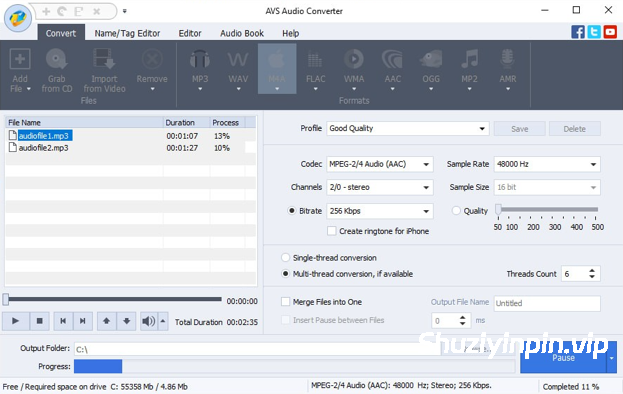
P2P | February 2026 | 88 MB
安装方法:将补丁复制到安装文件夹并应用。您也可以选择从其他地方运行它,并在需要时指定产品位置。
AVS Audio Converter 可帮助您转换、编辑和创建铃声。它支持 MP3、FLAC、OGG、AAC、M4A、M4B、M4R、AMR、WMA、VOX 等多种音频格式之间的转换。使用批量模式可以一次性转换和处理多个文件。转换前,您可以指定输出文件的频率、声道数、比特率和其他参数。
功能:
– 转换所有主流音频格式:
转换 MP3、WMA、WAV、M4A、AMR、OGG、FLAC、MP2 等格式。管理 APE 文件并将其编码为 AVS Audio Converter 支持的任何主流音频格式。查看支持的音频格式完整列表。
– 从视频中导出音频:
选择并转换视频文件中的音频。AVS Audio Converter 支持 DVD、MPEG、MP4、AVI、DIVX、MOV、WMV、VOB、3GP、RM、QT、FLV 等格式。查看支持的视频格式完整列表。
– 将文件转换为 M4B
格式:使用 AVS Audio Converter 将您的音频文件转换为 M4B 格式。您可以将音频文件分成章节并添加书签。在音频转换前设置质量级别。为您的 iPod/iPhone 准备音频文件。
– 为 iPhone 创建铃声:
编辑音频文件并将其保存为 M4R 格式,以便在 iPhone 上使用。使用 AVS Audio Converter 制作个性化铃声。
– 编辑音频文件:
使用 AVS Audio Converter 修剪、删除部分、合并文件并应用特效。修改音频文件中的附加文本信息。
使用 AVS Audio Converter,您可以:
– 将音频文件从一种格式转换为另一种格式;
– 创建和编辑 MP3 和 M4B 格式的有声读物;
– 按标记分割音频或将多个音频文件合并为一个文件;
– 在转换音频文件之前指定输出文件的频率、声道数、比特率和其他参数;
– 在转换音频时对 MP3 和 OGG 格式的参数进行微调;
– 在转换之前指定输出音频文件的位置;
– 直观地查看音频转换过程的进度;
– 转换完成后播放转换后的音频文件,以确保质量足够;
– 修改现有音频文件中的额外文本信息,例如标题、艺术家、专辑、评论。
支持
读取所有主流格式:MP3、MPEG3、WMA、WAV、M4A、M4B、M4R、AAC、AMR、AWB、OGG、MP1、AC3、MP2、FLAC、AIFF、AIF、AIFC、AU、VOX、MPC、MP+、MKA、RAW、PCM、GSM、AVI、IVF、DIV、DIVX、MTV、AMV、MPG、MPEG、MOD、MPE、MVV、M2V、WMV、ASF、DVR-MS、DAT、IFO、VOB、VRO、M2TS、M2T、MTS、TOD、TS、TP、DV、MKV、OGM、OGV、OGA、OGX、RM、RMVB、RAM、IVR、MOV、QT、M4V、MP4、3GP2、3GPP、3GP、3G2、FLV、SWF。 MID、MIDI、KAR、APE、QCP、MPA、RA
写入格式:MP3、WMA、WAV、M4A、M4B、M4R、AAC、AMR、AWB、OGG、MP2、FLAC
AVS Audio Converter will help you convert, edit, create ringtones. Convert audio files between MP3, FLAC, OGG, AAC, M4A, M4B, M4R, AMR, WMA, VOX and other formats with AVS Audio Converter. Use batch mode to convert and work with several files at one go. Specify frequency, number of channels, bitrate and other parameters of your output files before conversion.
Features:
– Convert between All Key Audio Formats
Convert MP3, WMA, WAV, M4A, AMR, OGG, FLAC, MP2, etc. Manage APE files and encode them to any key audio format supported by AVS Audio Converter . See a full list of supported audio formats.
– Export Audio from Video
Select and convert audio from your video files. AVS Audio Converter supports DVD, MPEG, MP4, AVI, DIVX, MOV, WMV, VOB, 3GP, RM, QT, FLV, etc. See a full list of supported video formats.
– Convert Files to M4B
Convert your audio tracks to M4B format with AVS Audio Converter . Divide them into chapters and add bookmarks. Set up quality level before audio conversion. Prepare audio files for your iPod/iPhone.
– Create Ringtone for iPhone
Edit an audio file and save it to M4R format for iPhone. Make an individual ringtone with AVS Audio Converter .
– Edit Your Audio Files
Trim, delete parts, merge files, apply effects with AVS Audio Converter . Modify extra text information in your audio files.
Using AVS Audio Converter you can:
– сonvert audio files from one format to another;
– create and edit audio books in MP3 and M4B formats;
– split your audio by markers or merge separate audio files into one single file;
– specify frequency, number of channels, bitrate and other parameters of your output files before you convert your audio files;
– apply fine tuning of parameters for MP3 and OGG formats when you convert your audio;
– specify the location of the output audio files before conversion;
– visually judge the progress of the audio conversion process;
– play the converted audio files after you convert them to make sure that the quality is sufficient;
– modify extra text information in existing audio files such as Title, Artist, Album, Comment.
All key formats are supported
Read: MP3, MPEG3, WMA, WAV, M4A, M4B, M4R, AAC, AMR, AWB, OGG, MP1, AC3, MP2, FLAC, AIFF, AIF, AIFC, AU, VOX, MPC, MP+, MKA, RAW, PCM, GSM, AVI, IVF, DIV, DIVX, MTV, AMV, MPG, MPEG, MOD, MPE, MVV, M2V, WMV, ASF, DVR-MS, DAT, IFO, VOB, VRO, M2TS, M2T, MTS, TOD, TS, TP, DV, MKV, OGM, OGV, OGA, OGX, RM, RMVB, RAM, IVR, MOV, QT, M4V, MP4, 3GP2, 3GPP, 3GP, 3G2, FLV, SWF, MID, MIDI, KAR, APE, QCP, MPA, RA
Write: MP3, WMA, WAV, M4A, M4B, M4R, AAC, AMR, AWB, OGG, MP2, FLAC
![[ Kontakt 和 Maschine 一键式自动 NICNT 生成器] BOB NICNT Maker v1.0-bobdule [WiN]](https://www.shuziyinpin.vip/wp-content/uploads/2026/09/BOB-NICNT-Maker.png)
![[FL Studio插件管理器] FL Studio Plugin Organizer v4.2 [WiN, MacOSX]](https://www.shuziyinpin.vip/wp-content/uploads/2026/08/FL-Studio-Plugin-Organizer-v4.0.jpg)
![[macOS 插件管理器] Oven (Audio Plugin Manager) v6.0.0 [MacOSX]](https://www.shuziyinpin.vip/wp-content/uploads/2025/09/Oven.png)
![[KONTAKT 8 便携版 库管理器修复程序] KONTAKT 8 Library Manager v8.13.1-vkDanilov [WiN]](https://www.shuziyinpin.vip/wp-content/uploads/2025/04/24bdef738a16963d55ad7780e2f1633e-1024x1024.jpeg)
![[AI 动态追踪视频编辑器] Nero Blur Face – AI Motion Tracking Video Editor 1.0.53.0 [WiN]](https://www.shuziyinpin.vip/wp-content/uploads/2026/09/Blur-Face.png)
![[MIDI创作生成工具] Rio Leyva MidiMine v1.0.3 STANDALONE x64 [WiN]](https://www.shuziyinpin.vip/wp-content/uploads/2026/09/Rio-Leyva-MidiMine.png)

评论0