
ItUsed | 15 May 2026 | 20.3 GB
安装方法:
1. 从“1. installers”文件夹运行官方安装程序。
2. 在安装程序中启用“采样安装” – 选择“完整采样安装 (122GB)”。
3. 点击“确定”按钮跳过所有错误,关闭安装程序。
4. 将程序文件解压并替换到“Garritan\CFX Concert Grand\Programs”文件夹。(“程序”文件夹文件树:https://pastebin.com/4LSQhSrs)
5. 将采样文件解压到“Garritan\CFX Concert Grand\Data\CFX_Samples”文件夹。(“CFX_Samples”文件夹文件树:https://pastebin.com/uKCVDFys)
6. 启动程序,点击预设加载(左上角),在资源管理器中将文件类型从“*.ARIA”更改为“*.”,找到许可证文件(许可证文件为“out11566526-6091.png”),点击打开或通过拖放打开。
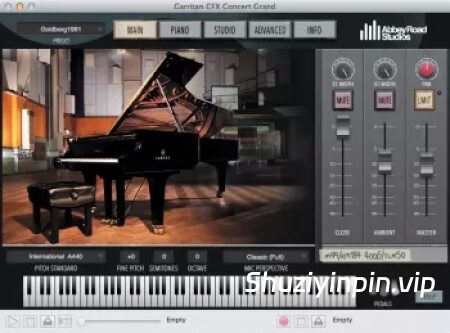
我们在艾比路一号录音棚放置了令人叹为观止的雅马哈 CFX 音乐会三角钢琴,屡获殊荣的工程师们运用世界顶级的麦克风和设备,打造出令人惊艳的虚拟乐器库。
这个项目的方方面面都体现了唯有最热情的人才能创造的完美:乐器、录音室、工程师、麦克风,无一例外。体验每一个细节中蕴含的热情。
此版本的优点:
– 所有采样现在均为 flac 格式。乐器完整大小:约 20GB。
– 所有麦克风位置的所有采样均已去除噪声。
We placed the awe-inspiring Yamaha CFX Concert Grand Piano in Abbey Road Studio One, where award-winning engineers used the world’s greatest microphones and equipment to create a stunning virtual instrument library.
Every facet of this project reflects the perfection that only the most passionate can produce: the instrument, the room, the engineers, and the mics. Experience the passion reflected in every detail.
Advantages of this version:
– All samples are now in flac. The full size of the instrument: +- 20GB.
– All samples, of all microphone positions have been cleared of noise.
1. Run the official installer from the “1. installers” folder.
2. Enable in the installer: “Samples Installations” – select “Full Samples Installation (122Gb)”.
3. Skip all errors with the “OK” button, close the installer.
4. Extract and replace Programs into: “Garritan\CFX Concert Grand\Programs”. (File tree “Programs”: https://pastebin.com/4LSQhSrs)
5. Extract samples into: “Garritan\CFX Concert Grand\Data\CFX_Samples”. (File tree “CFX_Samples”: https://pastebin.com/uKCVDFys)
6. Launch, click on the preset load (top left), change the file type in Explorer from “*.ARIA” to “*.”, find the license (license is a “out11566526-6091.png””), click open, or via Drag’n Drop.
![[六声部和声插件] Nico Baran The Backups v1.0.0-L O S T [MacOSX]](https://www.shuziyinpin.vip/wp-content/uploads/2026/09/Nico-Baran-The-Backups.png)
![[更新:终极超级合成器] reFX Nexus 5 v5.5.12 update-V.R [WiN, MacOSX]](https://www.shuziyinpin.vip/wp-content/uploads/2024/05/6c3858d9-b62e-471d-82bf-d71e9d625085-1024x658.png)
![[吉他放大器套件] Kuassa Amplification 360 bundle v1.4.0-V.R [MacOSX]](https://www.shuziyinpin.vip/wp-content/uploads/2026/09/Amplification-360.png)
![[更新:综合效果器套装(含Atlas Reverb混响)] Waves Ultimate 17 v26.09.22 [WiN, MacOSX]](https://www.shuziyinpin.vip/wp-content/uploads/2026/06/Waves-Ultimate-17.png)
![[SnowTec 全套效果器合集] SnowTec Full Bundle v2026.09.26-itUsed [WiN]](https://www.shuziyinpin.vip/wp-content/uploads/2026/09/SnowTec-Full-Bundle-v2026.png)
![[Stillwell 音频插件套装] Stillwell Audio Complete Collection v4.1.2 Incl.Patched And Licence AU VST3 Rev1-nimotheboss@MSJ [MacOSX]](https://www.shuziyinpin.vip/wp-content/uploads/2026/09/Stillwell-Audio-Complete-Collection-v4.1.2.jpg)

评论0