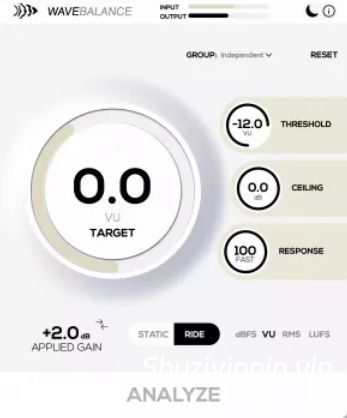
WaveBalance 应该放在每个音轨插件链的最顶端,用来给插件提供正确的电平。它就像增益分级一样,但速度更快、精度更高。它也可以用于每个总线通道,使每个总线的输出保持在特定的音量,这样会话中所有总线的总音量就不会导致混音总线削波。
Team R2R | 24 Jun 2026 | 5.9MB
安装方法:安装并注册,若要运行 .r2rwm 文件,您需要安装“TEAM.R2R.System.v1.5.0-R2R”(下载包内已提供)。
WaveBalance 可自动保持音轨的稳定工作电平,使均衡器、饱和器和模拟建模插件的行为更加可预测。无需不断调整音频片段的增益或处理不一致的录音,WaveBalance 即可在后台透明地保持您的工程平衡。
这是一款实用的增益分级插件,适用于混音电平、人声、导入的音轨、采样包和大型工程,具有透明的实时增益控制、分析保持工作流程、分组支持和内置动态余量保护。
自动增益分级功能:
了解 WaveBalance 的基本工作原理:分析不均匀的输入电平,将其校正到稳定的目标值,并在信号到达链中的下一个插件之前将其控制在可控范围内。
保持混音处于合适的电平:
WaveBalance 可自动管理音轨增益,使您的插件获得更稳定、更可预测的输入电平。无需不断调整音频片段的增益或处理不一致的录音,WaveBalance 即可在后台透明地保持您的工程平衡。
从人声和现场乐器到导入的音轨和采样包,它都能帮助压缩器、均衡器、磁带插件和饱和器在整个混音中表现得更加一致。它消除了增益控制的干扰,同时保持混音电平的可预测性。
更新日志:
点击查看
版本 1.0.4
• 新增:组视图中的“全部分析”按钮,只需单击一下即可分析(或停止)组中的所有静态音轨。该按钮显示“全部分析”/“全部停止”,当组中没有静态音轨时,按钮会自动禁用。
• 新增:静态/节奏链接功能,可在链接概览中链接组内的操作模式(新增“静态/节奏”行),因此切换一个音轨也会切换其链接的音轨。
• 新增:应用增益读数,组音轨推子会短暂显示分析完成后应用的增益校正值。
• 改进:“重置为默认值”弹出窗口现在会随插件窗口大小缩放。
• 改进:深色模式:调整了输入电平表填充颜色,以提高对比度。
• 修复:在 Pro Tools 中创建多个单声道实例期间以及打开多个实例后首次保存/关闭时崩溃的问题。
• 修复:在插件扫描和快速创建/删除操作期间崩溃的问题(Reason、Adobe Audition)。
• 修复:在组内重新排序(拖动交换)轨道时发生的崩溃问题。
版本 1.0.3
• 修复:在使用分组/链接实例的会话中打开插件界面时可能发生的 Pro Tools 崩溃问题。
• 改进:加载包含已保存的分组/链接状态的会话时的稳定性。
• 改进:链接参数的处理方式,使未分组的实例不再处理非活动链接状态。
• 改进:移除插件实例或关闭会话时的分组清理。
• 改进:AAX 打包和签名验证,以确保与 Pro Tools 的兼容性。
Keep tracks at a consistent operating level automatically so EQs, saturators, and analog-modelled plugins behave more predictably. Instead of constantly trimming clip gain or fighting inconsistent recordings, WaveBalance keeps your session balanced transparently in the background.
A practical gain staging plugin for mix levels, vocals, imported stems, sample packs, and large sessions, with transparent real-time gain control, Analyze & Hold workflow, grouping support, and built-in headroom protection.
Auto gain staging in motion
See the basic WaveBalance behavior: uneven input level is analyzed, corrected toward a stable target, and kept under control before it reaches the next plugin in your chain.
Keep your mix operating at the right level
WaveBalance automatically manages track gain so your plugins receive a more stable and predictable input level. Instead of constantly trimming clip gain or fighting inconsistent recordings, WaveBalance keeps your session balanced transparently in the background.
From vocals and live instruments to imported stems and sample packs, it helps compressors, EQs, tape plugins, and saturators behave more consistently across your entire mix. It removes the friction from gain staging while keeping mix levels predictable.
Changelog:
Click to view
Version 1.0.4
• New: Analyze All button in the Group view to analyze (or stop) every Static track in a group with one click. The button shows “ANALYZE ALL” / “STOP ALL” and disables itself when a group has no static tracks.
• New: Static/Ride linking to link the operation mode across a group from the Link overview (new “STATIC/RIDE” row), so switching one track switches its linked peers.
• New: Applied-gain readout where group track faders briefly show the gain correction that was applied after an analysis pass.
• Improved: The Reset to default popup now scales with the plugin window size.
• Improved: Dark mode: adjusted the input level meter fill colour for better contrast.
• Fixed: Crashes in Pro Tools during multi-mono instantiation, and the first save/close with several instances open.
• Fixed: Crashes during plug-in scanning and rapid create-destroy churn (Reason, Adobe Audition).
• Fixed: Crash when reordering (dragging to swap) tracks inside a group.
Version 1.0.3
• Fixed: A Pro Tools crash that could occur when opening the plugin UI in sessions using grouped/linked instances.
• Improved: Stability when loading sessions that contain saved group/link states.
• Improved: Handling of linked parameters so ungrouped instances no longer process inactive link states.
• Improved: Group cleanup when plugin instances are removed or sessions are closed.
• Improved: AAX packaging and signing validation for Pro Tools compatibility.
🏠 HomePage
阅读全文
本站部分资源来源于互联网,仅作介绍和学习使用,版权属原著所有。若有侵权,请发邮件(shuziyinpin@gmail.com),联系我们删除。加入本站VIP会员,购买正版打折,比淘宝价便宜!原文链接:
https://www.shuziyinpin.vip/51027.html,转载请注明出处。

![[Stillwell Audio效果插件完整收藏套装] Stillwell Audio Complete Collection v4.1.2 Incl Patched and Keygen-R2R [WiN]](https://www.shuziyinpin.vip/wp-content/uploads/2026/09/Stillwell-Audio-Complete-Collection.png)
![[语音处理器工具] Krotos Dehumaniser II v1.4.3-R2R [WiN]](https://www.shuziyinpin.vip/wp-content/uploads/2026/09/krotos-dehumaniser-2.png)
![[制作恐怖生物音效工具] Krotos Dehumaniser Simple Monsters v1.3.0-R2R [WiN]](https://www.shuziyinpin.vip/wp-content/uploads/2026/09/krotos-dehumaniser-simple-monsters.png)
![[重磅:声音设计神器] Krotos Plugins Collection v2026.09-R2R [WiN](5.43GB)](https://www.shuziyinpin.vip/wp-content/uploads/2024/08/f69c5f48-e41d-4a9c-8ab4-3013a59bc6a4.png)
![[声学建模混响] Tac System ONKIO Acoustics v2.1.3-R2R [WiN]](https://www.shuziyinpin.vip/wp-content/uploads/2026/09/tac-system-onkio-acoustics.png)
![[一键营造氛围和过渡效果插件] EDM Ghost Production Hyperlift v1.1.0 VST3-Team BATs [WiN]](https://www.shuziyinpin.vip/wp-content/uploads/2026/09/EDM-Ghost-Production-Hyperlift.png)

评论0