
P2P | 29 June 2026 | 36.6 MB
安装方法:只需安装,尽情享受!
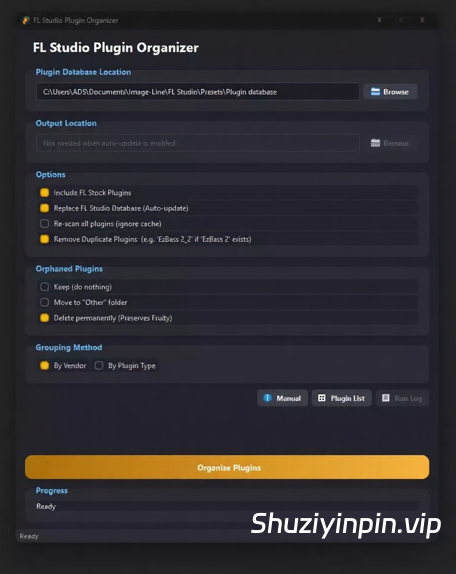
FL Studio Plugin Organizer 是一款 Windows 应用,可自动清理和整理您的 FL Studio 插件浏览器——告别在数百个插件的混乱列表中滚动查找的烦恼。它会将所有插件按厂商或插件类型整齐地整理到文件夹中,并立即显示在 FL Studio 中。现在,它还配备了强大的新工具,助您轻松管理整个插件库。
🆕 v3.1 新增功能
📁 自定义分组工作区 — 创建您自己的插件文件夹,并从内置浏览器将任何插件拖入其中。自定义分组始终优先于自动按厂商/类型排序,因此您精心设计的布局不会在后续的整理过程中被覆盖。分组(包括空分组)会立即保存并显示在工作区摘要栏中,让您随时了解已注册的插件。
🔀 自动共享变体 — 当插件同时存在于自定义分组中且符合自动规则时,整理器会自动在每个相关文件夹中放置一个副本。这意味着像 Serum 这样的插件可以同时存在于您的“收藏夹”自定义组和标准的 Xfer 供应商文件夹中——无需手动复制。
↩️ 恢复备份 — 现在每次运行“整理插件”都会先进行自动安全备份。您可以随时点击“恢复备份”(Ctrl+Shift+B)撤销运行,或浏览到您手动保存的任何备份 zip 文件。
📤 导入/导出自定义组 — “自定义组”工作区现在有“导出…”和“导入…”按钮,可将您的组和规则保存为可共享的 .json 文件——在重新安装或在第二台计算机上使用时非常方便。
✏️ 重命名文件夹 — 右键单击任何自定义组即可重命名它,或使用工作区中新增的“重命名文件夹…”按钮重命名磁盘上的任何类别文件夹(包括自动排序的供应商文件夹)。
ℹ️ 插件信息面板 — “智能卸载程序”的详细信息面板现在可以一目了然地显示每个插件的格式、安装日期、总大小和二进制文件路径——无需启动卸载程序即可查看。
⧉ 重复格式检测器 — 以多种格式安装的插件(例如,同时安装旧版 VST2 和 VST3)会在卸载程序树和详细信息面板中标记出来,并提供专门的“问题”筛选器,可一次性查找所有此类插件。
⚠ 二进制文件缺失警告 — .nfo 条目在磁盘上不再有匹配二进制文件的插件会以红色高亮显示,让您准确了解哪些插件已过时。
🧺 批量卸载队列 — 现在选择多个插件进行卸载时,会打开一个审核队列,您可以在其中逐个删除项目,然后再提交,而不是像以前那样弹出一个文本确认框。
🕘 卸载历史记录 — 永久记录每个已卸载插件及其卸载时间,与每次运行的调试日志分开。您可以从主窗口或智能卸载程序内部打开它。
⌨️ 键盘快捷键 — Ctrl+O 整理,Ctrl+B 备份数据库,Ctrl+Shift+B 恢复备份,Ctrl+U 卸载程序,Ctrl+G 自定义组,Ctrl+L 运行日志,F1 手动操作。
新增“在浏览器中隐藏 PNG 缩略图”选项(默认启用)——修复了由于 .nfo 和 .png 文件同时显示为独立项目而导致的 FL Studio 浏览器中插件条目重复的问题。
FL Studio Plugin Organizer is a Windows app that automatically cleans up and sorts your FL Studio plugin browser — no more scrolling through a chaotic list of hundreds of plugins. It organizes everything neatly into folders by vendor or plugin type, shows up instantly in FL Studio, and now comes packed with powerful new tools to manage your entire plugin collection.
🆕 WHAT’S NEW IN v3.1
📁 Custom Groups Workspace — create your own named plugin folders and drag any plugin into them from the built-in browser. Custom groups always take priority over automated Vendor/Type sorting, so your curated layout is never overwritten on subsequent Organize runs. Groups — including empty ones — are saved instantly and shown in the workspace summary strip so you always know what’s registered.
🔀 Auto-share Variants — when a plugin exists in both a custom group and matches an automated rule, the organizer automatically places a copy in each relevant folder. This means a plugin like Serum can live in your Favorites custom group and inside the standard Xfer vendor folder at the same time — no manual duplication needed.
↩️ Restore Backup — every Organize Plugins run now takes an automatic safety backup first. Click Restore Backup (Ctrl+Shift+B) any time to undo a run, or browse to any backup zip you saved manually.
📤 Import / Export Custom Groups — the Custom Groups Workspace now has Export… and Import… buttons to save your groups and rules as a shareable .json file — handy after a reinstall or on a second machine.
✏️ Rename Folder — right-click any custom group to rename it, or use the new Rename Folder… button in the Workspace to rename any category folder on disk (including auto-sorted vendor folders).
ℹ️ Plugin Info Panel — the Smart Uninstaller’s detail pane now shows format, install date, total size, and binary path(s) for every plugin at a glance — no need to start an uninstall just to check.
⧉ Duplicate Format Detector — plugins installed in more than one format (e.g. a legacy VST2 alongside VST3) are flagged in the uninstaller tree and detail panel, with a dedicated Issues filter to find them all at once.
⚠ Missing Binary Warning — plugins whose .nfo entry no longer has a matching binary on disk are highlighted in red, so you know exactly what’s stale.
🧺 Batch Uninstall Queue — selecting multiple plugins for removal now opens a review queue where you can drop individual items before committing, instead of a single text confirmation box.
🕘 Uninstall History — a permanent log of every plugin removed and when, separate from the per-run debug log. Open it from the main window or from inside the Smart Uninstaller.
⌨️ Keyboard Shortcuts — Ctrl+O Organize, Ctrl+B Backup DB, Ctrl+Shift+B Restore Backup, Ctrl+U Uninstaller, Ctrl+G Custom Groups, Ctrl+L Run Log, F1 Manual.
Added Hide PNG Thumbnails from Browser option (enabled by default) — fixes duplicate plugin entries in the FL Studio browser caused by .nfo and .png files both appearing as separate items
![[非常好用的Mac苹果康泰克音色标准非标准批量入库工具] Add Library for macOS v7 [MacOSX]](https://www.shuziyinpin.vip/wp-content/uploads/2024/06/1697688753966.png)
![[支持普通话:任何文本转换为自然语音] Text to Speech Studio Offline 1.0.0 [WiN]](https://www.shuziyinpin.vip/wp-content/uploads/2026/09/Text-to-Speech-Studio-Offline.png)
![[扒带神器] Transcribe! v9.70 (x64) [WiN]](https://www.shuziyinpin.vip/wp-content/uploads/2025/07/Transcribe.png)
![[全球最佳 DJ 软件] Serato DJ Pro Suite v4.0.10 [WiN]](https://www.shuziyinpin.vip/wp-content/uploads/2025/11/Serato-DJ-Pro-Suite-v4.0.0-1024x633.png)
![[专业音频和音乐编辑器] Gilisoft Audio Editor v3.3 [WiN]](https://www.shuziyinpin.vip/wp-content/uploads/2026/07/Gilisoft-Audio-Editor.png)
![[普通人的游戏音乐创作神器] 1BitDragon v5-ARCADiA [MacOSX]](https://www.shuziyinpin.vip/wp-content/uploads/2026/09/1BitDragon-v5.png)

评论0