
Team ARCADiA | 11 August 2026 | 29.58 MB
安装方法:WiN版,复制插件到相应路径。Mac版,只需安装,免激活版本。
从演奏到无限可能
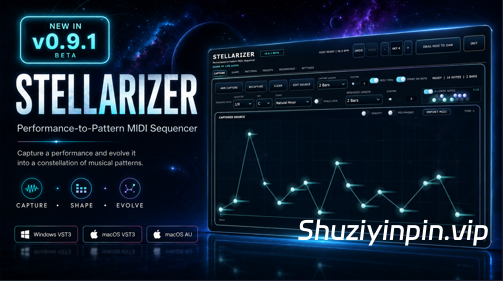
Stellarizer 是 S1gns Of L1fe Audio 出品的一款以演奏为导向的创意 MIDI 音序器。您可以演奏并录制乐句、导入 MIDI 片段、直接创建音符、使用步进录制功能,或生成全新的音源,然后在不丢失原始灵感的情况下探索各种音乐上的变奏。
Stellarizer 能够捕捉并转换时值、轮廓、力度、音符长度、延音、旋律和和声。无论是重塑单音主音、演化贝斯线条、拆解和弦进行,还是从无到有地生成乐句,它都能轻松胜任。
专为快速音乐探索而
打造 以自由、同步、固定长度或自定义长度模式实时录制 MIDI
使用步进录制构建乐句,或使用录音叠录添加乐句
探索八个可演奏的 Pattern 插槽,支持即时、节拍或小节切换
直接编辑音符、和弦、力度、持续时间、时值和音高
塑造轮廓、节奏、密度、发音、结构、时值、八度音程、音符长度和音乐关系
使用出厂音阶、自定义音阶或单个允许音符保持结果的调性
将录制和发现保存在录音图谱中
保存和整理预设
将完成的 MIDI 直接导出或拖入您的 DAW
跟随宿主软件的速度、走带控制、拍号和播放位置
Stellarizer 生成的是 MIDI 而不是声音,因此您可以将其与设置中的任何软件乐器、采样器、鼓机或外部硬件配对使用。
包含格式:
Windows x64:VST3;
macOS 11 或更高版本:通用 2 VST3 和 AU 乐器。
需要能够路由插件生成的 MIDI 的 DAW 或宿主软件。设置因宿主软件而异。
Digital Performer 和 Reason 并非 Stellarizer 的官方支持宿主软件。该插件可能可以在这些应用程序中扫描或运行,但兼容性、MIDI 路由和工作流程行为未经测试或保证。涉及 Digital Performer 或 Reason 的宿主软件特定问题不在 Stellarizer 的支持范围内。
Stellarizer v0.9.2 BETA 专为真正的创作而打造,为工作流程的每个环节带来更快的音序、更深入的音符编辑和更专注的音乐探索。
v0.9.2 新增功能:
步进录制功能可逐步构建单音乐句或复音和弦,并支持实时试听和可选步长。
录制叠录功能可在现有录制序列中添加新音符,而不会覆盖原始演奏。
力度和音符时值编辑功能提供直接的拖拽控制和精确的音乐数值。
多音符选择和编辑功能可以移动、重塑、调整或删除整个音符组,同时保持它们之间的音乐关系。
自定义音阶可以创建、命名、保存、调用,并随项目、预设和录音一起保存。
随机范围功能可将生成的素材限制在选定的音高范围内。
改进的自动切分功能可创建连续的网格对齐乐句,最多支持 16 小节,并防止出现不兼容的切分长度。
改进的量化功能可将现有音符和尾音对齐到选定的网格,并修正了分辨率映射,提供可靠的一键式菜单。
MIDI 学习功能增加了快速的硬件控制,同时保留了 DAW 自动化、宏、调制器和远程控制工作流程。
录音图谱的改进增加了熟悉的多选、批量删除和清晰的满容量警告。
插件更新通知直接显示在“设置”中,并可手动检查和访问 Gumroad 库。
工作流程和界面优化提升了编辑的清晰度、对齐性、可靠性、撤销功能以及单音或复音处理。
FROM PERFORMANCE TO POSSIBILITY
Stellarizer is a performance-driven creative MIDI sequencer from S1gns Of L1fe Audio. Play and capture a phrase, import a MIDI clip, create notes directly, use Step Record, or generate an entirely new source, then explore musically connected variations without losing the identity that made the original idea work.
Stellarizer captures and transforms timing, contour, velocity, note length, sustain, melody, and harmony. It is equally at home reshaping a monophonic lead, evolving a bass line, breaking apart a chord progression, or generating a phrase from nothing.
BUILT FOR FAST MUSICAL DISCOVERY
Capture live MIDI in Free, synchronized, fixed-length, or custom-length modes
Build phrases with Step Record or add to them with Recording Overdub
Explore eight playable Pattern slots with immediate, beat, or bar switching
Edit notes, chords, velocity, duration, timing, and pitch directly
Shape contour, rhythm, density, articulation, structure, timing, octave spread, note length, and musical relationship
Keep results in key with factory scales, Custom Scales, or individual Allowed Notes
Preserve captures and discoveries in the Recordings atlas
Save and organize presets
Export or drag finished MIDI directly into your DAW
Follow your host’s tempo, transport, time signature, and playback position
Stellarizer generates MIDI rather than sound, so you can pair it with any software instrument, sampler, drum machine, or external hardware in your setup.
INCLUDED FORMATS
Windows x64: VST3
macOS 11 or newer: Universal 2 VST3 and AU Instrument
A DAW or host capable of routing MIDI generated by plug-ins is required. Setup varies by host.
Digital Performer and Reason are not officially supported hosts for Stellarizer. The plug-in may scan or function in these applications, but compatibility, MIDI routing, and workflow behavior are not tested or guaranteed. Host-specific issues involving Digital Performer or Reason fall outside Stellarizer’s support coverage.
Stellarizer v0.9.2 BETA is built for real creative work and brings faster sequencing, deeper note editing, and more focused musical discovery to every part of the workflow.
WHAT’S NEW IN v0.9.2
Step Record builds monophonic phrases or polyphonic chords one step at a time, with live auditioning and selectable step lengths.
Recording Overdub adds new notes to an existing captured sequence without replacing the original performance.
Velocity and Note Duration editing provides direct drag controls and exact musical values.
Multi-note selection and editing moves, reshapes, adjusts, or deletes complete groups while preserving their musical relationships.
Custom Scales can be created, named, saved, recalled, and carried with projects, presets, and Recordings.
Random Range keeps generated material inside a chosen pitch register.
Improved Auto Dice creates continuous grid-aligned phrases, supports up to 16 bars, and prevents incompatible Dice lengths.
Improved Quantize snaps existing notes and tails to the selected grid with corrected resolution mapping and reliable one-click menus.
MIDI Learn adds fast hardware control while preserving DAW automation, macros, modulators, and remote-control workflows.
Recording Atlas improvements add familiar multi-selection, batch deletion, and clear full-capacity warnings.
Plugin update notifications appear directly in Settings with manual checking and Gumroad Library access.
Workflow and interface refinements improve editing clarity, alignment, reliability, Undo behavior, and Mono or Polyphonic handling.
![[Stillwell 音频插件套装] Stillwell Audio Complete Collection v4.1.2 Incl.Patched And Licence AU VST3 Rev1-nimotheboss@MSJ [MacOSX]](https://www.shuziyinpin.vip/wp-content/uploads/2026/09/Stillwell-Audio-Complete-Collection-v4.1.2.jpg)
![[氛围和弦进行生成器] Higher Plane SpaceWalk v1.2.2-V.R [WiN, MacOSX]](https://www.shuziyinpin.vip/wp-content/uploads/2026/02/higher-plane-spacewalk-ambient-chord-progression-generator.png)
![[光明黑暗人声音源] Occult Audio Vestral Voices v1.1.0 [KONTAKT] [WiN, MacOSX]](https://www.shuziyinpin.vip/wp-content/uploads/2026/09/occult-audio-vestral-voices.png)
![[电子管母带均衡器] Lemur Audio SIMON 2 v2.0.22 [WiN, MacOSX]](https://www.shuziyinpin.vip/wp-content/uploads/2026/07/Lemur-Audio-SIMON.png)
![[世界上首款基于人工智能的零延迟+去反馈+去混响+降噪] Alpha Labs De-Feedback V1 v1.1.4-Montero [MacOSX]](https://www.shuziyinpin.vip/wp-content/uploads/2026/09/De-Feedback-V1.png)
![[普通人的游戏音乐创作神器] 1BitDragon v5-ARCADiA [MacOSX]](https://www.shuziyinpin.vip/wp-content/uploads/2026/09/1BitDragon-v5.png)

评论0