
P2P | August 2026 | x64 x86 | 476.44 MB
安装方法:只需安装,免激活版本。
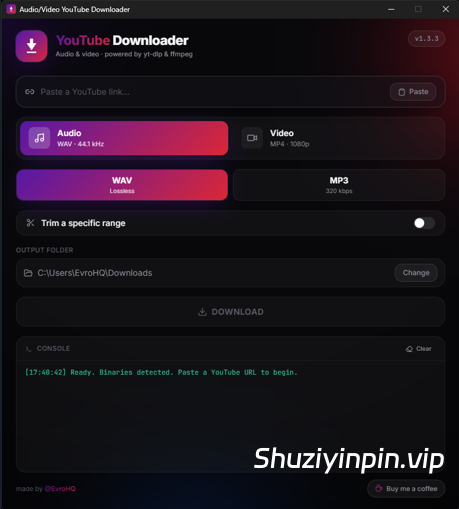
一款简洁现代的 Windows 应用,可从 YouTube 链接下载音频或视频,并可选配剪辑和分章节功能。
所有功能均已内置,无需额外工具、终端或设置。
功能亮点:
🎵 音频导出 — WAV(44.1 kHz,无损)或 MP3(320 kbps)
🎬 视频导出 — MP4 格式,最高支持 1080p / 2K / 4K(最佳可用分辨率,包含音频)
✂️ 剪辑 — 仅下载特定时间范围
🔖 分章节 — 如果视频包含章节,则一次性将每个章节保存为单独的文件
🔗 智能链接 — 播放列表/混音链接会自动剪辑为单个视频
📦 一体化 — 已集成 yt-dlp 和 ffmpeg,无需安装/下载其他软件。
使用方法:
将 YouTube 链接粘贴到文本框中(或点击“粘贴”按钮)。链接有效时,边框会变为绿色。
选择格式:
音频 → WAV(44.1 kHz,无损)或 MP3(320 kbps);
视频 → 1080p、2K 或 4K(系统会选择您所选分辨率下可用的最佳画质;视频始终包含音频)。
(可选)启用“裁剪特定范围”功能,即可仅截取视频的一部分。
只需输入数字即可——该字段会自动格式化:例如,输入 001030 将自动转换为 00:10:30(时:分:秒)。
(可选)如果视频包含章节,请启用“按章节分割”功能,即可一次性将每个章节保存为单独的文件。这些文件将保存在以视频名称命名的子文件夹中。(裁剪和分割章节功能互斥。)点击
“更改”选择输出文件夹(系统会记住您的选择)。默认情况下,输出文件夹是您的“下载”文件夹。
点击“下载”。您可以在日志和进度条中查看下载进度。
需要取消?点击“停止”。
当日志显示下载完成后,您的文件将出现在您选择的文件夹中。
A simple, modern Windows app to download audio or video from a YouTube link — with optional trimming and per-chapter splitting.
Everything is built in — no extra tools, no terminal, no setup.
Features
🎵 Audio export — WAV (44.1 kHz, lossless) or MP3 (320 kbps)
🎬 Video export — MP4 up to 1080p / 2K / 4K (best available, sound included)
✂️ Trim — download only a specific time range
🔖 Split by chapters — if a video has chapters, save each one as its own file in a single run
🔗 Smart links — playlist/mix links are auto-trimmed to the single video
📦 All-in-one — yt-dlp and ffmpeg are bundled; nothing else to install / Download
How to use
Paste a YouTube link into the field (or click Paste). The border turns green when the link is valid.
Choose the format:
Audio → WAV (44.1 kHz, lossless) or MP3 (320 kbps)
Video → 1080p, 2K, or 4K (it takes the best quality available up to your choice; video always includes sound)
(Optional) Turn on “Trim a specific range” to grab only a portion.
Just type the digits — the field formats itself: typing 001030 becomes 00:10:30 (hh:mm:ss).
(Optional) If the video has chapters, turn on “Split by chapters” to save each chapter as its own file, all in one run. They land in a subfolder named after the video. (Trim and chapter split are mutually exclusive.)
Choose the output folder with Change (it’s remembered next time). By default it’s your Downloads folder.
Click DOWNLOAD. You can follow progress in the log and the progress bar.
Need to cancel? Click Stop.
Your file appears in the chosen folder when the log says the download finished.
![[专业音频和音乐编辑器] Gilisoft Audio Editor v3.3 [WiN]](https://www.shuziyinpin.vip/wp-content/uploads/2026/07/Gilisoft-Audio-Editor.png)
![[普通人的游戏音乐创作神器] 1BitDragon v5-ARCADiA [MacOSX]](https://www.shuziyinpin.vip/wp-content/uploads/2026/09/1BitDragon-v5.png)
![[最受欢迎的人工智能(AI)DJ软件] Atomix VirtualDJ 2026 Pro Infinity v8.5.9644 Incl Patched and Keygen-R2R [WiN]](https://www.shuziyinpin.vip/wp-content/uploads/2026/04/atomix-virtualdj-2026-pro-infinity.jpeg)
![[专业DJ演奏工具] Algoriddim djay Pro 5.6.9-TNT [MacOSX]](https://www.shuziyinpin.vip/wp-content/uploads/2024/10/14122315_algoriddim-djay-pro.png)
![[吉他谱与和弦学习工具] Songsterr Guitar Tabs and Chords v7.0.30 (Premium Version) [Android]](https://www.shuziyinpin.vip/wp-content/uploads/2025/06/Songsterr-Guitar.png)
![[ Kontakt 和 Maschine 一键式自动 NICNT 生成器] BOB NICNT Maker v1.0-bobdule [WiN]](https://www.shuziyinpin.vip/wp-content/uploads/2026/09/BOB-NICNT-Maker.png)

评论0