
关联资源
[电子管母带均衡器] Lemur Audio SIMON v1.6.4-BUBBiX [WiN]
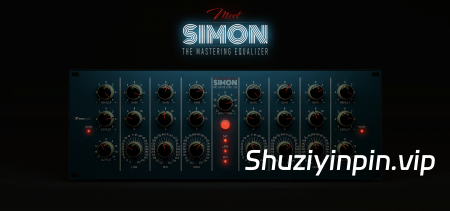
Team R2R | 24 September 2026 | 43.18 MB
MORiA | 24 September 2026 | 212.44 MB
安装方法:
隆重推出 SIMON 2:母带级均衡器
新特性
高通(HP)与低通(LP)滤波器
SIMON 2 在搁架式(shelf)频段控制旋钮旁新增了 HP 和 LP 旋钮。
每个通道均配备高通(10–300 Hz)和低通(3–30 kHz)滤波器,斜率为 12 dB/倍频程,位于 EQ 电路之前。它们支持 LINK(联动)和 M/S 模式,不引入任何延迟;当设为 OFF(关闭)时,会完全从信号路径中切除。
全新饱和度引擎
SIMON 2 饱和度模型菜单 —— Original(原版)、Class-A(A类)、Op-Amp(运放)、Tube(电子管)
提供四种饱和度模型,均由 INPUT TRIM(输入增益)控制驱动强度。Original 是 SIMON 的初代模型(原名 DIGITAL),音色干净细腻。Class-A 模拟了高电平驱动下的分立元件 A 类线路放大器特性,带来更丰富的高频细节与深度感。Op-Amp 即使在高驱动电平下也能保持纯净音色。Tube 模式则增添温暖感,并产生几乎纯粹的偶次谐波。所有模型均支持各种质量模式(包括 ZL 模式)。
皮肤外观:FULL(完整)、COMBINED(组合)及自定义颜色
SIMON 2 SKIN(皮肤)菜单 —— FULL、COMBINED 及 HUE(色相)滑块
提供两种面板样式:FULL(单色调)或 COMBINED(组合式,将搁架频段区域以灰色区分,便于快速识别);此外还配有 HUE 滑块,可将面板调整为任意颜色。所选颜色会随项目中的每个插件实例一同保存。
可调节的弹出数值显示尺寸
SIMON 2 POPUP SIZE(弹出尺寸)滑块
位于设置面板(齿轮图标处)的 POPUP SIZE 滑块用于调节旋钮旁数值显示框的大小。调节滑块时,所有旋钮的数值显示都会实时变为新尺寸,让您能立即看到效果。
Meet SIMON 2 : The Mastering Equalizer
What’s new
HP & LP filters
SIMON 2 HP and LP knobs beside the shelf controls
A high-pass (10–300 Hz) and a low-pass (3–30 kHz) on every channel, 12 dB/oct, ahead of the EQ. They follow LINK and M/S like the bands, add no latency, and switch fully out of the signal path at OFF.
New saturation engine
SIMON 2 saturation model menu — Original, Class-A, Op-Amp, Tube
Four saturation models, all driven by INPUT TRIM. Original is SIMON’s first model (formerly DIGITAL), clean and subtle. Class-A behaves like a discrete class-A line stage driven hot — more top end, more depth. Op-Amp stays clean even when pushed hard. Tube adds warm, almost purely even harmonics. All four work in every Quality mode, ZL included.
Skins: FULL, COMBINED and any colour
SIMON 2 SKIN menu — FULL, COMBINED and the HUE slider
Two faceplates — FULL in one tone, or COMBINED with the shelf sections set off in grey for quicker orientation — and a HUE slider that turns either one to any colour. The colour is saved with each instance in your project.
Adjustable popup size
SIMON 2 POPUP SIZE slider
POPUP SIZE in the gear panel sets how big the value readout next to a knob is drawn. While you move it, every knob shows its readout at the new size, so you see the result right away.
![[Stillwell Audio效果插件完整收藏套装] Stillwell Audio Complete Collection v4.1.2 Incl Patched and Keygen-R2R [WiN]](https://www.shuziyinpin.vip/wp-content/uploads/2026/09/Stillwell-Audio-Complete-Collection.png)
![[语音处理器工具] Krotos Dehumaniser II v1.4.3-R2R [WiN]](https://www.shuziyinpin.vip/wp-content/uploads/2026/09/krotos-dehumaniser-2.png)
![[制作恐怖生物音效工具] Krotos Dehumaniser Simple Monsters v1.3.0-R2R [WiN]](https://www.shuziyinpin.vip/wp-content/uploads/2026/09/krotos-dehumaniser-simple-monsters.png)
![[重磅:声音设计神器] Krotos Plugins Collection v2026.09-R2R [WiN](5.43GB)](https://www.shuziyinpin.vip/wp-content/uploads/2024/08/f69c5f48-e41d-4a9c-8ab4-3013a59bc6a4.png)
![[声学建模混响] Tac System ONKIO Acoustics v2.1.3-R2R [WiN]](https://www.shuziyinpin.vip/wp-content/uploads/2026/09/tac-system-onkio-acoustics.png)
![[一键营造氛围和过渡效果插件] EDM Ghost Production Hyperlift v1.1.0 VST3-Team BATs [WiN]](https://www.shuziyinpin.vip/wp-content/uploads/2026/09/EDM-Ghost-Production-Hyperlift.png)

评论0