
MOCHA | 01 October 2026 | 4.5 MB
安装方法:
VHS/CRT电路弯曲
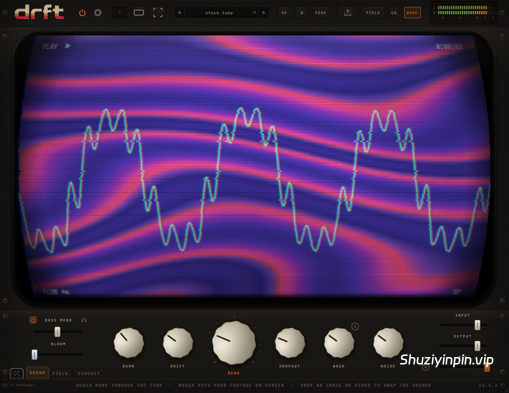
特效:磁带抖动、磁头烧蚀、跟踪失真、丢帧和雪花——六个旋钮,无论你播放什么,都会对画面造成损伤,而CRT显示器会将损伤的每一个细节都清晰地呈现出来。
声音背后的画面:
将视频、GIF或静态图像放入CRT显示器,它们会通过与音频相同的电路播放。或者进行实时拍摄:任何你的机器可以识别的摄像头——网络摄像头、采集卡,或者在Mac上通过“连续互通摄像头”功能连接你的iPhone——将镜头对准你的手、你的桌子、房间,这些都会变成画面。
六个旋钮,赋予画面独特的特性:
烧蚀(BURN)让画面灼烧得过热;漂移(DRIFT)让磁带漂移,并在画面后留下模糊的回声;弯曲(BEND)使画面扭曲变形;丢帧(DROPOUT)在录像中打出空洞;失真(WASH)使画面变得模糊不清;噪声(NOISE)则让画面被雪花覆盖。声音和画面由同一个旋钮控制——转动其中一个旋钮,你就能同时听到声音和看到画面。
信号中断时,
画面也会随之中断。信号中断直接影响整个机器:音频出现故障的瞬间,画面也会随之撕裂。这不是靠可视化工具猜测——而是同一个事件,听觉和视觉同步。
23个生成器,即使没有视频
素材也能使用。 “场”页面会生成自己的画面:23 个生成器——流动、等离子、隧道、万花筒、极光、焦散、细胞、曼陀罗等等——通过色调、缩放、发光、着色和流动来塑造,而“跟随”功能则可以设置它们与音频的交互强度。然后将它们混合:“混合”推杆可以对生成器进行亮度键控,使其与视频或实时摄像机的画面同步,这样你的视频素材就会穿过图案,而不是替换掉图案。
损坏电视,而不是磁带。
CIRCUIT(电路)页面包含六个直接作用于电视机硬件本身的旋钮——它们处理屏幕上现有的任何内容,因此无论是原始素材、摄像头画面还是生成器图案,都会受到同样的“弯曲”处理。偏转线圈(deflection coil)会拉伸并弯曲光栅扫描线;色彩基准信号失效,导致画面无法识别原本的色彩,转而将亮度信息解读为色相。 INJECT 功能将你的波形信号送入视频信号流中:低音(bass)在屏幕上勾勒出缓慢下沉的曲线,而镲片声(hats)则将其梳理成层层涟漪。只需一个 DEPTH 推子,即可同时掌控这一切。
一块画布,能够记住你演奏的内容,
FEED 功能读取画面信息——包括亮度、复杂度和破碎程度——并将其反馈回音频信号中。强烈的白光闪烁会重塑声音质感,而无信号的黑场则带来静默。将音乐视频输入其中,混音便会随着画面节奏“呼吸”起伏。
画面播放声音
信号时,会读取帧——亮度、复杂程度、破碎程度——并将其反馈到音频中。一道耀眼的白光会叠加在声音上;一个死寂的声道会变得安静。播放音乐视频时,混音会随着画面呼吸。
按下录制键,保留录制内容。
录制键会同时录制视频和声音,并保存为真正的 MP4 文件——导出时,文件会通过相同的流程重新渲染每一帧,因此文件与您观看的内容完全一致。您可以选择 16:9 的画面比例、适用于手机和胶片设备的 9:16 竖屏格式,或者超宽屏格式,并直接从插件中剪辑出经过电路弯曲处理的音乐视频。
VHS / CRT circuit-bend FX
Tape wow, head burn, tracking wash, dropouts and snow – six knobs of damage on whatever you run through it, over a CRT that shows you every bit of what it does.
A picture behind the sound
Drop a video, a GIF or a still onto the tube and it plays through the same circuit as your audio. Or go live: any camera your machine can see – a webcam, a capture card, or on a Mac your iPhone over Continuity Camera – point it at your hands, your desk, the room, and that becomes the picture.
Six knobs of character
BURN scorches it hot, DRIFT lets the tape wander and leaves a blurred echo smearing behind the picture, BEND warps and skews, DROPOUT punches holes in the take, WASH softens everything to mush, NOISE buries it in snow. Sound and picture ride the same knobs – turn one and you hear it and see it move together.
When it drops, it drops everywhere
Dropouts are wired straight across the machine: the instant one punches a hole in the audio, the picture tears with it. Not a visualizer guessing along – one event, heard and seen.
23 generators when you have no footage
The FIELD page makes its own picture: 23 generators – flow, plasma, tunnel, kaleido, aurora, caustic, cells, mandala and more – shaped by hue, zoom, glow, tint and flow, with FOLLOW setting how hard they ride your audio. Then blend them: the BLEND fader luma-keys the generator against your video or your live camera, so your footage comes through the pattern instead of replacing it.
Break the television, not the tape
The CIRCUIT page is six knobs that damage the set itself – and it runs on whatever is already on the tube, so it bends your footage and your camera the same way it bends the generators. The deflection coil pins and bows the raster. The colour reference dies, so the picture stops knowing what colour anything is and reads brightness as hue instead. INJECT puts your waveform into the video line, where bass draws slow curves down the screen and hats comb it into ripples. One DEPTH fader rides all of it at once.
A canvas that remembers what you played
PAINT is the FIELD page’s other half, and a different instrument entirely. Nothing is generated fresh each frame – a buffer is redrawn into itself, turning and drifting and fading, while the transients in your track stamp new marks on top. What you played a few seconds ago is still up there, smeared and rotated away from what you are playing now. Six kinds of mark, including ink marbling that pushes the whole picture outward into nested contours.
The picture plays the sound
feed reads the frame – how bright, how busy, how broken – and pushes it back into the audio. A hot white flash leans on the sound; a dead channel goes quiet. Run a music video through it and the mix starts breathing with the footage.
Press REC, keep the take
The REC key captures the tube and the sound together and writes a real MP4 – the export re-renders every frame through the same pipeline, so the file matches what you watched. Frame it 16:9, vertical 9:16 for phones and reels, or ultrawide, and cut circuit-bent music videos straight out of the plugin.
![[门控多重效果器] SampleRoll SHFT v1.1.3 Patched Incl. Keygen-MOCHA [WiN]](https://www.shuziyinpin.vip/wp-content/uploads/2026/10/SampleRoll-SHFT.png)
![[Apogee插件套装] Plugin Alliance Apogee Bundle v2026.09 Incl Patched and Keygen-R2R [WiN]](https://www.shuziyinpin.vip/wp-content/uploads/2026/10/Apogee-Bundle.png)
![[Styx Audio预调插件合集] Styx Audio All Plugins Bundle v2026.10.02-itUsed [WiN]](https://www.shuziyinpin.vip/wp-content/uploads/2026/08/Styx-Audio.png)
![[最精准的音高修正插件] Antares AutoTune Advanced v1.0.0.725 ARM REPACK-GUISEPPE [MacOSX]](https://www.shuziyinpin.vip/wp-content/uploads/2026/10/antares-autotune-advanced.jpg)
![[更新:终极超级合成器] reFX Nexus 5 v5.5.19 update-V.R [WiN, MacOSX]](https://www.shuziyinpin.vip/wp-content/uploads/2024/05/6c3858d9-b62e-471d-82bf-d71e9d625085-1024x658.png)
![[10款硬件级处理器] Temecula DSP Everything Bundle v2026.10.01 Incl Patched and Keygen-R2R [WiN]](https://www.shuziyinpin.vip/wp-content/uploads/2026/09/Temecula-DSP-Everything-Bundle.png)

评论0