
特别推荐
[AA插件捆绑包]Acustica Audio Plugins Bundle 2024.9+安装方法+双语说明书 [WiN, MacOSX](70GB+)
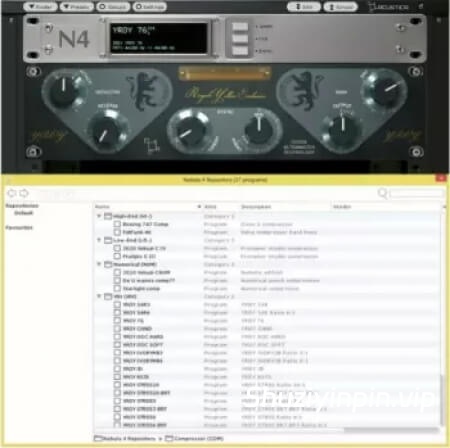
P2P | 11 January 2023 | WiN: 19.14 MB | MAC: 81.71 MB
安装方法:
完整拓展下载:[高精度硬件模拟多效果插件] Acustica Audio Nebula 4 v2.2.1 (External Libraries Only) [WiN, MacOSX](20.5GB+)
N4.5 是一款 VST、AAX 和 AU 格式的多效果插件,能够模拟和复制多种昂贵的音频设备,无需购置昂贵且笨重的硬件。
N4.5 以极高的精度模拟模拟硬件的特性和个性,让您无需购置昂贵且笨重的录音室硬件,即可模拟和复制多种昂贵的音频设备。
体验我们基于矢量 Volterra 内核的专有音频处理技术的强大功能,了解 Nebula 技术能为您带来什么!内置超过 350 个模拟预设,让您瞬间为数字混音增添模拟的温暖音色。这种采样过程的成果是对多种音频信号处理器的高度逼真、复杂的模拟,所有这些都集成在 N4 VST、AAX 或 AU 插件中,并兼容所有主流 DAW。N4.5
功能:
• 兼容搭载 Apple Silicon 的 macOS Monterey 系统。
• 引擎已更新。
• 修复了一些小错误并进行了少量改进,规格方面没有重大变化。
注意:
尽管版本号有所更改(N4.5),但 N4 插件的名称不会改变,并且它仍然兼容所有之前使用该插件的旧项目。N4.5
版本号仅用于在 Aquarius Desktop 的购买页面中标识此最新更新。
所有文件均未打补丁,因此性能与原版相同。现有 N4 用户应重新配置系统,以便在最新引擎上运行用户生成的插件。
此最新版本基于 N4 Player 构建,因此比之前的版本更安全。无需任何身份验证。无论如何,合法用户在测试期间应避免运行 Aquarius 版本。
再次提醒,您可以轻松访问第三方库并支持您喜爱的 Nebula 开发者。
N4.5 is a VST, AAX and AU multi-effect plug-in that is able to emulate and replicate several types of expensive audio equipment, eliminating the need for costly and bulky hardware.
N4.5 emulates the character and personality of analog hardware with exacting accuracy, allowing you to emulate and replicate several types of expensive audio equipment, eliminating the need for costly and bulky studio hardware.
Experience the full power of our proprietary audio processing technology, based on Vectorial Volterra Kernels, and find out what Nebula technology can do for you! With over 350 bundled emulation presets, you’ll be adding the warmth of analog to your digital mixes in no time at all. The result of this sampling process is highly realistic, complex emulations of many types of audio signal processors, all rendered within N4 VST, AAX, or AU plug-in that is compatible with all major DAW’s.
N4.5 features:
• Compatible with macOS Monterey on Apple Silicon.
• Engine updated.
• Minor bug fixes and minor improvements with no significant change in specification.
Note:
Despite the new designation (N4.5) the name of the N4 plugin will not change and it will remain compatible with all old projects where it was used.
The N4.5 designation is only used to recognize this latest update in the purchased page of Aquarius Desktop.
None of the files are patched, so expect the same level of performance as the original. Existing N4 users should rebuild their setups to run user-generated plugins on the latest engine.
This latest release is built upon N4 Player so it should be safer to use than previous release. No identifiable auth is included or required. In any case, legit users should avoid running Aquarius during testing.
Once again, you can easily access 3rd party libraries and support your favorite Nebula developers.
![[距离模拟器] 194dB Audio Distance Simulator v1.0.0-itUsed [WiN]](https://www.shuziyinpin.vip/wp-content/uploads/2026/10/Distance-Simulator.png)
![[复音合成器] Arturia MiniFreak V v5.0.1 [WiN, MacOSX]](https://www.shuziyinpin.vip/wp-content/uploads/2024/06/dcd713da-4f30-4bd5-b834-8e757fa6c1ef-1024x688.png)
![[低频增强插件] 194dB Audio Low End Max v1.1.2-V.R [WiN, MacOSX]](https://www.shuziyinpin.vip/wp-content/uploads/2026/10/Low-End-Max.png)
![[SnowTec 全套效果器合集] SnowTec Full Bundle v2026.10.08-itUsed [WiN]](https://www.shuziyinpin.vip/wp-content/uploads/2026/09/SnowTec-Full-Bundle-v2026.png)
![[键盘音色合集插件] Arturia Analog Lab V Pro v5.12.6–V.R [WiN]](https://www.shuziyinpin.vip/wp-content/uploads/2024/09/13122395_arturia-analog-lab-v-pro.png)
![[音频混音处理插件捆绑包] NICO BARAN PLUGINS 2026-R2R [WiN]](https://www.shuziyinpin.vip/wp-content/uploads/2026/10/NICO-BARAN-PLUGINS.png)

评论0