
MOCHA | 29 January 2026 | 1.3 GB
安装方法:
VoiceAssist | 智能语音和对话处理 |忘掉你对 DynAssist 的所有认知吧——VoiceAssist 更胜一筹。它是你的智能助手,助你轻松编辑干净、一致的语音和对话。
AI 驱动的降噪、去混响、频率恢复、音量均衡、呼吸和齿音控制——以及更多工具,助你简化日常工作流程。一切尽在掌控。VoiceAssist 让一切皆可调整。
干净
告别重录和糟糕的音质。使用我们的“干净”功能,从干净干声开始。借助 VoiceAssist 本地运行的 AI 模型,去除混响和背景噪音,例如交通噪音、风扇噪音或其他干扰。无需云端,无需上传。干净的音频,就在你的电脑上。麦克风
位置不佳导致人声浑浊?没问题。使用我们的“高频恢复”功能,重现清晰音质。
这是一款真正颠覆性的快速专业语音编辑工具。你的客户一定会对你的成果赞叹不已。
动态
每个字、每个音节都至关重要——无论是对话还是人声。使用 VoiceAssist 动态部分,获得水晶般清晰的人声轨道。它会分析您的演唱,并根据您的设置编写自定义音量自动化。
想要一个不易察觉的细微音量变化?使用高速模式。需要为说唱人声进行强劲的音量均衡?切换到快速模式,您的声音将清晰、稳定地穿透混音。
使用集成的峰值控制,在 LUFS-I 或 LUFS-S 模式下工作,仅在真正需要时触发压缩器。
低频
缺少深沉的低频来增强人声录音的力度?
VoiceAssist 可帮助您恢复低频能量,获得更饱满、更有冲击力的声音。
低频共振衰减功能会自动检测窄峰,因此您可以轻松调节到合适的量,无需手动查找。
基于音高的低切功能会跟踪录音中的最低音调并自动调整截止点。
呼吸声和齿音
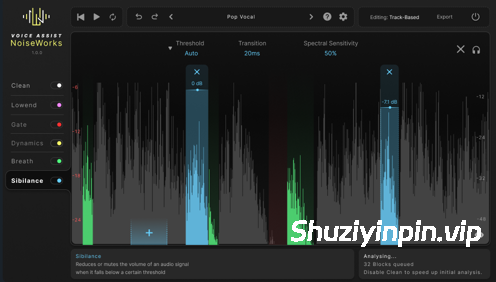
刺耳的齿音或急促的呼吸声会让您的混音听起来不够专业。VoiceAssist 通过智能检测和灵活的编辑功能,让您轻松掌控这些声音。
* 自动降低呼吸声和齿音,强度可调。
* 如有需要,可单独微调每个检测到的部分。
* 可选择整体音量降低或仅针对刺耳部分的频谱处理。
* 所有区域均可完全自定义——轻松调整边界、添加或删除。
保持人声干净、自然,随时可用于混音。
门限
这款内容感知语音门限器仅在真正需要时才启动——避免过度处理或生硬的剪切。它的设计旨在保持录音的清晰度和一致性,即使在环境变化、剪辑或麦克风位置不同的情况下也能如此。
该门限器并非依赖固定阈值,而是采用智能语音和静音检测技术,仅在需要时才做出反应。这确保了录音的透明度,避免了过度门限器带来的典型失真。
如果您需要更多控制,可以随时切换到传统的基于阈值的模式。可调节的边界条件让您可以根据具体的录音情况微调门限器的行为。
阻止主机:读取_mocha.txt
VoiceAssist | Smart Vocal & Dialogue Processing | Forget everything you know about DynAssist — VoiceAssist goes further. It’s your smart assistant for clean, consistent vocal and dialogue editing.
AI-powered denoising, dereverberation, frequency recovery, leveling, breath and sibilance control — plus many more tools to streamline your daily workflow. Everything stays under your control. Everything can be adjusted with VoiceAssist.
Clean
No more rerecording or bad audio quality. Start with a clean and dry signal using our Clean Section. Remove reverb and background noise like traffic, fan noise, or other distractions — thanks to VoiceAssist’s locally running AI model. No cloud. No upload. Just clean audio, right on your machine.
Muddy vocals caused by poor mic positioning? No problem. Bring back clarity with our Recover Highs feature.
A real game changer for fast and professional voice editing. Your clients will be amazed by your work.
Dynamics
Every word and syllable counts — whether it’s for dialogue or vocals. Get crystal-clear voice tracks with the VoiceAssist Dynamics Section. It analyzes your performance and writes a custom volume automation — tailored to your settings.
Want a subtle volume ride that no one will notice? Use the High Speed mode. Need aggressive leveling for rap vocals? Switch to Fast Speed, and your voice will cut through — clear and consistent.
Work in LUFS-I or LUFS-S with integrated peak control to trigger your compressor only when you really need it.
Lowend
Missing that deep low end to give your voice recordings more weight?
VoiceAssist helps you recover low-end energy for a fuller, more impactful sound.
The low-end resonance reduction detects narrow peaks automatically, so you can dial in the right amount — no need to hunt them down manually.
The pitch-based low cut tracks the lowest pitch in your recording and adjusts the cutoff point automatically.
Breaths And Sibilance
Harsh sibilance or sharp breaths can make your mix sound unprofessional. VoiceAssist gives you control with intelligent detection and flexible editing.
* Automatically reduce breaths and sibilance with adjustable intensity.
* Fine-tune each detected section individually if needed.
* Choose between overall volume reduction or spectral processing that targets only the harsh parts.
* All regions are fully customizable — adjust boundaries, add or remove with ease.
Keep your vocals clean, natural, and mix-ready.
Gate
The content-aware voice gate only works when it really has to — no more over-processing or unnatural cuts. It’s designed to keep your recordings clean and consistent, even across changing environments, comped takes, or varying mic positions.
Instead of relying on a fixed threshold, the gate uses intelligent voice and silence detection to react only when needed. This ensures a transparent result without the typical artifacts of aggressive gating.
If you prefer more control, you can always switch to a traditional threshold-based mode. Adjustable boundaries let you fine-tune the gate’s behavior to match your specific recording situation.
Block host: read _mocha.txt
![[音高修正效果器插件包] Antares Auto-Tune Bundle v2026.09 ARM REV1-GUISEPPE [MacOSX]](https://www.shuziyinpin.vip/wp-content/uploads/2026/09/Antares-Auto-Tune-Bundle.png)
![[交互式多重效果插件] Lunacy Audio BEAM Bundle v2.3.1 [VST3/AAX]-Team BATs [WiN]](https://www.shuziyinpin.vip/wp-content/uploads/2026/09/lunacy-audio-beam-bundle.jpeg)
![[Spire合成器] Reveal Sound Spire v1.5.22-V.R+99999扩展+安装教程 [WiN]](https://www.shuziyinpin.vip/wp-content/uploads/2024/06/e5204834-312d-4dea-9e23-e2cd49fa50a5-1024x535.png)
![[9款硬件级处理器] Temecula DSP Everything Bundle v2026.09.17 Incl Patched and Keygen-R2R [WiN]](https://www.shuziyinpin.vip/wp-content/uploads/2026/09/Temecula-DSP-Everything-Bundle.png)
![[macOS 插件管理器] Oven (Audio Plugin Manager) v6.0.0 [MacOSX]](https://www.shuziyinpin.vip/wp-content/uploads/2025/09/Oven.png)
![[Nolvra Effects 所有插件套装] Nolvra Effects All Plugins Bundle v2026.09 [WiN]](https://www.shuziyinpin.vip/wp-content/uploads/2026/09/nolvra-effects-all-plugins-bundle.png)

评论9