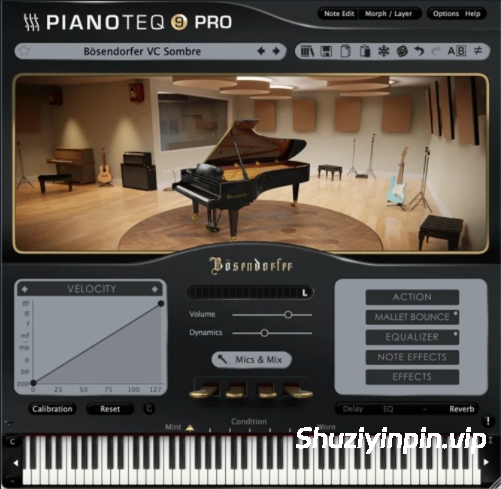
[建模钢琴插件] Modartt Pianoteq Pro v9.1.2 [WiN](133.6MB)

vkDanilov | STANDALONE VST3i VSTi | March 2026 | 133.6 MB

安装方法:直接安装,免激活版本。

Pianoteq 9 是 Modartt 出品的一款虚拟乐器,它采用物理建模技术,能够逼真地模拟钢琴和其他乐器的动态音色。与采样器不同,Pianoteq 实时生成声音,使其更具表现力和响应速度。

Pianoteq 9 包含多项重大改进:
改进的音板振动模型能够营造更深沉、更逼真的立体声和空间感。乐器音色更加丰富、自然且立体。
新增和更新的乐器。竖琴部分新增了三重竖琴。其音色源自巴洛克时期,拥有独特而精致的音色。音乐会竖琴和凯尔特竖琴的拨弦音色得到了改进。MKII 和复古簧片也进行了更新,使其拥有更动态的响应和更饱满的强音。
扩展的预设选择。新增了多种富有表现力的预设,包括:
“Sombre”(深沉的电影音色);
“Felt”(复古乐器音色);
改进的双耳预设,带来更饱满、更具沉浸感的耳机音效。
扩展的麦克风功能。界面允许您在乐器周围放置多达八个虚拟麦克风,更新后的混音器提供直观的立体声和多声道输出控制。
全新震撼的雷鸣踏板,以及更多精彩内容。

专业版:终极专业版本,允许您为每个音符自定义多达 30 个物理参数,并支持高达 192 kHz 的内部采样率。

更新日志:

点击查看

9.1.2 (2026/2/10)
• 修复录制的 MIDI 序列中重复的 MIDI 事件(v9.1.1 回归问题)。

9.1.1(2026/2/2)
• 改进了现代三角钢琴的延音“嗖嗖”声。
• 斯坦威 B 型钢琴更新:低音区音色调整,重新设计了“温暖”预设。
• 布鲁特纳钢琴更新:低音区音色调整。
• K2 三角钢琴更新:音色调整。
• VST3 插件的 MIDI 程序更改模拟(单 MIDI 通道)。
• 手动录制的 MIDI 序列的长度现在可以正确保存。
• 修复了从操作系统文件资源管理器加载 MIDI 文件时“打开方式”的问题。
• 节拍器声音现在可以正确调用。
• 更新了 Linux SVG 图标(使用 –install-app-icon-and-quit 选项)。
• 改进了设计面板中阻抗控制的易用性。
• (仅限 iOS)兼容宿主软件(例如 iPad 版 Logic)的 AUv3 插件(仅限标准版/专业版)现已公开外部音频输入参数。
• (2026-02-03)恢复 Linux JACK 支持。

9.1.0(2025/12/10)
• 新增乐器包:Syngular。
• 为多款现代三角钢琴新增温暖、单声道和双耳预设。
• 现在可以将下一个/上一个收藏预设分配给键盘快捷键和 MIDI 映射。
• 现在可以将静音和 MIDI 紧急停止分配给键盘快捷键和 MIDI 映射。
• 降低了内存占用,主要适用于 iOS。
• 在 macOS 上启用“使用默认系统输出”选项后,采样率和缓冲区大小现在得以保留。

9.0.3(2025/11/17)
• 修复了某些 DAW 中延音踏板和其他参数更新的问题。
• 修复了导致麦克风 6、7、8 声音失真的问题。
• 修复 Windows 系统下 VST3 插件包文件夹属性问题。
• 修复调制齐奏宽度滑块时崩溃的问题。
• 修复 Linux 系统下全屏启动时崩溃的问题。
• (仅限 iOS)修复部分 AUv3 宿主程序中采样率错误的问题。

9.0.2(2025/10/20)
• 修复 STAGE 版本无法在 Logic/MainStage/GB 中打开多个实例的问题。
• 修复 VST3 参数的自动化相关问题。
• 添加了一些“双耳”和“盖下”预设。
• 修复哇音踏板和相位踏板。
• Windows:修复安装程序问题和 Pianoteq 图标。
• 注意:iOS 版本尚未在 App Store 上架,希望不久后就能上架。

9.0.1(2025/10/15)
• (仅限 iOS)应用图标支持深色模式。

9.0.0 (2025/10/15)
• 新增乐器:三重竖琴,已添加到竖琴乐器包。
• 现代和历史三角钢琴已全面更新。
• MKII 和复古簧片乐器已更新。
• 所有三角钢琴新增“忧郁”预设。
• 为历史三角钢琴(Kremsegg 和 Karsten 音色包)新增“毡布”预设。
• 为超过 30 种乐器新增“双耳”预设。
• 提升了凯尔特竖琴和音乐会竖琴的拨弦真实感。
• KIViR.ptq 中的 CP-80 音色得到显著提升。
• 节拍器音色得到改进(4 种选择)。
• 原生支持 Windows on ARM。
• 移除 VST2 支持。
• 现在 Linux 系统(与 Windows 和 macOS 系统并存)支持 VST3。
• 当旧版本 Pianoteq 不可用时,自动迁移使用该旧版本 Pianoteq 的项目。需要宿主软件支持:Cubase、Pro Tools、Logic Pro(自动化曲线除外)、DP 等。
• iOS(使用 AUv3)和 macOS(使用 AUv2)之间的 Logic 项目完全兼容,包括自动化曲线。
• 实现了 NKS2 支持。
• 更新后的“麦克风与混音”面板现在最多可使用 8 个麦克风。
• Pianoteq STAGE 用户现在可以访问“麦克风与混音”面板并修改混音器设置。
• FX 面板:均衡器现在具有 5 个可配置频段。
• FX 面板:延迟效果器中新增乒乓模式选项。
• FX 面板:混响效果器中新增低切参数。
• 新增全局击弦硬度参数。
• 新增击弦音色控制(适用于 STANDARD/PRO 用户,PRO 用户可编辑音符)。
• 新增力度偏移控制(适用于 STANDARD/PRO 用户可编辑音符)。
• 新增雷鸣踏板。
• 音符 FX 面板:新增单音模式,并提供连奏和滑音选项。
• 主窗口可通过拖动右下角自由调整大小。
• 新增“高”界面模式,以及现有的“紧凑”模式。
• (仅限 iOS)新增对纵向模式和窗口模式的支持。

Pianoteq 9 is a virtual instrument from Modartt that uses physical modeling to create realistic and dynamic sounds of pianos and other instruments. Unlike samplers, Pianoteq generates sound in real time, which makes it more expressive and responsive.

Pianoteq 9 includes several significant improvements:
An improved soundboard vibration model creates a deeper, more realistic stereo and spatial perception of sound. Instruments sound richer, more organic, and three-dimensional.
New and updated instruments. A new Triple Harp has been added to the Harps section. Its sound, rooted in the Baroque era, has a distinctive and refined timbre. String plucking has been improved for the Concert and Celtic Harps. The MKII and Vintage Reeds have been updated for a more dynamic response and richer fortissimo sound.
Expanded preset selection . New expressive presets have been added, including
“Sombre” for a deep, cinematic sound;
“Felt” for vintage instruments;
and improved Binaural presets for a fuller, more immersive sound on headphones.
Expanded microphone capabilities. The interface allows you to place up to eight virtual microphones around the instrument, and the updated mixer provides intuitive controls for stereo and multichannel output.
The new roaring Thunder pedal , and much more.

PRO: The ultimate professional version that allows you to customize up to 30 physical parameters for each note and supports internal sampling rates up to 192 kHz.

Changelog

Click to view

9.1.2 (2026/2/10)
• Fix duplicated MIDI events in recorded MIDI sequences (v9.1.1 regression).

9.1.1 (2026/2/2)
• Sustain ‘whoosh’ noise improved in modern grand pianos.
• Steinway B update: revoicing in the bass range, Warm preset redesigned.
• Blüthner update: revoicing in the bass range.
• K2 grand piano update: revoicing.
• MIDI Program Change emulation for the VST3 plugin (single MIDI channel).
• The length of manually recorded MIDI sequences is now properly preserved.
• Fix ‘open With’ when loading MIDI files from the OS file explorer.
• Metronome sound is now correctly recalled.
• Linux SVG icon updated ( –install-app-icon-and-quit option ).
• Improved accessibility of the impedance control in the design panel.
• (iOS only) external audio input parameters are now exposed in the AUv3 plugin (std/pro only) for compatible hosts (e.g. Logic for iPad).
• (2026-02-03) restore linux JACK support.

9.1.0 (2025/12/10)
• New instrument pack: Syngular.
• New Warm, Mono and Binaural presets added to several modern grand pianos.
• Next/previous favourite preset can now be assigned to keyboard shortcuts and MIDI mappings.
• Mute and MIDI Panic can now be assigned to keyboard shortcuts and MIDI mappings.
• Reduced memory usage, mostly useful for iOS.
• Sample rate and buffer size are now preserved on macOS when the ‘use default system output’ option is enabled.

9.0.3 (2025/11/17)
• Workaround for sustain pedal and other parameters updates issues in some DAWs.
• Fix an issue causing mics 6,7,8 to sound distorted.
• Fix VST3 bundle folder attributes on Windows.
• Fix a crash when modulating the unison width slider.
• Fix a crash when starting in fullscreen on Linux.
• (iOS only) fix wrong sample rate issue in some AUv3 hosts.

9.0.2 (2025/10/20)
• Fix issue where the STAGE version failed to open more than one instance in Logic/MainStage/GB.
• Fix automation-related issue for the VST3 parameters.
• Added a few ‘Binaural’ and ‘Under Lid’ presets.
• Fix the wahwah and phaser pedals.
• Windows: fix installer issues, and the Pianoteq icon.
• Note: iOS version is not yet available on the appstore, hopefully won’t be long.

9.0.1 (2025/10/15)
• (iOS only) Dark mode support for the app icon.

9.0.0 (2025/10/15)
• New instrument: Triple Harp, added to the Harp instrument pack.
• Modern and historic grand pianos have been thoroughly updated.
• MKII and Vintage Reeds instruments updated.
• New ‘Sombre’ presets added to all grands.
• New ‘Felt’ presets added to historic grands (Kremsegg and Karsten packs).
• New ‘Binaural’ presets added for more than 30 instruments.
• Improved pluck realism on Celtic and Concert harps.
• The CP-80 in KIViR.ptq has been seriously improved.
• Metronome sounds improved (4 choices).
• Native support for Windows on ARM.
• VST2 support removed.
• VST3 support now available on Linux (alongside Windows and macOS).
• Automatic migration of projects using an older major version of Pianoteq, when that version is not available. Requires host support: Cubase, Pro Tools, Logic Pro (except automation curves), DP, …
• Full compatibility of Logic projects between iOS (using the AUv3) and macOS (using the AUv2), including automation curves.
• NKS2 support implemented.
• Up to 8 microphones can now be used in the updated Mics & Mix panel.
• Pianoteq STAGE users can now access the Mics & Mix panel and modify mixer settings.
• FX panel: equalizer now features 5 configurable bands.
• FX panel: ping-pong option added in delay effect.
• FX panel: low-cut parameter added to the reverb effect.
• Global Hammer Hardness parameter added.
• Hammer Tone control added (for STANDARD/PRO users, note-edit for PRO users).
• Velocity Offset control added (note-edit for STANDARD/PRO users).
• Thunder pedal added.
• Note FX panel: monophonic mode added, with legato and portamento options.
• The main windows can be freely resized by dragging its bottom right corner.
• New ‘Tall’ interface mode, in addition to the already existing ‘Compact’ mode.
• (iOS only) Added support for portrait orientation, and windowed mode.

🏠 HomePage

阅读全文
资源下载
下载价格VIP专享
仅限VIP下载升级VIP
常见问题
开通VIP会员是否可以无限下载?
本站所有资源,针对不同等级VIP可直接下载,特殊资源会注明是否免费,指会员所享有根据选择购买的会员选项所享有的特殊服务,具体以本站公布的服务内容为准。
购买VIP会员是否可以退款?
VIP会员属于虚拟服务,付款后不能申请退款;开通VIP会员之前,请予以确认;如有疑问,可以联系站长咨询。
资源下载链接失效怎么办?
下载链接失效,不用担心,可以通过留言或者评论的方式和我们联系,一般会在24小之内解决!
百度网盘链接打不开怎么办?
1.新疆和台湾是百度网盘限制区,可以使用手机网络,不要连接WIFI,然后转存到网盘下载! 2.海外打不开百度网盘链接,可以使用梯子,连接大陆网络即可!
本站部分资源来源于互联网,仅作介绍和学习使用,版权属原著所有。若有侵权,请发邮件(shuziyinpin@gmail.com),联系我们删除。加入本站VIP会员,购买正版打折,比淘宝价便宜!原文链接:https://www.shuziyinpin.vip/46292.html,转载请注明出处。
0

评论0

请先
显示验证码
没有账号?注册  忘记密码?