
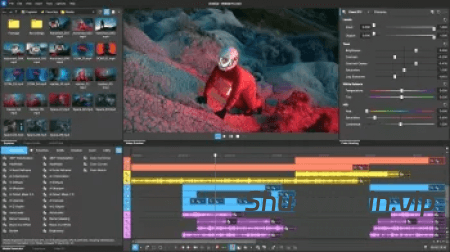
[经典专业视频制作创意工具] BorisFX VEGAS Pro 2026.0.0.105-V.R [WiN](562.13MB)

Team V.R | 17 May 2026 | 562.13 MB

安装方法:安装之后,使用patch文件激活。

⚡ VEGAS Pro 助您突破极限 ⚡

VEGAS Pro 的构建与众不同,因此您可以更大胆地编辑视频。凭借强大的工具和闪电般的时间线,它是终极的创意秘籍。
轻松编辑
使用直观、易于使用的工具快速入门并保持高效。
一体化功能
内置工具可提供您所需的速度、控制和功能,超越基础功能。
高级可扩展性
通过对第三方插件和硬件的全面支持,进一步激发您的创造力。
探索 VEGAS Pro 的新功能
VEGAS 核心引擎
快速、强大、为精确而打造。VEGAS 核心引擎可增强您的编辑过程,即使在压力下也能提供可靠的色彩精度和流畅的播放。

创纪录的时间内呈现完美的色彩
快速工作,信任您的色彩,并确信最终效果将与您的想法完全一致。
流畅的预览播放
​​ 即使在充满视频效果的高分辨率媒体负载沉重的情况下,也能以高预览帧率准确地审查您的工作。
超级时尚的界面让您专注于区域
完全集成的色彩
分级 直接在时间线上分级,无需切换模式或打断您的流程。VEGAS Pro 将色彩校正完全集成,因此您可以保持高效和创造力。
为您设计
VEGAS Pro 为您提供一个干净、专注的工作空间和智能 UI 设计,帮助您专注于区域。
统一资源管理器
在一个熟悉、简化的视图中快速访问所有媒体。
轻松导出
在易于使用的渲染界面中访问强大的导出选项,专为专业人士和初学者打造。

Vegas Pro 2026.0.0 Build 105 – 发行说明

点击查看

变更和修复:

稳定性/崩溃修复

提升了多个方面的整体崩溃恢复能力(异常安全性和额外的防护检查)。
修复了与 UI 和格式化/日志记录代码中过长的文件路径/文件名 (MAX_PATH) 相关的崩溃问题。
崩溃修复:提升了指针/类型使用和项目/UI 状态处理的安全性。
崩溃修复:更安全地处理异常期间 VfW 编解码器关闭的行为。
减少了崩溃报告中附加的冗余数据量。
提升了内部错误捕获/报告的可靠性。

关键帧/包络/时间线编辑

修复了淡入淡出包络上贝塞尔点的绘制问题。
修复了对数贝塞尔控制柄的问题。
修复了在边缘附近选择关键帧会触发错误并导致关键帧卡住的问题。
恢复了移动第一个关键帧(包括 OFX 包络)的功能。
通过右键单击添加的 OFX​​ 包络点现在默认设置为“线性”而不是“保持”。
修复了包络碰撞框行为不明确的问题(光标与右键单击上下文菜单)。

插件/OFX/特效:

统一了OFX黑名单/排除列表的行为。
改进了OFX标识符哈希处理,以避免冲突(例如发光与裁剪)。
修复了BCC崩溃问题:更新了OFX字符串/自定义参数临时缓冲区处理,以防止释放后使用。
“运动模糊”现在可以正确加载旧项目中的插件(已修复UID问题)。
改进了OFX预设从旧版本提升的兼容性。
改进了OFX DLL被阻止/卸载时旧版插件选择器的稳定性。
更新了OFX描述属性,以指示不安全的克隆行为。
更新了色调环方向,使其与示波器绘图、标签和目标相匹配。

AI 功能/智能遮罩/Z深度/自动重排:

修复了在智能遮罩2.0帧分析后,Vegas在后台进程中卡死的问题。
Z 深度:提高了预览清晰度并移除了图例。
Z 深度:减少了不必要的重新计算。
改进了AI设备设置行为(Vegas文件名现在使用4位数字)。
渲染对话框:当存在输出特效时,自动重排功能已正确禁用/隐藏。
AI 插件参数范围:允许在适当情况下使用大于功能限制的值。

文本编辑/字幕/语音服务:

提高了媒体级别的文本编辑可靠性。
减少了事件发生后的长时间停顿。
改进了分析状态行为,并减少了分析期间不必要的 UI 更新。
提高了服务/端口被阻塞或已被占用时的稳定性;增加了 gRPC 异常处理。
现在会在生成新字幕之前移除现有字幕。
新增单元测试并采纳了代码审查反馈。
工作流程支持音轨/音频到 WAV 的渲染。

STORYBLOCKS 集成:

新增分页支持(页脚/页面按钮、导航启用/禁用、改进布局)。
使用 API“扩展”功能改进 Storyblocks 搜索,以减少额外的详细信息请求。
改进搜索时控件禁用行为。
更新过滤器和占位符文本的本地化。UI
优化:布局边距、重命名页脚组件、改进下载指示器样式。
修复了重复启动同一下载时下载卡住的问题。
在适当情况下,将每页搜索结果数量调整为 Storyblocks 的最大值。

调色:

在媒体特效级别进行调色时,调色目标现在可以正确更新。

音频:

修复了环绕声道映射显示错误的问题(5.1/7.1 ↔ 6/8 声道)。

已知问题:

由于最近的 Windows 更新与后台智能传输服务 (BITS) 冲突,可能会发生崩溃或挂起。
部分高清视频素材可能无法以正确的宽高比显示。
粒子幻象OFX特效在项目中首次使用时可能无法生效。
产品激活可能陷入循环,或者提示未找到任何许可证购买记录。请联系技术支持以解决此问题。

VEGAS Pro is built different, so you can edit videos bolder. With powerful tools and a lightning-fast timeline, it’s the ultimate creative cheatcode.
Effortless editing
Get started quickly and stay efficient with intuitive, easy-to-use tools.
All-in-one power
Go beyond the basics with built-in tools that deliver the speed, control, and power you need.
Advanced expandability
Push your creativity further with full support for third-party plugins and hardware.
Explore what’s new in VEGAS Pro
VEGAS Core Engine
Fast, powerful, and built for precision. The VEGAS Core Engine supercharges your editing process and delivers reliable color accuracy with smooth playback, even under pressure.

Perfect colors in record time
Work fast, trust your colors, and feel confident that the final look will match exactly what you had in mind.
Fluent preview playback
Accurately review your work with high preview framerates even under the heavy load of high-res media packed with video effects.
A super sleek interface keeps you in the zone
Fully-integrated color grading
Grade directly on the timeline without switching modes or breaking your flow. VEGAS Pro keeps color correction fully integrated, so you stay efficient and creative.
Designed for you
VEGAS Pro gives you a clean, focused workspace with smart UI design that helps you stay in the zone.
Unified Explorer
Quickly access all your media in one familiar, streamlined view.
Export made easy
Access powerful export options in a easy-to-use render interface, built for both pros and beginners.

Vegas Pro 2026.0.0 Build 105 – Release Notes

Click to view

Changes and fixes:

STABILITY / CRASH FIXES

Improved overall crash resilience in multiple areas (exception safety and additional guard checks).
Fixed crashes related to long file paths / long file names (MAX_PATH) in UI and formatting/logging code.
Crash fix: improved safety around pointer/type usage and project/UI state handling.
Crash fix: safer handling around VfW codec close behavior during exceptions.
Reduced amount of superfluous data attached to crash reports.
Improved internal error trapping/reporting reliability.

KEYFRAMES / ENVELOPES / TIMELINE EDITING

Fixed drawing of Bezier points on fade envelopes.
Fixed logarithmic Bezier handles.
Fixed keyframe selection near edges triggering errors and causing keyframes to stick.
Restored ability to move the first keyframe (including OFX envelopes).
OFX envelope points added via right-click now default to Linear instead of Hold.
Fixed ambiguous envelope hitbox behavior (cursor vs right-click context menu).

PLUG-INS / OFX / EFFECTS

Unified OFX blacklisting/exclusion listing behavior.
Improved OFX identifier hashing to avoid collisions (Glow vs Crop).
BCC crash fix: updated OFX string/custom parameter temp buffer handling to prevent use-after-free.
“Motion Blur” from older projects now loads correctly (UID issue fixed).
Improved OFX preset uplift compatibility from older versions.
Improved legacy plugin chooser robustness when OFX DLLs are blocked/uninstalled.
Updated OFX description properties to indicate unsafe cloning behavior.
Updated Hue Ring orientation to match scope plot, labels, and targets.

AI FEATURES / SMART MASK / Z-DEPTH / AUTO REFRAME

Fixed Vegas hanging in background processes after Smart Mask 2.0 frame analysis.
Z-Depth: improved preview legibility and removed legend.
Z-Depth: reduced unnecessary recalculations.
Improved AI device setting behavior (Vegas filename now uses 4 digits).
Render dialog: Auto Reframe is disabled/hidden appropriately when Output FX is present.
AI plugin parameter ranges: allow values larger than functional limits where appropriate.

TEXT-BASED EDITING / SUBTITLES / SPEECH SERVICES

Improved Text-Based Editing reliability at media-level.
Reduced long pauses after events.
Improved analysis-state behavior and reduced unnecessary UI updates during analysis.
Improved robustness when services/ports are blocked or already in use; additional GRPC exception handling.
Existing subtitles are now removed before generating new subtitles.
Added unit tests and incorporated code review feedback.
Track/audio-to-WAV render support for workflows.

STORYBLOCKS INTEGRATION

Paging support added (footer/page buttons, navigation enable/disable, improved layout).
Improved Storyblocks search using API “extended” feature to reduce extra detail requests.
Improved control disabling behavior while searching.
Localization updates for filters and placeholder text.
UI polish: layout margins, renamed footer component, improved download indicator styling.
Fixed stuck downloads when starting the same download repeatedly.
Adjusted search results per page to Storyblocks maximum where appropriate.

COLOR GRADING

Color grading target now updates correctly when grading at the Media FX level.

AUDIO

Fixed incorrect display of surround channel mapping (5.1/7.1 ↔ 6/8 channels).

KNOWN ISSUES

A crash or hang may occur due to a conflict with the Background Intelligent Transfer Service from a recent Windows Update.
Some HDV media may not be displayed with the proper aspect ratio
Particle Illusion OFX may not apply when it is initially used for the first time in a project
Product activation may get stuck in a loop or may indicate that no purchases were found for a license. Please contact support for help in fixing this issue.

🏠 HomePage

阅读全文
资源下载
下载价格VIP专享
仅限VIP下载升级VIP
常见问题
开通VIP会员是否可以无限下载?
本站所有资源,针对不同等级VIP可直接下载,特殊资源会注明是否免费,指会员所享有根据选择购买的会员选项所享有的特殊服务,具体以本站公布的服务内容为准。
购买VIP会员是否可以退款?
VIP会员属于虚拟服务,付款后不能申请退款;开通VIP会员之前,请予以确认;如有疑问,可以联系站长咨询。
资源下载链接失效怎么办?
下载链接失效,不用担心,可以通过留言或者评论的方式和我们联系,一般会在24小之内解决!
百度网盘链接打不开怎么办?
1.新疆和台湾是百度网盘限制区,可以使用手机网络,不要连接WIFI,然后转存到网盘下载! 2.海外打不开百度网盘链接,可以使用梯子,连接大陆网络即可!
本站部分资源来源于互联网,仅作介绍和学习使用,版权属原著所有。若有侵权,请发邮件(shuziyinpin@gmail.com),联系我们删除。加入本站VIP会员,购买正版打折,比淘宝价便宜!原文链接:https://www.shuziyinpin.vip/49041.html,转载请注明出处。
0

评论0

请先
显示验证码
没有账号?注册  忘记密码?
