
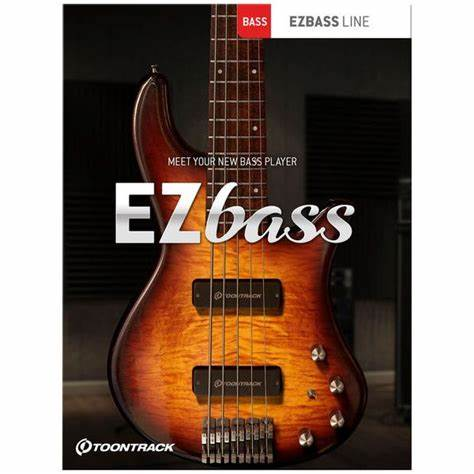
WiN: Team V.R | 19 May 2026 | 44 MB
MAC: Team V.R | 19 May 2026 | 81 MB
安装方法:先安装v1.0基础版本(下载内已提供),再覆盖安装升级包。建议直接把音色库跟midi放到想要的目录,然后打开客户端,按提示找到目录就行了。
我们自豪地推出市场上首款此类低音软件。它不仅超越了传统的采样库,提供了纯净的声音,而且还具备了基础功能,让你能够轻松地为你的歌曲添加低音。
两个贝斯库、混音预设、贝斯律动以及丰富的创意歌曲创作功能。
两把精心采样的贝斯吉他——一把复古,一把现代。
无需离开软件即可进行编曲、创作、修改和重新编曲。
自带贝斯 MIDI 接口,适用于各种风格。
使用鼓或键盘 MIDI,EZbass 会自动创建匹配的贝斯线。
使用内置的“网格编辑器”,您可以修改 MIDI 的演奏或更细微的细节。
音频到 MIDI 的转换基于与 Superior Drummer 3 相同的技术。
全套音色:19套
EZB-Funk Fusion
EZB-Acoustic
EZB-Americana
EZB-ClassicRock
EZB-DiscoPop
EZB-EZbassModern
EZB-EZbassVintage
EZB-Fretless
EZB-Gospel
EZB-HardRock
EZB-HeavyMetal
EZB-Hollowbody
EZB-Metal
EZB-ProgressiveMetal
EZB-SessionPlayer
EZB-SynthBass
EZB-TheEightiesElectric
EZB-TheEightiesElectronic
EZB-TheSixties
EZB-Upright
MIDI loop库:43套
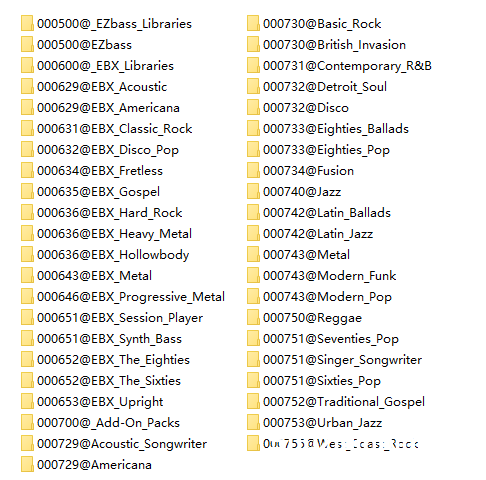
EZbass 1.3.3 版本更新说明 2026-05-19
变更
说明常规
* 在 Mac 系统上,独立图标和项目图标已更新为 macOS Tahoe 风格。
* 新增对 Rock Legend EBX 中使用的右手闷音演奏法的支持。
设置
* 新增更改部分键盘快捷键的功能:“为音符添加闷音”、“移除音符闷音”以及 Tracker 部分中的一些快捷键。
错误修复
常规
* 在较新版本的 Apple 宿主软件中,菜单无法正确响应点击操作。
声音引擎
* 播放过程中,MIDI 音符有时会提前或延迟几个采样点进行渲染。
* 在某些情况下,音符的播放方式与预期以及 1.3.0 版本之前的演奏方式不同,例如是否使用连奏。
* 更改音色库后,某些内部播放状态不会重置,因此例如颤音可能无法正常工作。
* 速度同步效果器的速度不会在速度改变时更新,只会在效果器加载时(即加载库预设或项目时)更新。
歌曲轨道
* 以 44.1 kHz 以外的采样率导出音频时,音符的时序不准确。
* 如果网格编辑器处于焦点状态,则无法使用键盘快捷键停止录制。
编辑播放样式
* 修复了一些因更改“数量”而导致的潜在崩溃问题。
网格编辑器
* 尝试在轨道开始之前移动音符可能会导致崩溃。
* 在 Mac 上,向音符添加“滑入”效果不佳。它不会更改音符的开始时间,并且可能会导致后续崩溃。
* 在 Mac 上,网格编辑器中缩放按钮的工具提示显示了与鼠标滚轮一起使用的错误修饰符。
* 如果此时节点已存在,则使用指针工具在 CC 编辑器中双击将不再添加节点。
⚡ EZbass ⚡
We are proud to introduce the market’s first bass software of its kind. One that goes above and beyond a traditional sample library to deliver not only pristine sound but also fundamental features that effortlessly let you to add bass to your songs.
Two bass libraries, mix-ready presets, bass grooves and a wealth of features for creative songwriting.
Two carefully sampled bass guitars – one vintage and one modern.
Arrange, compose, change and rearrange – without leaving the software.
Comes with bass MIDI for a broad range of styles.
Use drum or keyboard MIDI and have EZbass automatically create matching basslines.
Alter the performance or the subtler details of the MIDI using the built-in ‘Grid Editor.’
Audio to MIDI conversion based on the same technology found in Superior Drummer 3.
Release notes for EZbass 1.3.3 2026-05-19
CHANGES
General
* On Mac, the standalone icon and the project icon have been updated to macOS Tahoe style.
* Added support for right-hand mute articulation used in Rock Legend EBX.
Settings
* Added possibility to change some keyboard shortcuts: “Add Damping to Notes,” “Remove Damping from Notes” and a few in the Tracker section.
BUG FIXES
General
* Menus would not respond properly to clicks in newer versions of Apple hosts.
Sound Engine
* During playback, MIDI notes would in some cases be rendered several samples too early or too late.
* In some cases, notes would be played back differently than how they should be and how they were played before version 1.3.0, for example with/without legato.
* Changing libraries did not reset certain internal playback states, so for example trills could stop working properly.
* Tempo-synced effects did not update their tempo when the tempo was changed, only when the effects were loaded (when the library preset or project was loaded).
Song Track
* Audio export at sample rates other than 44.1 kHz did not have accurate timing of the notes.
* It was not possible to stop recording with keyboard shortcuts if the Grid Editor had focus.
Edit Play Style
* Some potential crashes caused by changing Amount have been fixed.
Grid Editor
* Trying to move notes before the start of the track could cause a crash.
* Adding a “Slide In” to a note did not work well on Mac. It did not change the start time of the note and it could cause a crash later.
* On Mac, the tooltips for the zoom buttons in the Grid Editor said incorrect modifiers to use with the mouse wheel.
* Double-clicking in the CC editor with the Pointer Tool will no longer add a node if one already exists at that time.
![[最精准的音高修正插件] Antares AutoTune Advanced v1.0.0.725 ARM REPACK [MacOSX]](https://www.shuziyinpin.vip/wp-content/uploads/2026/10/antares-autotune-advanced.jpg)
![[狂野鼓组音源] Heavyocity Oblivion Drums [KONTAKT]](https://www.shuziyinpin.vip/wp-content/uploads/2026/10/heavyocity-oblivion-drums.jpg)
![[更新:终极超级合成器] reFX Nexus 5 v5.5.19 update-V.R [WiN, MacOSX]](https://www.shuziyinpin.vip/wp-content/uploads/2024/05/6c3858d9-b62e-471d-82bf-d71e9d625085-1024x658.png)
![[古典单簧管乐器音源] Embertone Herring Clarinet [KONTAKT]](https://www.shuziyinpin.vip/wp-content/uploads/2026/10/embertone-herring-clarinet.png)
![[10款硬件级处理器] Temecula DSP Everything Bundle v2026.10.01 Incl Patched and Keygen-R2R [WiN]](https://www.shuziyinpin.vip/wp-content/uploads/2026/09/Temecula-DSP-Everything-Bundle.png)
![[13 款混音大师插件] Mastering The Mix Plugins Collection 2026.09.30-V.R [WiN]](https://www.shuziyinpin.vip/wp-content/uploads/2026/04/Mastering.The_.Mix_.Bundle.v5.0.1.png)

评论0