
关联资源
[Sequoia 2026+内容库] Boris FX Sequoia 2026 Content+v2026.0.0-R2R [WiN](597.4MB+3.76GB)
(其内包含内容库)
Team R2R | 09 May 2026 | 597.9 MB | CONTENT: Team R2R | 02 February 2026 | 3.76 GB
工程师之选。
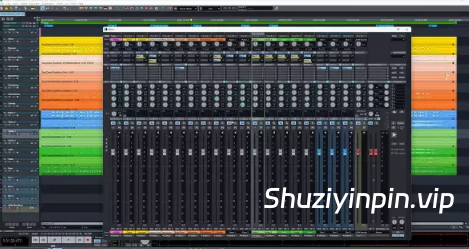
全球最知名的录音棚都信赖 Sequoia——如今,它配备了全新的 ADM 编辑器和杜比全景声渲染功能,可打造沉浸式 3D 音频制作体验。广播公司和顶级音响工程师都对其可靠性、直观的工作流程以及在录音棚和现场环境中的灵活集成能力赞不绝口。
混合音频引擎
凭借其智能延迟管理,可提供毫不妥协的音频质量。计算音轨效果时响应时间的缩短,使得实时监听延迟更低。此外,集成的高延迟引擎可确保更高效的系统利用率,并集成复杂的对象、AUX 和环绕声功能。创建完美的 32 位浮点录音,并实现高达 384 kHz 的极致精度。在您要求最苛刻的项目中,尽享无与伦比的清晰度和细节。
基于对象的编辑
借助 Sequoia 的基于对象的编辑功能,您可以掌控音频项目的方方面面。您可以将音轨拆分成任意数量的对象,并将其放置在时间线上的任意位置。每个对象都拥有自定义淡入淡出、效果、自动化,甚至路由。基于对象的编辑功能让您可以实时控制每个参数,从而以最精细的程度调整、优化和完善您的声音。
在 Sequoia 中进行母带处理
借助 Sequoia 易于使用且完全可自定义的工作流程,您可以完全掌控母带处理过程,并以您想要的方式进行工作。使用基于对象的编辑功能,在进行全局编辑之前进行精确校正,确保干净且可控的基础。无缝管理专辑顺序,添加 PQ 和 ISRC 代码,并使用高级计量工具验证响度和合规性。自信地同时导出多种格式的交付物,确保您的母带符合创意和技术标准。
自 v2026.0.0 版本发布以来的变更:
包括 RLM 激活和 CodeMeter 激活。CodeMeter 激活本身没有变化。
请注意,CodeMeter 激活提供更多
付费专业选项。我们注意到一些用户询问 BorisFX/R2R 产品的更新。正如我们所说,
您可以从 BorisFX 官网下载正版完整安装程序。
您无需等待 R2R 的更新。
The Engineers’ Choice
The world’s most renowned studios rely on Sequoia — now with a new ADM editor and Dolby Atmos rendering for immersive 3D audio productions. Broadcasters and top sound engineers trust its reliability, intuitive workflow, and flexible integration in the studio and live environment.
Hybrid Audio Engine
With its intelligent latency management, the Hybrid Audio Engine delivers uncompromising audio quality. Reduced response time when calculating track effects allows for live monitoring at lower latencies. In addition, the integrated High Latency Engine ensures more effective system utilization and the integration of sophisticated object, AUX & Surround functions. Create flawless 32-bit float recordings and achieve maximum precision at up to 384 kHz. Take advantage of unsurpassed clarity and detail on your most demanding projects.
Object-Based Editing
Every aspect of your audio project is in your hands with Sequoia’s object-based editing. Break your tracks into as many objects as you need and position them anywhere on the timeline. Every object has custom fades, effects, automations, and even routing. Object-based editing gives you real-time control over every parameter so that you can tweak, refine, and perfect your sound at the most granular level.
Mastering in Sequoia
Take full control of your mastering process and work the way you want with Sequoia’s easy-to-use, fully customizable workflow. Use object-based editing to make precise corrections before applying global edits, ensuring a clean and controlled foundation. Seamlessly manage album sequencing, add PQ and ISRC codes, and verify loudness and compliance with advanced metering tools. Export deliverables in various formats simultaneously with complete confidence, knowing your masters meet both creative and technical standards.
Changes since our v2026.0.0 release:
This includes both RLM Activation and CodeMeter Activation. There are no
changes in the CodeMeter Activation. Note that CodeMeter activation has more
paid professional options available.We saw some people asking updates for BorisFX / R2R products. As we said,
you can download legit full installer from Boris FX website. You don’t need
to wait R2R.
![Cockos REAPER v7.80 [WiN]](https://www.shuziyinpin.vip/wp-content/uploads/2024/07/99abe3fc-da4f-4563-bad0-1f5332e4a7ef.png)
![[视频编辑软件] CyberLink PowerDirector Ultimate 2027 v25.0.0904 [WiN]](https://www.shuziyinpin.vip/wp-content/uploads/2026/01/PowerDirector-Ultimate-2026-248x300.jpg)
![[多语言版] Adobe Audition 2026 v26.5 (x64) Multilingual [WiN]](https://www.shuziyinpin.vip/wp-content/uploads/2026/01/Audition-2026-.png)
![[更新:水果全插件版+附加组件+FLEX Pack] Image-Line – FL Studio v26.1.6.5639 incl Keygen-AUDIOWAREZ [WiN]](https://www.shuziyinpin.vip/wp-content/uploads/2026/07/FL-Studio-26.png)
![[歌曲大师扒谱神器] Aurally Sound Song Master v5.0.03 Incl. Keygen-MOCHA [WiN]](https://www.shuziyinpin.vip/wp-content/uploads/2024/08/1ca7a94df560755c13a1f4c106128a79-1024x785.jpeg)

评论0