
MOCHA | June 2026 | VST3/SAL | 70.1 MB
安装方法:
只需轻点鼠标,即可创作优美的音符和和声。
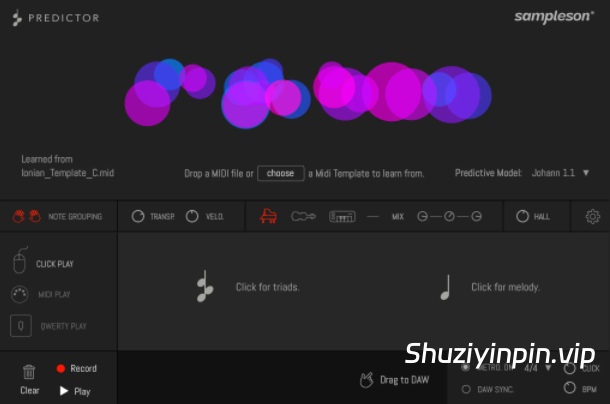
Predictor 是一款插件和应用程序,只需简单点击即可生成音符、三和弦和和声。它通过学习现有的 MIDI 文件来预测新的音符和和弦。
是激发新灵感或突破创作瓶颈的理想之选。
Predictor 自带一个集成的 MIDI 库,您也可以加载任何您喜欢的 MIDI 文件,Predictor 将从中学习。
Predictor 可以从任何 MIDI 文件中学习,生成即将出现的音符和和声。
Predictor 是一款生成式 MIDI 作曲工具,可以学习您拖放到其中的 MIDI 文件。它会分析终止式、音符关系、力度、乐曲位置、调式以及其他特征,从而预测新的音符和和声,然后您可以使用鼠标、电脑键盘或任何 MIDI 控制器来触发它们。
您控制节奏,Predictor 处理音符。您执行的每一次点击或触发都会启动下一个预测的音符或和弦,因此乐句的流畅性完全取决于您的节奏把握。这让体验更具表现力和互动性——你不仅仅是在聆听生成的想法,而是在积极地塑造它们的发展方向。
对于好奇者来说,这简直就是一个无底洞。
尽管理念简单,Predictor 却能帮助你探索意想不到的路径。有些会成功,有些则不会——而这正是创作过程的一部分。重点不在于完美,而在于探索。每一次点击,你都会被邀请去发现新的事物——一段你从未写过的旋律,一个改变情绪的和弦,一段开启新篇章的乐句。有时它会感觉像是随机的,有时又会感觉像是魔法。但无论如何,它都能让你不断前进、思考和尝试。Predictor 并不承诺确定性——它提供的是动力。而有时,这正是你所需要的。
生成范围和区域:
Predictor 会根据你弹奏的键盘范围来预测下一个音符。它将键盘划分为三个区域:低音区(最高到 F2)、中音区(F2-F4)和高音区(从 F4 开始)。这种逻辑也适用于“圆圈区”。您可以使用 QWERTY 键盘或鼠标点击来触发各个音域的单音或和弦。使用 MIDI 控制器,您可以更灵活地演奏任意音域的三和弦,而不仅仅局限于中间区域。
节奏由您掌控,
Predictor 与您共同创作。它会根据您在电脑键盘上的敲击、点击或 MIDI 控制器上的音符来生成和声和旋律。您负责节奏,Predictor 则负责其余部分,它会提供乐句来激发您的下一个歌曲灵感。
Predictor 会决定接下来的音符,但正是您的时机把握赋予了它们生命。每一次敲击或按键都定义了律动,并塑造了乐句的感觉。您引领节奏,Predictor 则跟随声音。
Create beautiful notes and harmonies by simply clicking your mouse.
Predictor is a plug-in and app that generates notes, triads and voicings with simple clicks. It works by learning from existing MIDI files to predict new notes and chords.
Ideal for sparking fresh ideas or breaking through creative blocks.
It comes with an integrated MIDI library, but you can also load any MIDI file you like and Predictor will learn from it.
Predictor learns from any MIDI file to generate upcoming notes and voicings.
Predictor is a generative MIDI composition tool that can learn from the MIDI file you drop onto it. It analyzes cadences, note relationships, velocities, piece position, modulations, and other features to predict new notes and voicings that you can then trigger with the mouse, the computer keyboard, or any MIDI controller.
You control the rhythm, Predictor handles the notes. Each tap or trigger you perform launches the next predicted note or chord, so the flow of the phrase depends entirely on your timing. This makes the experience feel more expressive and connected — you’re not just listening to generated ideas, you’re actively shaping how they unfold.
A rabbit hole for the curious.
Despite its simple idea, Predictor can help you take unimagined paths. Some will work, some won’t — and that’s part of the process. The point isn’t perfection, it’s exploration. With each click, you’re invited to discover something new — a melody you wouldn’t have written, a chord that changes the mood, a sequence that opens up a track. Sometimes it’ll feel random, other times it’ll feel like magic. But either way, it keeps you moving, thinking, experimenting. Predictor doesn’t promise certainty — it offers momentum. And sometimes, that’s exactly what you need.
Generation ranges and zones
Predictor estimates the next notes based on the keyboard range you play. It divides the keyboard into three zones: low (up to F2), mid (F2–F4), and high (from F4 onwards). This logic also applies to the Circles Zone. You can trigger single notes or chords in each range using your QWERTY keyboard or mouse clicks. With a MIDI controller, you get added flexibility to play triads in any range, not just the mid zone.
You are in charge of rhythm.
Predictor co-creates with you. It takes your tap on computer keys, clicks, or notes from a MIDI controller to generate voicings and melodies. You’ll be in charge of the rhythm, while Predictor will take care of the rest, proposing phrases to kickstart your next song idea.
Predictor takes care of what notes come next, but it’s your timing that gives them life. Every tap or key press defines the groove, and that’s what shapes the feel of the phrase. You lead with rhythm, Predictor follows with sound.
![[和弦生成器MIDI工具] Mario Nieto Chord Generator v1.1.6 Incl Keygen-R2R [WiN]](https://www.shuziyinpin.vip/wp-content/uploads/2024/12/CG_Main-1024x898.png)
![[氛围和弦进行生成器] Higher Plane SpaceWalk v1.2.2-V.R [WiN, MacOSX]](https://www.shuziyinpin.vip/wp-content/uploads/2026/02/higher-plane-spacewalk-ambient-chord-progression-generator.png)
![[多频段声音塑形插件] EDM Ghost Production Phantomic v1.1.1-Team BATs [WiN]](https://www.shuziyinpin.vip/wp-content/uploads/2026/09/edm-ghost-production-phantomic.jpg)
![[光明黑暗人声音源] Occult Audio Vestral Voices v1.1.0 [KONTAKT] [WiN, MacOSX]](https://www.shuziyinpin.vip/wp-content/uploads/2026/09/occult-audio-vestral-voices.png)
![[电子管母带均衡器] Lemur Audio SIMON 2 v2.0.22 [WiN, MacOSX]](https://www.shuziyinpin.vip/wp-content/uploads/2026/07/Lemur-Audio-SIMON.png)
![[Stillwell Audio效果插件完整收藏套装] Stillwell Audio Complete Collection v4.1.2 Incl Patched and Keygen-R2R [WiN]](https://www.shuziyinpin.vip/wp-content/uploads/2026/09/Stillwell-Audio-Complete-Collection.png)

评论0