
P2P | 07 July 2026 | 36.81 MB
安装方法:只需安装,尽情享受!
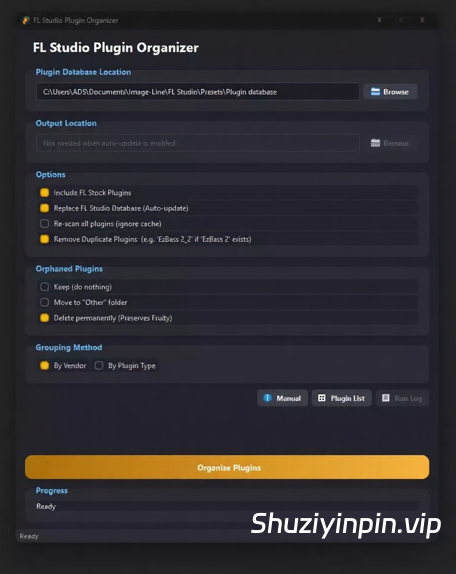
FL Studio Plugin Organizer 是一款适用于 Windows 的桌面应用程序,可自动将您的 FL Studio 插件浏览器整理到整齐有序的文件夹中。您无需每次打开 FL Studio 时都滚动浏览冗长杂乱的列表,而是可以按照您想要的方式对所有插件进行分组——按厂商(FabFilter、Xfer、Native Instruments 等)或按类型(合成器、鼓组、混响、均衡器等)。
🆕 v3.2 版本新增功能
🔁 FLP Modifier — 直接打开项目,无需启动 FL Studio 即可删除或替换其中的任何插件实例、音频通道或混音器效果。删除通道机架实例后,系统会自动重新编号剩余通道并清理播放列表片段引用,从而确保您编曲的其余部分保持不变。有关完整操作步骤,请参阅上方的 FLP Modifier 部分。
📊 使用情况分析 — 扫描您的 FL Studio 项目,查看您实际使用的插件、从未使用的插件以及按厂商和项目划分的使用情况。请参阅上方的“使用情况分析”了解完整操作步骤。
🔎 界面缩放 — 使用标题栏中的新增 – / % / + 控件或 Ctrl++ / Ctrl+- / Ctrl+0,将整个界面缩放 70% 至 160%。无需重启,下次打开应用时,系统会记住您选择的缩放比例。请参阅上方的“界面缩放(缩放)”了解详情。
🔁 自定义组复制/移动模式 — 右键单击任何自定义组,即可在复制模式(插件仍保留在其供应商/类型文件夹中)和移动模式(插件仅存在于自定义组中)之间切换。可针对每个组进行设置,并立即保存。请参阅上方的“自定义组工作区”了解详情。
🤖 AI 提示工具 — 使用任何 AI 聊天按类型对插件进行分类,无需 API 密钥。导出现成的提示,粘贴 AI 的回复,然后使用“按插件类型(来自 AI 提示)”作为分组方法。请参阅上方的“AI 提示”了解完整操作步骤。
🛑 重新设计的停止控制 — 整理进度条现在与现代化的药丸形停止按钮配合使用,因此您可以一目了然地安全地取消正在进行的运行。
🆕 v3.2 版本新增功能:
FLP Modifier 插件——无需启动 FL Studio,即可直接打开项目并删除或替换其中的任何插件实例、音频通道或混音器效果。删除通道机架实例后,剩余通道的编号会自动重新排序,并清理播放列表片段引用,从而确保您编曲的其余部分保持不变。请参阅上方的 FLP Modifier 插件,了解完整操作步骤。
FL Studio Plugin Organizer is a desktop application for Windows that automatically sorts your FL Studio plugin browser into neat, structured folders. Instead of scrolling through a long, unorganized list every time you open FL Studio, you can have all your plugins grouped exactly the way you want — by vendor (FabFilter, Xfer, Native Instruments…) or by type (Synth, Drums, Reverb, EQ…).
🆕 WHAT’S NEW IN v3.2
🔁 FLP Modifier — open a project directly and delete or replace any plugin instance, audio channel, or mixer effect inside it, without launching FL Studio. Deleting a Channel Rack instance now correctly renumbers surviving channels and cleans up Playlist clip references, so the rest of your arrangement stays intact. See FLP Modifier above for the full walkthrough.
📊 Usage Analytics — scan your real FL Studio projects to see which installed plugins you actually use, which ones you never touch, and how usage breaks down by vendor and project. See Usage Analytics above for the full walkthrough.
🔎 GUI Scaling — zoom the entire interface from 70%–160% with the new − / % / + controls in the title bar, or Ctrl++ / Ctrl+- / Ctrl+0. No restart needed, and your chosen scale is remembered next time you open the app. See GUI Scaling (Zoom) above for details.
🔁 Custom Group Copy / Move Mode — right-click any custom group to toggle it between Copy mode (plugin stays in its Vendor/Type folder too) and Move mode (plugin lives only in the custom group). Set per-group, saved instantly. See Custom Groups Workspace above for details.
🤖 AI Prompt Tool — classify plugins by type using any AI chat, no API key required. Export a ready-made prompt, paste the AI’s reply back in, and use By Plugin Type (from AI Prompt) as your Grouping Method. See AI Prompt above for the full walkthrough.
🛑 Redesigned Stop Control — the Organize progress bar now pairs with a modern pill-shaped Stop button, so you can safely cancel a run in progress at a glance.
🆕 WHAT’S NEW IN v3.2
FLP Modifier — open a project directly and delete or replace any plugin instance, audio channel, or mixer effect inside it, without launching FL Studio. Deleting a Channel Rack instance now correctly renumbers surviving channels and cleans up Playlist clip references, so the rest of your arrangement stays intact. See FLP Modifier above for the full walkthrough.
![[多格式音频合并工具] Vovsoft Merge Audio Files v1.4 [WiN]](https://www.shuziyinpin.vip/wp-content/uploads/2026/11/Vovsoft-Merge-Audio-Files.jpg)
![[多平台流媒体音乐下载与格式转换工具] Ondesoft All-In-One Streaming Music Converter v3.2.2 [WiN]](https://www.shuziyinpin.vip/wp-content/uploads/2026/11/All-In-One-Streaming-Music-Converter.png)
![[Steinberg 应用程序补丁工具] Steinberg Apps Patcher by iamdumb UPDATED November 2026 macOS [MacOSX]](https://www.shuziyinpin.vip/wp-content/uploads/2026/11/Steinberg-Apps-Patcher.jpg)
![[创意音乐制作应用] Mixvibes Remixlive v8.7.1-MacKed [MacOSX]](https://www.shuziyinpin.vip/wp-content/uploads/2026/11/Mixvibes-Remixlive.png)
![[音频编辑器] AVS Audio Editor 26.0.3.6 Multilingual [WiN]](https://www.shuziyinpin.vip/wp-content/uploads/2025/07/avs-audio-editor.png)
![[DJ混音器] Virtual DJ Studio 9.1.5 [WiN]](https://www.shuziyinpin.vip/wp-content/uploads/2026/10/vdj9-420.png)

评论0