
关联资源
[AI 辅助弹性调平器] Mercurial Tones Tether v1.2.1 [WiN]
P2P | 03 August 2026 | 5.50 MB
安装方法:
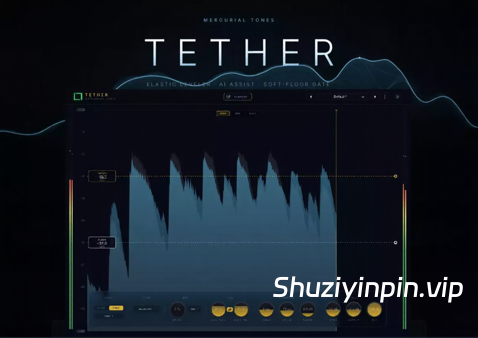
弹性调平器 · 人工智能辅助 · 软地板门
工作原理:
在滚动响度视图上绘制一条水平线。这条线就是您的输出电平,没有阈值、比率或增益补偿。检测到的响度会实时向这条线拉动,因此整个录音都能达到您想要的位置并保持稳定。
调整动态:
设置两侧的拉动力度,然后决定校正的重点和移动方式。“聚焦”功能会将拉动偏向于轻微的偏差或大的波动,“自然引擎”则赋予它音乐性的、与节目相关的动态,而不是静态的旋钮。
何时释放:
低于底线时,向上的拉动会被释放,因此呼吸声、串音和环境噪音不会被拉到目标位置。平滑的拐点会将其淡出,不会产生爆音,为您提供一个内置的柔和门限,它是同一手势的一部分。
播放它,它会聆听。
不知道从哪里开始?按下“AI 辅助”按钮,播放几秒钟的音轨,Tether 会通过其自身的引擎进行分析,然后为您提供真实的“目标”、“底线”、“拉动”、“聚焦”、“速度”和“范围”设置,供您在此基础上进行调整。
How It Works
Draw one horizontal line across a big scrolling loudness view. That line is your output level, no threshold, no ratio, no makeup gain. The detected loudness is pulled toward it in real time, so a whole take lands where you want it and holds.
Shape The Motion
Set how hard it pulls from each side, then decide where correction concentrates and how it moves. Focus biases the pull toward small slips or big swings, and the Natural Engine gives it musical, program-dependent motion instead of a static knob.
Knows When To Let Go
Below the floor line the upward pull is released, so breaths, bleed and room noise are never dragged up to the target. A smooth knee fades it out with no pops, giving you a built-in soft gate that is part of the same gesture.
Play It. It Listens.
Not sure where to start? Press AI Assist, play a few seconds of your track, and Tether analyzes it through its own engine, then hands you real Target, Floor, Pull, Focus, Speed and Range settings to build from.
![[重磅更新:全部 23 款 Soundtoys 效果器插件包] Soundtoys Bundle v5.5.5.19885 U2B REV2-GUISEPPE [MacOSX]](https://www.shuziyinpin.vip/wp-content/uploads/2026/10/Soundtoys-Bundle.png)
![[更新:康泰克采样器] Native Instruments Kontakt 8 v8.14.1 U2B-DevXJuan [MacOSX]](https://www.shuziyinpin.vip/wp-content/uploads/2025/04/24bdef738a16963d55ad7780e2f1633e-1024x1024.jpeg)
![[高级多普勒引擎插件] TONSTURM DopplerPRO v1.1.0 [WiN, MacOSX]](https://www.shuziyinpin.vip/wp-content/uploads/2026/11/TONSTURM-DopplerPRO.png)
![[数字立体声延迟和乐句采样插件] PSPaudioware Lexicon PSP42 v2.1.1-R2R [WiN]](https://www.shuziyinpin.vip/wp-content/uploads/2026/06/pspaudioware-lexicon-psp42.jpeg)
![[终极模拟延迟插件] PSPaudioware PSP BBDelay v1.0.2-GAMESENSE [MacOSX]](https://www.shuziyinpin.vip/wp-content/uploads/2026/09/pspaudioware-psp-bbdelay.jpeg)

评论0