
P2P | 21 August 2026 | 7.19 MB
安装方法:
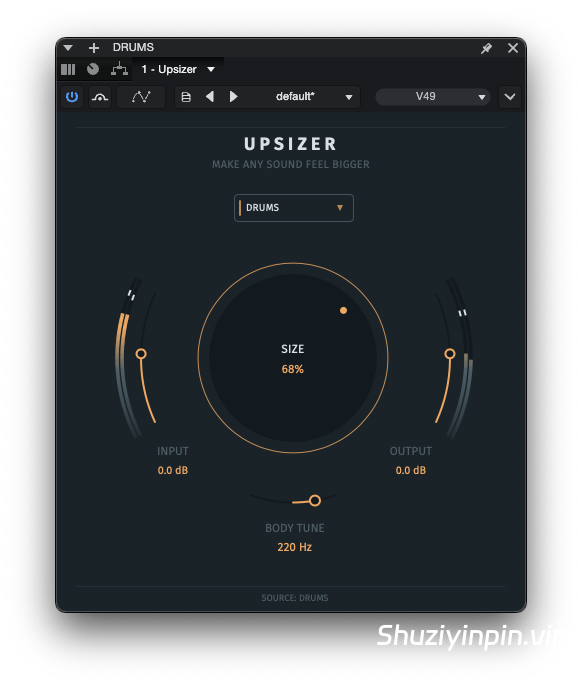
控制感知大小和比例
Upsizer 功能可重塑定义音源大小的线索,让您直接控制其感知物理尺寸。
它适用于单个声音、组、循环、总线或完整混音,支持单声道或立体声素材。
Upsizer FX 的核心是一个主要的“大小”控制。调高此值,即可从细微的尺寸增加到更大更饱满的音源。
Upsizer 并非仅仅依赖音量或立体声宽度,而是将原始音源置于中心,并围绕其构建有形状的支撑层。时间、音高、频谱、动态和空间变化协同作用,增强音源的感知物理尺寸。十二个用户可选的“音源配置文件”可针对不同的素材调整响应。
“BODY TUNE”功能可让您将新增的饱满度集中到最适合音源的位置。在“完整混音”模式下,该控制变为“MIX ROOT”,使新增的饱满度与音轨保持音乐上的连接。
尺寸
通过一个主要控件即可控制感知到的物理尺寸,从细微的尺寸增加到更大更饱满的音源。
音色调整与混音根源
将新增的丰满度集中到最适合音源的位置。选择“完整混音”时,“混音根源”会将新增的丰满度与音轨保持音乐上的连接。
12 种音源配置文件
可选择女声、男声、钢琴/键盘、合成器、合成器音垫、鼓组、独奏吉他、失真吉他和弦、原声吉他和弦、贝斯、完整混音或通用。每种配置文件都会改变处理方式对所选素材的响应。
Control Perceived Size and Scale
Upsizer reshapes the cues that define how large a sound source feels, giving you direct control over its perceived physical scale.
Use it on individual sounds, groups, loops, buses, or full mixes, with mono or stereo material.
Upsizer FX is built around one main SIZE control. Turn it up to move from a subtle increase in scale to a much larger and more substantial source.
Rather than relying on volume or stereo width alone, Upsizer keeps the original at the center and builds shaped supporting layers around it. Timing, pitch, spectral, dynamic, and spatial changes work together to increase the perceived physical size of the source. Twelve user-selected Source Profiles tune the response for different material.
BODY TUNE lets you focus the added body where it works best for the source. In Full Mix mode, the control becomes MIX ROOT, keeping the additional body musically connected to the track.
SIZE
Control perceived physical scale with one main control, from a subtle increase in size to a much larger and more substantial source.
BODY TUNE & MIX ROOT
Focus the added body where it works best for the source. When Full Mix is selected, MIX ROOT keeps the added body musically connected to the track.
12 Source Profiles
Choose Female Vocal, Male Vocal, Piano / Keys, Synth, Pads, Drums, Solo Guitar, Dist. Guitar Chords, Acoustic Chords, Bass, Full Mix, or Universal. Each profile changes how the processing responds to the selected material.
![[音量塑形器和频谱闪避插件] Sonic Academy SideKick v1.0.3-HCiSO [MacOSX]](https://www.shuziyinpin.vip/wp-content/uploads/2026/10/sonic-academy-sidekick.jpg)
![[终极鼓合成器] Sonic Academy KICK 3 v1.1.8-HCiSO [MacOSX]](https://www.shuziyinpin.vip/wp-content/uploads/2024/11/c3f18698-035c-4b4c-8aba-e0603c3cd83f-1024x638.png)
![[Stillwell 音频插件套装] Stillwell Audio Complete Collection v2026.10.04 Incl Patched and Keygen-R2R [WiN]](https://www.shuziyinpin.vip/wp-content/uploads/2026/09/Stillwell-Audio-Complete-Collection.png)
![[Nuro Audio终极完整效果包] Nuro Audio Effects Bundle v2026.10-Zom [WiN]](https://www.shuziyinpin.vip/wp-content/uploads/2026/03/Nuro-Audio-Blockchain-Ultra.png)
![[全新的 MSEG 包络插件] Sync Audio MegaMorph v1.0.3 U2B-MORiA [MacOSX]](https://www.shuziyinpin.vip/wp-content/uploads/2026/10/Sync-Audio-MegaMorph.png)
![[复古数字音色插件] Stryde Audio Swayed v1.1.0 Incl Patched and Keygen-R2R [WiN]](https://www.shuziyinpin.vip/wp-content/uploads/2026/10/stryde-audio-swayed.jpeg)

评论0