
下载地址
[更新:第五代来袭]reFX Nexus v5 update+原厂+全套扩展+皮肤+教程 [WiN, MacOSX](20GB+240GB)
(其内已包含)
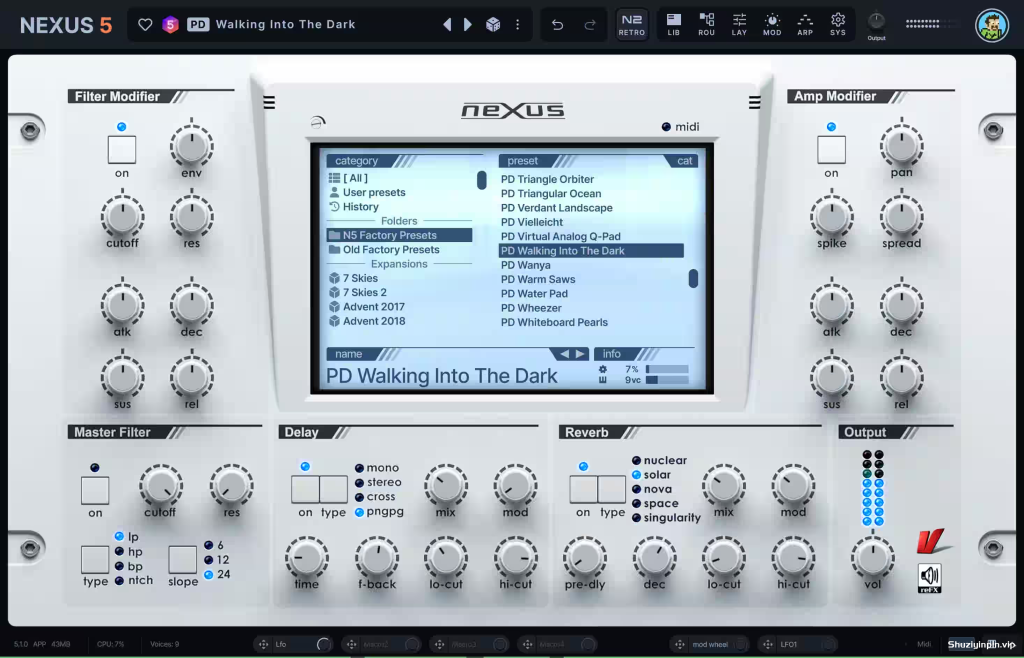
Team V.R | 06 October 2026 | WIN: 24 MB | MAC: 68 MB
安装方法:
⚡ 终极超级合成器 ⚡
体验一款真正全能的合成器。NEXUS5 拥有尖端功能和无与伦比的多功能性,是您通往无限创造力的大门。
无与伦比的采样能力:无缝导入单个样本、多个样本或整个库。自动切片和循环,轻松实现工作流程。
8 个高级发生器:使用虚拟模拟、采样器、波表、时间拉伸器、复古采样器、颗粒、云和 FM 合成探索无限可能。
录音室级效果器:数十种效果器,包括全新的 Bucket Brigade Delay、粒子混响、元音滤波器、旋转、推动器等,为您的声音增添深度和个性。
还有更多!完美融合了强大功能、精准度和用户友好性,使其成为各个级别制作人的理想选择。
兼容所有 NEXUS 产品
NEXUS5 与您现有的所有 NEXUS 项目和库兼容。您可以将旧节奏加载到 DAW 中,也可以加载之前的声音。一切正常。
版本历史
5.5.21 2026-10-05
新增:
+ 皮肤编辑器:对话框现在会跟随皮肤(背景、标题栏、文本和按钮)变化,新增“对话框”组。
+ 皮肤编辑器:在皮肤浏览器中右键单击皮肤即可显示其文件。
更改:
* 皮肤编辑器:颜色名称不再显示其内部前缀。
* 脉冲波形现在使用与其他效果显示相同的颜色。
修复:
– 修复了名称中带有点的皮肤(例如“Light 1.5”)无法加载、保存或显示缩略图的问题。
– 修复了从浅色皮肤切换回默认皮肤后,部分旋钮颜色会残留的问题。
– 修复了脉冲导入对话框的波形忽略皮肤的问题。
– 修复了对话框打开时,皮肤更改后对话框文本不会更新的问题。
– 皮肤编辑器:双击“另存为”不再打开第二个对话框。
⚡ The Ultimate Super Synth ⚡
Experience a synthesizer that truly does it all. Packed with cutting-edge features and unmatched versatility, NEXUS5 is your gateway to limitless creativity.
Unparalleled Sampling Power: Seamlessly import single samples, multi-samples, or entire libraries. Automatic slicing and looping for effortless workflow.
8 Advanced Generators: Explore endless possibilities with Virtual Analog, Sampler, Wavetable, Time Stretcher, Retro Sampler, Grain, Cloud, and FM synthesis.
Studio-Grade Effects: Dozens of effects, including the new Bucket Brigade Delay, Particle Reverb, Vowel Filter, Rotary, Pusher, and more, to add depth and character to your sound.
And So Much More! The perfect blend of power, precision, and user-friendliness, making it ideal for producers at any level.
Compatible with everything NEXUS
NEXUS5 is compatible with all your existing NEXUS projects and libraries. You can load your old beats into your DAW and load the sounds you’ve had before. Everything just works.
VERSION HISTORY
5.5.21 2026-10-05
new:
+ Skin Editor: dialogs now follow the skin (background, title bar, text and buttons), with a new Dialogs group.
+ Skin Editor: right-click a skin in the skin browser to reveal its file.
changes:
* Skin Editor: color names are shown without their internal prefixes.
* The Impulse waveform now uses the same colors as the other effect displays.
fixes:
– Fixed skins with a dot in their name (e.g. “Light 1.5”) not loading, saving or showing their thumbnail.
– Fixed switching from a light skin back to the default leaving some dial colors behind.
– Fixed the Impulse import dialog’s waveform ignoring the skin.
– Fixed dialog text not updating when the skin changes while the dialog is open.
– Skin Editor: clicking Save As twice no longer opens a second dialog.
![[RAWL 插件套装] RAWL Plugins Bundle v2026.10.06-itUsed [WiN]](https://www.shuziyinpin.vip/wp-content/uploads/2026/10/rawl-plugins-bundle.jpg)
![[模拟建模母带处理插件] ACMT ACM-SA Series Plugins v3.4.0 Incl Keygen-R2R [WiN]](https://www.shuziyinpin.vip/wp-content/uploads/2025/08/20082531_acmt-acm-sa-series-plug-ins-.png)
![[ACM500X系列插件] ACMT ACM500X Series Plugins v3.4.0 Incl Keygen-R2R [WiN]](https://www.shuziyinpin.vip/wp-content/uploads/2026/10/acmt-acm500x-series-plugins.jpg)
![[多功能图形均衡器] ACMT ACM210X1 v3.4.0 Incl Keygen-R2R [WiN]](https://www.shuziyinpin.vip/wp-content/uploads/2025/08/ACM210X1.png)
![[失真效果器插件] 2JR Gelato Distortion v1.0.0 [WiN, MacOSX]](https://www.shuziyinpin.vip/wp-content/uploads/2026/10/2jr-gelato-distortion.jpg)
![[合唱效果器] Sonic Academy JU-60 v1.0.0-HCiSO [MacOSX]](https://www.shuziyinpin.vip/wp-content/uploads/2025/01/plugin-ab7e37ab69ab923e64c9f633d59ef1d03478a27ca5ee2f39e82a9df33860e2a5-1024x576.png)

评论0