
Team V.R | 07 October 2026 | WiN: 10 MB | MAC: 37 MB
安装方法:只需安装,免激活版本。
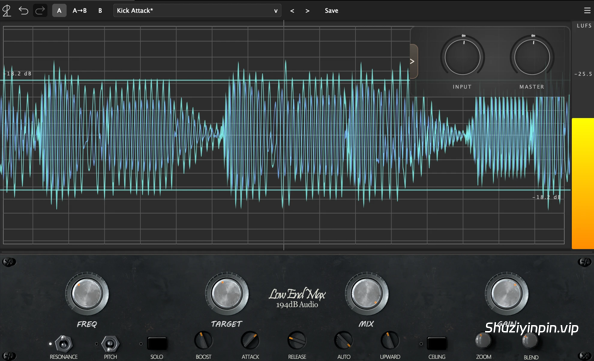
使用 FREQ 旋钮,您可以选择目标频率(单位为 Hz),或者切换到 E1 或 A0 等音符。
Low End MAX 采用我们新开发的处理技术,增强目标频段,同时抑制其余低频,让您获得理想的低频,而不会产生不必要的浑浊感。
您可以完全掌控低频的包络。
使用 Target 旋钮设置目标电平,然后使用 Attack(起音)、Release(释放)、Upward(上升)和 Ceiling(上限)旋钮微调低频的波形。
Low End MAX 内置波形可视化工具,让您可以直观地看到贝斯和底鼓之间的平衡。
加载一个包含所需低频的参考音轨,即可立即查看该平衡应有的样子,然后在自己的混音中进行调整。您还可以查看使用 Low End MAX 的所有工具调整低频后的效果。
With the FREQ knob, choose the exact frequency in Hz to target — or switch to musical notes such as E1 or A0.
Using our newly developed processing, Low End MAX enhances the targeted range while suppressing the rest of the low end, so you get the low end you want without piling up unnecessary mud.
Shape your low end’s envelope with full control.
Set your target level with the Target knob, then use Attack, Release, Upward, and Ceiling to fine-tune the shape of your low end.
Low End MAX comes equipped with a built-in waveform visualizer so you can actually see the balance between your bass and kick.
Load up a reference track with the low end you’re after, and you can instantly see how that balance should look — then match it in your own mix. You can also see how your low end looks after shaping it with all the tools Low End MAX has to offer.
![[复音合成器] Arturia MiniFreak V v5.0.1 [WiN, MacOSX]](https://www.shuziyinpin.vip/wp-content/uploads/2024/06/dcd713da-4f30-4bd5-b834-8e757fa6c1ef-1024x688.png)
![[SnowTec 全套效果器合集] SnowTec Full Bundle v2026.10.08-itUsed [WiN]](https://www.shuziyinpin.vip/wp-content/uploads/2026/09/SnowTec-Full-Bundle-v2026.png)
![[键盘音色合集插件] Arturia Analog Lab V Pro v5.12.6–V.R [WiN]](https://www.shuziyinpin.vip/wp-content/uploads/2024/09/13122395_arturia-analog-lab-v-pro.png)
![[音频混音处理插件捆绑包] NICO BARAN PLUGINS 2026-R2R [WiN]](https://www.shuziyinpin.vip/wp-content/uploads/2026/10/NICO-BARAN-PLUGINS.png)
![[高级混响插件] Nico Baran The Motel v1.0.0 Incl Keygen-R2R [WiN]](https://www.shuziyinpin.vip/wp-content/uploads/2026/10/nico-baran-the-motel.png)
![[物理建模合成器] reFX Rippler v1.1.7-V.R [WiN, MacOSX]](https://www.shuziyinpin.vip/wp-content/uploads/2026/08/reFX-Rippler.png)

评论0