
P2P | November 2026 | 12.91 MB
安装方法:免安装免激活,复制插件到相应路径即可。
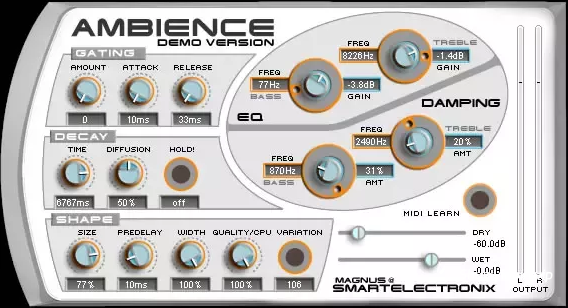
Ambience 是一款足以媲美顶级商业混响器的混响效果器。它还包含一些独特的功能,例如门限器和非常实用的保持功能。
凭借其卓越的品质和丰富的预设及功能,Ambience 插件已成为一款颇具代表性的免费 VST“经典”插件。
功能特性:
预设:内置一系列高质量预设!
干声:直通(未处理)声音的增益。要将 Ambience 用作发送效果,请将其设置为 -inf。
湿声:处理后声音的增益。
时间:混响回声消失所需的时间。
大小:房间的大小。请注意,过长的混响时间和过小的房间大小并不相配。对于自然的声音,较小的房间大小应搭配较短的混响时间,反之亦然。
预延迟:直通声音与第一声回声开始之间的延迟量。
宽度:从单声道 (0%) 到宽立体声 (100%) 均可设置。你可能一直都想把这个旋钮调到 100%。
质量:这个旋钮可以让你权衡混响质量和 CPU 使用率。质量越高,CPU 使用率越高。如果把 CPU 使用率调得很低,你可以做出一些有趣的效果(试试看!)。
变体:这个按钮可以创建同一房间的不同变体。如果混响中有一些恼人的回声/嗡嗡声让你很烦,可以按几次这个按钮,直到找到你喜欢的变体。如果听起来仍然不好,可以尝试提高质量设置。
更高级的控制:
学习这些功能的最佳方法可能是自己尝试和实验,但这里有一些提示:
阻尼部分 – 这会影响混响特性随时间衰减的方式。用它来控制低音和高音的衰减时间。在普通的房间里,低音,尤其是高音,衰减得比中音快。
均衡器部分 – 这就像给混响加上一个大型均衡器。确实如此 :) 它主要用于去除低音,否则低音会让混响听起来浑浊。
门限部分 – 如果您想要自然的混响,请立即关闭此部分!否则,如果您想尝试一些新花样,可以使用它使混响跟随音频输入的动态变化。如果您想在保持节奏的同时获得非常饱满的混响效果,这将非常有用。
保持 – 按下此按钮后,混响将冻结在当前声音,并无限期地保持该声音,直到您再次按下它。如果您想用拨弦、踩镲或任何您能想到的声音创建丰满的合成器音色,这将非常有用。尝试将其与门限器结合使用。
扩散 – 此旋钮对声音的影响非常细微。在较小的房间中尤其明显。
Ambience is a reverb that rivals the quality of the best commercial reverbs. It also includes some unusual functions, like a gater and a very useful hold function.
Due to the superior quality of the plugin and its array of useful presets and functions, the Ambience plugin has become somewhat of a free VST “Classic”.
Features
Presets: An array of quality presets are included!
Dry: Gain of direct (unprocessed) sound. To use Ambience as a send effect, set this to -inf.
Wet: Gain of processed sound.
Time: The time it takes for the reverb echoes to die out.
Size: The size of the room. Note that long reverb time and small room size don’t mix well. For natural sounds, a small room size should be accompanied by a short reverb time, and vice verse.
Pre-Delay: Amount of delay between the direct sound and the onset of the first echoes.
Width: All the way from mono (0%) to wide stereo (100%). Probably you will want this one at 100% all the time.
Quality: This knob allows you to trade off reverb quality for CPU usage. High quality high cpu usage. You can make fun effects if you set it very low (try it!).
Variation: This button creates a new variant of the same room. If there’s some annoying echo/ringing in the reverb that bugs you, hit this button a few times until you find a variation that you like. If it still sounds bad to you, try raising the Quality too.
More Advanced Controls:
The best way to learn these is probably by trying them out and experimenting yourself, but here are some hints:
The Damping Section – This affects how the reverb’s character develops over time as it decays. Use it to control the decay time of bass and treble. In normal rooms, bass and especially treble decay quicker than the mid range.
The EQ Section – This is like putting a big equalizer on the reverb. And in fact it is :) It’s mostly useful for cutting away bass that can otherwise make the reverb sound muddy.
The Gating Section – If you want natural reverb, abandon this section at once! Otherwise if you are in an experimental mood, you may use this one to make the reverb follow the dynamics of the audio input. Can be useful if you want to preserve rhythm while still having a very wet reverb.
Hold – When you press this, the reverb will freeze at it’s current sound, holding it indefinitely until you press it again. Great if you want to create a lush pad from a plucked string or a hihat or whatever you can imagine. Try combining with the gater.
Diffusion – This knob has a very subtle effect on the sound. It is especially noticable with small room sizes.





评论0