
FREE | MAC | 388 MB
安装方法:
您可以在这里找到 Nord Stage 4 音效库。
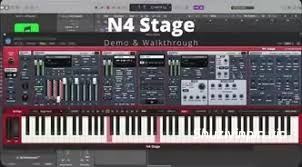
Clavia Nord Stage 4 模拟器。Nord音色的钢琴和采样库,可在 Mac 上演奏。这是最接近真实 Nord 的体验!N4 Stage 让你在一个乐器中演奏管风琴、合成器、效果器和现场工具。它既有独立版本,也有 DAW 的 AU 版本,此外还包含 Red Stage 键盘所没有的其他功能。
功能介绍
– 钢琴:双层音色、弦共鸣、半踏板、延音踏板和柔音踏板、按键释放音效、可选踏板噪音
– 管风琴:音轮、晶体管和管风琴音色(带拉杆)、打击乐、颤音/合唱效果以及带驱动的旋转扬声器
– 合成器:三层振荡器或自定义采样、滤波器、包络、低频振荡器、琶音器、齐奏
– 效果器:每层均可添加调制、延迟、放大器、均衡器和压缩器,以及混响
– 实时工具:分割和分层、程序、歌曲列表、全局移调、声音搜索和收藏夹、MIDI 学习、变形、紧急按钮
– 持续音垫:任意调的持续音垫,带有独立的音量和滤波器
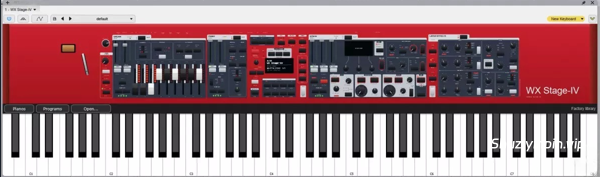
– 三种皮肤,包括硬件风格的舞台面板
Clavia Nord Stage 4 emulator. Nord like sounding piano and sample libraries, playable on your Mac. This is the closest you get to the real deal!!! N4 Stage lets you play organ, synth, effects and live tools in one instrument. Comes as a standalone a AU for your DAW Plus other functions you wont find on the Red Stage keyboard.
You can find Nord Stage 4 Sound Library here
WHAT’S IN IT
– Piano: two layers, string resonance, half-pedalling, sostenuto and soft pedal, key-release sounds, optional pedal noise
– Organ: tonewheel, transistor and pipe models with drawbars, percussion, vibrato/chorus and a rotary speaker with drive
– Synth: three layers of oscillators or your own samples, filters, envelopes, LFO, arpeggiator, unison
– Effects: modulation, delay, amp, EQ and compressor per layer, plus reverb
– Live tools: splits and layers, programs, a song list, global transpose, sound search and favourites, MIDI learn, morphing, a panic button
– Drone pad: a sustained pad in any key with its own volume and filters
– Three skins, including a hardware-style stage panel

评论0