
关联资源
[创意效果插件] iZotope FXEQ v1.1.0-V.R [WiN]
[创意效果插件] iZotope FXEQ v1.0.0.442 [WiN, MacOSX]
特别推荐
[不断更新:20多套全家桶]iZotope系列插件完整套装 [WiN, MacOSX]
HiDERA | 8 August 2025 | 191 MB
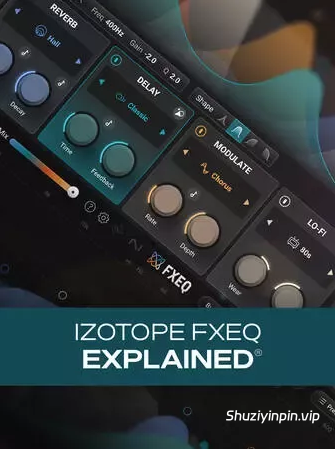
加入制作大师 Eli Krantzberg 的行列,深入了解 iZotope 全新推出的 FXEQ 插件。这款令人着迷的插件可让您以前所未有的方式控制五种不同的效果,每种效果都可以在整个频谱范围内精准应用。想给管风琴音色添加一些颗粒感,但只针对中频?没问题!或者想给合成器琶音的某个窄带中高频添加大量混响?使用 FXEQ 处理这些效果轻而易举——无需其他插件!这是一个充满无限可能的效果器游乐场,完成本 iZotope FXEQ 课程后,您就可以在下一个作品中立即使用这款插件了。这些 iZotope FXEQ 视频专为 FXEQ 新用户设计。
Eli 将热情欢迎您的到来,并首先快速概述 FXEQ 的功能、用途和界面布局。注意:这款插件会让您上瘾!在尝试各种效果和选项时,你很容易忘记时间。好消息是,你可以创造出一些真正独特、音色绝佳的效果,Eli 在整个课程中提供了大量示例。介绍之后,Eli 进入了五个模块中的第一个——饱和度模块(SATURATE)。该模块提供了多种饱和度类型(Satin、Tape、Grit、Foldback、Snap、Bump、Steel、Corode),可以实现从微妙饱和到严重失真的各种效果,并可应用于任何频率范围。
接下来,Eli 演示了混响模块及其三种类型(Hall、Chamber、Plate)。使用 FXEQ,无需使用单独的均衡器来衰减低频/高频;你可以在插件内部自定义所需的频率。你还可以同步预延迟和尾音时间,或手动调整它们。
课程的其余部分将涵盖剩余的模块,包括延迟(经典、反向、过载、调制)、调制(合唱、倍增、相位、镶边)和低保真(广播、磁带、黑胶、磁带)。Eli 为每种效果提供了大量的音频示例——在单个音轨和/或整个混音中——以便您能够听到每种效果在实际音乐环境中的效果。
这是一款真正独特的插件,它将强大的处理潜力集中在一个便捷的位置,而这门 FXEQ 视频课程是学习如何全面掌握其使用方法的最简单快捷的方式。请参阅各个 iZotope FXEQ 视频教程的说明,了解更多关于此插件的功能以及如何将其运用到您的作品中,使其脱颖而出的信息。探索声音的无限可能……立即观看“iZotope FXEQ 详解”!
您将学到:
– 使用饱和度模块将颗粒感、饱和度或失真效果应用于任何频率范围。
– 使用 REVERB 模块,在单个音轨或整个混音中使用三种不同类型的混响,并可设置与速度同步的预延迟和尾音时间。
– 使用调制模块创建旋转或微妙的镶边、相位或合唱效果。
– 使用低保真模块为音轨或整个混音的特定频段增添复古气息。
– 还有更多功能!
Join production guru Eli Krantzberg for a detailed look at FXEQ, the new addictive plug-in from iZotope that allows you unparalleled control of five different effects, each of which can be used anywhere across the frequency spectrum with exacting precision. Want to add some grit to an organ but on the midrange only? No problem! Or how about adding a ton of reverb to only a narrow upper-mid frequency band on a synth arp sound? This type of processing is a breeze with FXEQ – no other plug-ins needed! This is a virtual playground of effect possibilities, and by the end of this iZotope FXEQ course, you’ll be ready to start using the plug-in on your very next production. These iZotope FXEQ videos are designed for new FXEQ users.
Eli welcomes you and begins with a quick overview of what FXEQ is, what it can do, and how the interface is laid out. Caution: This plug-in is addictive! You can easily lose track of time while trying out all the effects and options it has available. The good news is that you can create some truly unique, awesome-sounding effects, and Eli provides plenty of examples throughout the course. After the introduction, Eli moves on to the first of the five modules, SATURATE, which allows for anything from subtle saturation to serious distortion applied to any range of frequencies you’d like, thanks to its numerous types available (Satin, Tape, Grit, Foldback, Snap, Bump, Steel, Corode).
Next, Eli demonstrates the REVERB module and its three types (Hall, Chamber, Plate). With FXEQ, there’s no need to use a separate EQ to roll off the lows/highs; you can customize what frequencies you want all from within the plug-in. You also have the ability to sync the pre-delay and tail times or adjust them manually.
Throughout the rest of the course, the remaining modules are covered, including DELAY (Classic, Reverse, Crunch, Modulation), MODULATE (Chorus, Doubler, Phaser, Flanger), and LO-FI (Radio, Cassette, Vinyl, Tape). Eli provides plenty of audio examples for each effect – on individual tracks and/or the entire mix – so you can hear how each works in an actual musical context.
This is a truly unique plug-in that puts an enormous amount of processing potential in one convenient place, and this FXEQ video course is the easiest and quickest way to learn how to use it fully inside and out. See the individual iZotope FXEQ video tutorial descriptions for more information on everything this plug-in can do and how you can use it in your own productions to make them stand apart. Discover the sonic possibilities… Watch “iZotope FXEQ Explained” today!
What You Will Learn:
-Applying grit, saturation, or distortion effects to any frequency range with the SATURATE module.
-Using three different types of reverb with tempo-syncable pre-delay and tail times on individual tracks or the whole mix using the REVERB module.
-Creating swirling or subtle flanging, phasing, or chorusing effects with the MODULATE module.
-Adding vintage vibes to certain frequency areas of a track or the whole mix with the LO-FI module.
-And more!





评论0