
CRD | 01.2026 | 65 MB
您用旧版乐谱编辑器创建的乐谱与新版不兼容?您拥有 PDF 格式的乐谱,并希望用您喜爱的乐谱编辑器进行修改?
过去,唯一的解决办法要么是重新完整地输入乐谱,要么是打印出来,然后使用光学识别软件将其转换为可编辑的文档,但转换效果往往参差不齐。
如今,这种方法已成为过去。PDFtoMusic Pro 可以从 PDF 格式的文档(您可以使用任何软件生成 PDF 文件,即使是已停产的软件)重建原始乐谱,并将其导出为 MusicXML 等格式,这种格式在大多数专业乐谱编辑器中都适用。
由于 PDFtoMusic Pro 只处理从乐谱编辑器软件导出的 PDF 文件,因此它具有极高的可靠性和卓越的转换效果。
因此,PDFtoMusic Pro 无法处理扫描的乐谱。
功能:
PDFtoMusic Pro 可从 PDF 文件中提取音乐相关元素,只需几秒即可完成,并支持将乐谱导出为多种格式,例如 MusicXML、MIDI、Myr(和声助手文件)或 WAV、AIFF 等数字音频格式。
高品质吉他音色由我们自主研发的物理建模合成器“MyrSynth-Guitar”生成,该合成器是 Myriad HQ 模块的一部分(Linux 系统不支持)。
此外,PDFtoMusic Pro 还内置虚拟歌手模块,可自动演唱人声部分!
系统要求:
Windows(7 至 10)。
语言:
程序界面支持英语、法语、德语和荷兰语。
怎样调速度
PDFtoMusic在识别了曲谱之后可以为你播放出来,非常适合初学者学习,对于一些复杂的乐谱,我们需要将播放的速度降低才会更加合适,下面就来告诉大家怎样调速度。
1、首先我们打开一个PDF乐谱,然后在上方菜单栏中选择Performance。
2、在Performance中选择Tempo设置,Tempo就是音乐进行的快慢。
3、然后我们就可以对其进行设置了,默认速度是80,用户可以根据自己的需求来进行调整。
4、设置完成后点击Play就可以听到播放的效果了。
如何导出
PDFtoMusic可以将PDF乐谱导出为其他格式,从而让用户更加便捷的导入其他软件中使用,是个文件转换的实用工具,下面就来告诉大家怎么导出。
1、导出就在主界面的右上角,如图箭头所示,Export就是导出功能了。
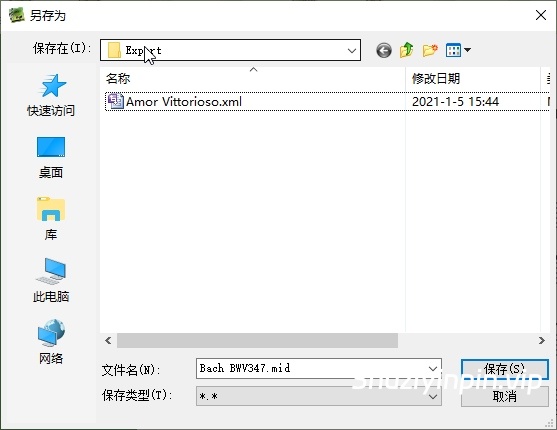
2、点击导出后,就会弹出另存为的界面,选择导出的路径和设置文件名点击确定就可以了。
怎么把文件转化为MID
许多用户会发现软件默认导出的只有XML格式,无法选择其他格式,下面就来告诉大家怎么转为MID等其他格式。
1、首先我们在上方的菜单栏选择Setting,然后点击第一项Preferences。
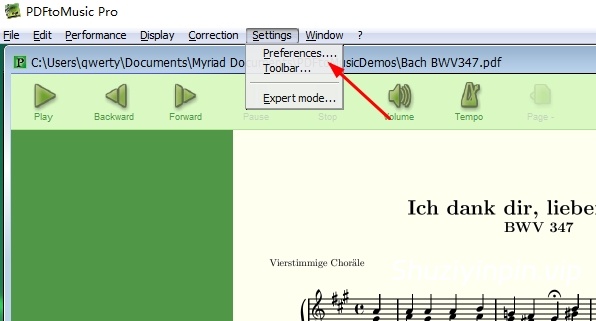
2、然后我们就来到了一个详细的设置界面,选择Export功能。
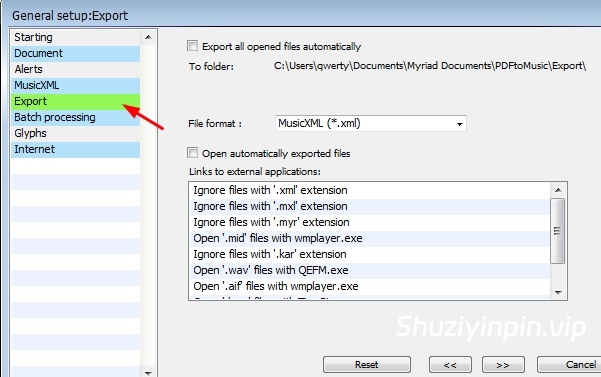
3、在Flie format中将xml格式改为MID格式后点击保存。
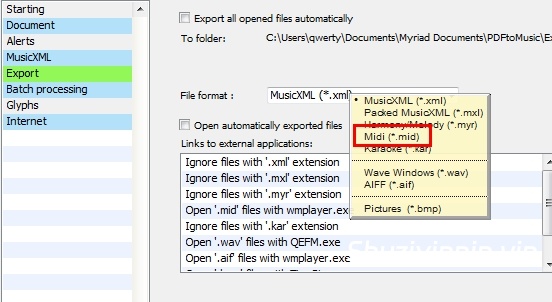
4、如此设置之后,在进行导出就会发现文件格式已经是MID了。
The scores you created with your old score editor are no more compatible with the new one? You own scores in PDF format, and you’d want to modify them with your favorite score editor?
Until now, the only solution was either to input your score again completely, or to print them and to use an optical recognition software to convert them, with more or less success, into editable documents.
This way of thinking now belongs to the past. From a document in PDF format (that you can generate from any software, even from discontinued products), PDFtoMusic Pro rebuilds the original score, and exports it for instance into MusicXML format, useable in most of the professional score editors.
Because it only processes PDF files that have been exported from a score editor software, PDFtoMusic Pro offers a unique reliability and outstanding results.
Therefore, scanned sheet music cannot be managed by PDFtoMusic Pro.
Features:
From a PDF file, PDFtoMusic Pro extracts in a few seconds the music-related elements, and enable the score to be played or exported in miscellaneous formats, like MusicXML, MIDI, Myr (Harmony Assistant files), or in a digital audio format like WAV ou AIFF.
High-quality guitar sounds are generated by our Physical Modeling Synthesizer “MyrSynth-Guitar”, part of the Myriad HQ module (not available on Linux)
With its Virtual Singer embedded module, PDFtoMusic Pro also sings the vocal parts!
System requirements:
Windows (7 to 10).
Languages
The program interface includes English, French, German and Dutch languages.
🏠 HomePage
![[DJ混音器] Virtual DJ Studio 9.1.2 [WiN]](https://www.shuziyinpin.vip/wp-content/uploads/2026/10/vdj9-420.png)
![[苹果简单实用的网络防火墙工具] Radio Silence 3.4 [MacOSX]](https://www.shuziyinpin.vip/wp-content/uploads/2024/11/2a284542-0321-49cc-9ab6-2b0c54606f58.png)
![[可视化图形音乐编辑工具] Cycling ’74 Max v9.2.0-bobdule [WiN]](https://www.shuziyinpin.vip/wp-content/uploads/2025/05/1730589948_1433002159.webp)
![[语音降噪平衡控制应用] Voice Ready v1.0.2 [WIN]](https://www.shuziyinpin.vip/wp-content/uploads/2026/10/Voice-Ready.png)
![[StoryVox Pro 语音克隆器] StoryVox Pro v1.0.18 [WiN]](https://www.shuziyinpin.vip/wp-content/uploads/2026/08/StoryVox-Pro-Voice-Cloner.jpg)
![[非常好用的Mac苹果康泰克音色标准非标准批量入库工具] Add Library for macOS v7 [MacOSX]](https://www.shuziyinpin.vip/wp-content/uploads/2024/06/1697688753966.png)

评论0