
关联资源
[更新:VSL文件生成自定义设置工具] R2R-VSLEMU Magic Files Tool Manager v1.2 [WiN]
[VSL专用的钢琴播放器] VSL Vienna Synchron Piano Player v1.3.1542 Incl Emulator-R2R [WiN]
[VSL专用的采样播放器] VSL Vienna Synchron Player v1.3.2652 Incl Emulator-R2R [WiN]

WiN | January 2026 | 78.02 KB
R2R-VSLEMU 魔法文件生成
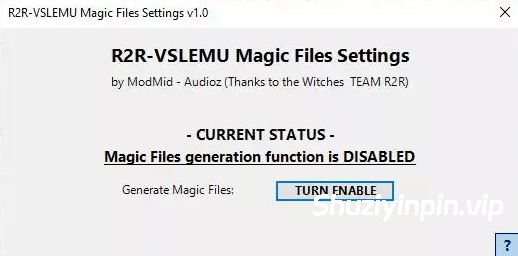
自定义设置工具 这个小工具旨在帮助 R2R 同步播放器/钢琴用户控制 R2R VSLEMU 使用的魔法文件生成功能。它在 Windows 注册表中读写一个 DWORD 值,用于启用或禁用 Magic 文件的创建。
目的
应用会在 HKEY_CURRENT_USER\Software\TEAM R2R\R2RVSL 键下更改 DWORD 选项 SynchronEnableDumpMode 的值,这与你在注册表编辑器中手动作完全相同,但通过清晰的图形界面实现。你只需点击一个按钮即可启用或禁用 Magic 文件生成功能,无需手动编辑注册表。
工作
原理程序启动时,会读取当前的 SynchronEnableDumpMode 值,并显示 Magic Files 生成函数当前是否启用或禁用。要更改状态,只需点击“生成 Magic Files”按钮:该值会在注册表中实时更新,屏幕上的文字会立即反映新状态。
实际示例
如果你为R2R Synchron Player/Piano安装了一个新的VSL库,并且需要R2R-VSLEMU来生成所需的Magic Files,你只需在启动播放器前开启“Generate Magic Files”功能即可。Magic Files创建完成且一切正常后,你可以再次关闭该功能,用于日常使用,无需打开Windows注册表编辑器或手动修改按键。
Custom Settings Tool for R2R-VSLEMU Magic Files generation
This small tool was created to help R2R Synchron Player/Piano users control the Magic Files Generation function used with the R2R VSLEMU. It reads and writes a singleDWORD value in the Windows Registry that enables or disables the creation of Magic Files.
PURPOSE
The app changes the value of the DWORD option SynchronEnableDumpMode under the key HKEY_CURRENT_USER\Software\TEAM R2R\R2RVSL, exactly as you would do manually in the Registry Editor, but through a clear graphical interface. You can enable or disable the Magic Files generation function simply by clicking a single button, instead of editing the registry by hand.
HOW IT WORKS
When the program starts, it reads the current value of SynchronEnableDumpMode and shows whether the Magic Files generation function is currently enabled or disabled. To change the status, you just click the “Generate Magic Files” button: the value is updated in real time in the registry, and the text on the screen immediately reflects the new state.
PRACTICAL EXAMPLE
If you install a new VSL library for the R2R Synchron Player/Piano and need R2R-VSLEMU to generate the required Magic Files, you simply turn the “Generate Magic Files” function ON before launching the player. After the Magic Files have been created and everything is working, you can turn the function OFF again for normal everyday use, without ever opening the Windows Registry Editor or modifying keys manually.
![[KONTAKT 8 便携版 库管理器修复程序] KONTAKT 8 Library Manager v8.13.1-vkDanilov [WiN]](https://www.shuziyinpin.vip/wp-content/uploads/2025/04/24bdef738a16963d55ad7780e2f1633e-1024x1024.jpeg)
![[AI 动态追踪视频编辑器] Nero Blur Face – AI Motion Tracking Video Editor 1.0.53.0 [WiN]](https://www.shuziyinpin.vip/wp-content/uploads/2026/09/Blur-Face.png)
![[MIDI创作生成工具] Rio Leyva MidiMine v1.0.3 STANDALONE x64 [WiN]](https://www.shuziyinpin.vip/wp-content/uploads/2026/09/Rio-Leyva-MidiMine.png)
![[音频分析工具] Spectro v1.6 U2B-EDiSO [MacOSX]](https://www.shuziyinpin.vip/wp-content/uploads/2026/08/Spectro.png)
![[Kontakt 便携版图标恢复为原始图标小工具] KONTAKT 8 PORTABLE logo Restore-bobdule [WiN]](https://www.shuziyinpin.vip/wp-content/uploads/2026/03/native-instruments-kontakt-8-portable.png)
![[多用途文件格式转换器] FMJ-Software Awave Studio v12.16.0 Incl Patched and Keygen-R2R [WiN]](https://www.shuziyinpin.vip/wp-content/uploads/2024/12/awmains.png)

评论0