
关联资源
[VSL专用的钢琴播放器] VSL Vienna Synchron Piano Player v1.3.1542 Incl Emulator-R2R [WiN]
[VSL专用的采样播放器] VSL Vienna Synchron Player v1.3.2652 Incl Emulator-R2R [WiN]

WiN | January 2026 | 77.28 KB
这个小工具帮助 Synchron Player 和 Synchron Piano 用户控制 R2R VSLEMU 模拟器中使用的 Magic 文件生成行为。它无需手动编辑系统注册表即可启用或禁用创建魔法文件的功能。还提供了方便的方式,将生成的魔法文件复制到正确的文件夹,并启动 VSLEMU CacheBuilder.In short,这是给懒人(像我:)……但我希望这能帮助那些在创建许可时遇到困难的人。
该工具帮助您实现以下几点:
1.监控该功能的当前状态。
2. 启用或禁用 VSLEMU 的魔法文件生成,无需手动编辑注册表系统文件。
3. 将生成的魔法文件从VSLEMU转储文件夹复制到正确的目标文件夹。
4. 复制后快速运行VSLEMU CacheBuilder,重建你的魔法缓存。
使用示例
1.确保你在系统上安装了最新的 R2R-VSLEMU。
2. 确保你的正规 Synchron 库和许可正确安装。
3. 使用此工具将 Magic Files 功能设置为启用。
4. 运行 R2R Synchron Player 或 Synchron Piano Player,加载你的合法库。
5. 加载一个库预设,等待 Magic 文件在桌面的“VSLEMU Dump”文件夹中生成。
6. 将 Magic Files 功能重新设置为禁用。
7. 在此工具中点击“复制魔法文件”:
– 查看已找到的复制魔法文件列表。
– 点击“立即复制文件”确认。
8. 在日志窗口中,点击“打开VSLEMU缓存构建器”以重建你的魔法缓存。
9. 重建缓存后,你可以在VSLEMU中使用你的库,无需激活iLok许可,并且可以与社区分享魔法文件。
魔法文件类型列表
以下扩展名可处理:
– *。R2RVSLSYN :用于同步播放器
– *。R2RVSLSYNP :用于同步钢琴播放器
该工具会检查 VSLEMU 转储文件夹中的所有 Magic 文件,并以两列列表显示。
点击“复制魔法文件”时,会弹出一个新窗口,显示所有在 Desktop\VSLEMU Dump 文件夹里的魔法文件。
点击“立即复制文件”时:
– VSLEMU 转储文件夹中的所有魔法文件都会根据其扩展名被复制(而非移动)到相应的目的地。
– 末尾会显示详细的日志窗口,列出每个复制的文件及其目标路径。
– 从日志窗口,你可以启动 CacheBuilder,无需在电脑上搜索。
注意
——该工具不会修补或修改任何二进制文件;它仅:
– 切换一个注册表值(同步EnableDumpMode)。
– 将魔法文件复制到预期文件夹。
– 分享时,请不要忘记包含魔法文件及相关库内容,遵循VSLEMU手册和R2R发布说明中的指导。
鸣谢
——由ModMid为“Audioz”社区创建的工具。
——特别感谢“TEAM R2R”的魔法模拟工作以及迄今为止所有美丽的魔法咒语。我们将永远感激不尽
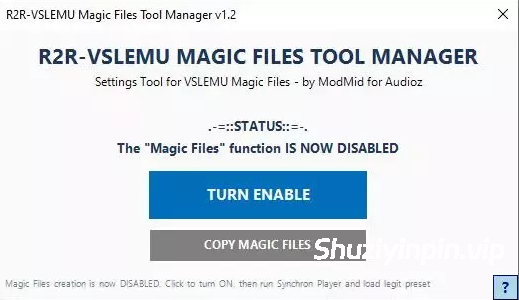
This small tool help Synchron Player and Synchron Piano users control the Magic Files generation behavior used with R2R VSLEMU emulator. It enables or disables the creation Magic Files function without any manual edit on the system registry. Also provides a convenient way to copy generated Magic Files to the correct folders and launch the VSLEMU CacheBuilder.In short, a tool for the lazy ones (like me :) …but I hope this helps those who have trouble creating licenses.
THIS TOOL HELPS YOU TO:
1. Monitor the current status of this function.
2. Enable or disable Magic Files generation for VSLEMU, without manually editing the registry system file.
3. Copy generated Magic Files from the VSLEMU dump folder to the correct target folders.
4. Quickly run the VSLEMU CacheBuilder after copying to rebuild your Magic Cache, if you want.
USAGE EXAMPLE
1. Make sure you have installed latest R2R-VSLEMU on your system.
2. Make sure your legit Synchron library and license are correctly installed.
3. Using this tool for set Magic Files function to ENABLED.
4. Run the R2R Synchron Player or Synchron Piano Player and load your legit library.
5. Load a library preset and wait for the Magic Files to be generated in the “VSLEMU Dump” folder on your Desktop.
6. Set the Magic Files function back to DISABLED in this tool.
7. Click “COPY MAGIC FILES” in this tool:
– Review the list of Magic Files found to copy.
– Confirm by pressing “COPY FILES NOW”.
8. In the Log Window, click “OPEN VSLEMU CACHEBUILDER” to rebuild your Magic Cache.
9. After rebuilding the cache, you can use your libraries with VSLEMU without requiring an active iLok license, and you can share the Magic Files with the community.
MAGIC FILE TYPES LIST
The following extensions are handled:
– *.R2RVSLSYN : for Synchron Player
– *.R2RVSLSYNP :for Synchron Piano Player
The tool inspects all Magic Files in the VSLEMU Dump folder and shows them in a two-column list.
When you click “COPY MAGIC FILES”, a new window appears and shows all Magic Files found in folder Desktop\VSLEMU Dump.
WHEN YOU PRESS “COPY FILES NOW”:
– All Magic Files in the VSLEMU Dump folder are copied (not moved) to the appropriate destination, based on their extension.
– A detailed log window is shown at the end, listing each copied file and its target path.
– From the Log window, you can launch CacheBuilder without having to search for it on your PC.
NOTE
– This tool does NOT patch or modify any binaries; it only:
– Toggles one registry value (SynchronEnableDumpMode).
– Copies Magic Files to their expected folders.
– When sharing, do not forget to include the Magic Files and the related library content, following the guidelines in the VSLEMU manual and R2R release notes.
CREDITS
– Tool created by ModMid for “Audioz” community.
– Special thanks to “TEAM R2R” for their magical emulation work and for all their beautiful magic spell they have done so far. We will be truly eternally grateful
![[Boris FX AI 媒体服务] Boris FX AI Media Service v2027.0.0.6-R2R [WiN]](https://www.shuziyinpin.vip/wp-content/uploads/2026/10/Boris-FX-AI-Media-Service.png)
![[全球最佳 DJ 软件] Serato DJ Pro Suite v5.0.0-V.R [WiN, MacOSX]](https://www.shuziyinpin.vip/wp-content/uploads/2025/11/Serato-DJ-Pro-Suite-v4.0.0-1024x633.png)
![[专业 DJ 软件] PCDJ DEX Pro x64 v4.1.0.0-F4CG [WiN]](https://www.shuziyinpin.vip/wp-content/uploads/2025/03/a04b70684813997e8afcafc37a03aab0-1024x618.jpeg)
![[立体声工具] Thimeo Stereo Tool v11.05 [MacOSX]](https://www.shuziyinpin.vip/wp-content/uploads/2024/09/R-C-1024x684.png)
![[音频与MIDI文件快速试听工具] Wide Blue Sound Finder Audio Tools v1.4.5-MacKed [MacOSX]](https://www.shuziyinpin.vip/wp-content/uploads/2026/10/wide-blue-sound-finder-audio-tools-.png)
![[专业 DJ 软件] PCDJ DEX Pro v4.1.0-TNT [MacOSX]](https://www.shuziyinpin.vip/wp-content/uploads/2026/10/pcdj-dex-pro.png)

评论0