
P2P | March 2026 | 11 MB
安装方法:安装之后,使用注册机激活。
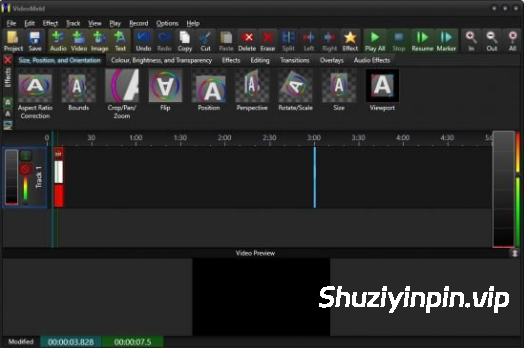
VideoMeld 是一款全新的多轨数字音频和视频编辑程序。VideoMeld 拥有同类产品中最先进的特效编辑器之一。它可以同时应用多种特效,创造出令人惊叹的丰富效果。特效设置可以随时间精确调整,从而实现精细的动画视觉效果。
它的用途包括:
– 将任意数量的音频和视频文件混合成一个文件
– 使用背景音乐、照片和视频创建令人印象深刻的演示文稿或教程
– 编辑视频并添加文字字幕、特效和转场
– 创建专业级的 YouTube 视频
– 母带处理音乐录音,将乐器和人声轨道分开
– 录制电脑屏幕视频(屏幕录制),非常适合用于软件培训视频或演示
VideoMeld 的功能包括:
– 高达 1920×1080 的高清视频,并保存为 MPEG 4 H.264 格式
– 高品质 8 声道音频(7.1 环绕立体声)
– 超过 50 种视频特效、转场和合成功能
– 7 种音频特效,包括降噪、压缩/扩展、均衡器和音调调整
– 功能强大!所有音频和视频效果的动态效果设置
– 字幕或滚动字幕
– 屏幕录制功能可直接从计算机屏幕录制视频
VideoMeld is an all new multitrack digital audio and video editing program. VideoMeld has one of the most advanced effects editors in its class. Many effects can be applied at the same time, creating incredible variety. Effect settings can be varied precisely over time for detailed animated visuals.
Use it to:
– Mix together any number of audio and video files into a single file
– Create impressive presentations or tutorials with background music, photos, and video
– Edit videos and add text captions, special effects, and transitions
– Create professional looking YouTube videos
– Master music recordings, keeping instrument and vocal tracks separate
– Make video recordings of the computer screen (screencasting), ideal for software training videos or demonstrations
VideoMeld features include:
– High quality HD video up to 1920×1080 and save as MPEG 4 H.264
– High quality 8 channel audio (7.1 surround sound)
– Over 50 video effects, transitions, and compositing functions
– 7 audio effects including Noise Reduction, Compressor/Expander, Equalizer, and Pitch
– Powerful! dynamic effect settings for all audio and video effects
– Scrolling captions for credits or tickers
– Screencasting records video directly from the computer screen
![[视频制作套装] Movavi Video Suite 2026.1.2 (x64) Multilingual [WiN]](https://www.shuziyinpin.vip/wp-content/uploads/2026/10/Movavi-Video-Suite.png)
![[更新:水果全插件版+附加组件+FLEX Pack] Image-Line FL Studio Producer Edition v26.1.7.5654-Audiowarez [WiN]](https://www.shuziyinpin.vip/wp-content/uploads/2026/07/FL-Studio-26.png)
![[视频编辑软件] CyberLink PowerDirector Ultimate 2027 v25.0.1005.1 [WiN]](https://www.shuziyinpin.vip/wp-content/uploads/2026/08/CyberLink-PowerDirector.2027.png)
![[达芬奇调色工具] Blackmagic Design DaVinci Resolve Studio 21.1.1 Multilingual-R2R [WiN]](https://www.shuziyinpin.vip/wp-content/uploads/2026/06/DaVinci-Resolve-Studio-v21.0.0.47.png)
![[可视化图形音乐编辑工具] Cycling ’74 Max v9.2.0-bobdule [WiN]](https://www.shuziyinpin.vip/wp-content/uploads/2025/05/1730589948_1433002159.webp)
![[终极音乐制作套装] BandLab Cakewalk Sonar v32.10.0.003 Incl Keygen-R2R [WiN]](https://www.shuziyinpin.vip/wp-content/uploads/2024/08/580094fe-6f7b-407b-b44e-556a90bdadd4-1024x683.png)

评论0