
MOCHA | 19 April 2026 | 4.7 MB
安装方法:
音调曲线校正器:
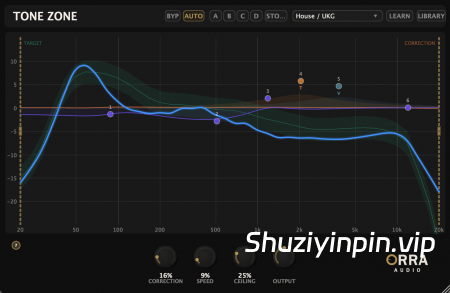
在一个插件中分析、校正和塑造您的音调曲线。查看您的混音与专业目标的差距,并使用全参数均衡器和逐频段饱和度进行微调。
* 40 段频谱分析,平滑显示音调曲线
* 24 种风格目标曲线,由专业母带校准
* 可从任何音频文件学习参考音轨
* 基于 FFT 的自动校正均衡器,具有电平感知处理功能
* 6 段参数均衡器叠加层,带有可拖动节点
* 逐频段模拟饱和度:电子管、VCA、英式
* A/B/C/D 比较 — 四个插槽,可快速试听设置
* 自动校正切换 — 禁用音调校正,同时保持一致的延迟,确保任何音轨上可靠的 PDC(相位检测校正)
* 内部旁路 (BYP) — 干净的交叉淡入淡出旁路,分析始终实时进行
* 精细控制 — Shift+滚动可精确设置 Q 值,Shift+拖动可精细调整频率/增益
让您的音调曲线保持在最佳状态
不仅仅是一个仪表。
大多数音调分析工具仅止于指出问题所在。Tone Zone 更进一步——它能分析、校正并允许您手动微调,所有操作都在同一个窗口中完成,无需切换插件。
传统方法:
打开计量插件查看音调曲线。找出问题。切换到单独的均衡器进行校正。再切换回计量插件检查校正结果。重复此过程,直到音调看起来合适——或者直到您失去耐心。
在一个插件中发现问题,在另一个插件中修复。
Orra 方法:
将您的音调曲线与目标风格进行比较。调高校正旋钮,基于 FFT 的均衡器会自动将您的频谱调整到目标位置。然后使用 6 段参数均衡器进行微调,并添加每个频段的饱和度——所有操作都在同一个窗口中完成,并实时更新。
无需切换插件即可完成分析、校正和音色塑造。
此插件为“随心付费”(免费/PWYW),但仍需要许可证密钥。
Tonal Curve Corrector
Analyze, correct, and sculpt your tonal curve in one plugin. See where your mix sits against professional targets and fine-tune with a full parametric EQ and per-band saturation.
* 40-band spectral analysis with smooth tonal curve display
* 24 genre target curves calibrated from professional masters
* Reference track learning from any audio file
* FFT-based auto-corrective EQ with level-aware processing
* 6-band parametric EQ overlay with draggable nodes
* Per-band analog saturation: Tube, VCA, British
* A/B/C/D comparison — four slots for fast settings auditioning
* Auto Correction Toggle — Disable tonal correction while maintaining consistent latency for reliable PDC on any track
* Internal Bypass (BYP) — clean crossfade bypass with analysis always live
* Fine Control — Shift+scroll for precise Q, Shift+drag for fine frequency/gain
Keep your tonal curve in the zone
Not just a meter.
Most tonal analysis tools stop at showing you the problem. Tone Zone goes further — it analyzes, corrects, and lets you fine-tune by hand, all in the same window without switching plugins.
Traditional Approach
Open a metering plugin to see your tonal curve. Spot the issues. Switch to a separate EQ to make corrections. Flip back to the meter to check your work. Repeat until it looks right — or until you run out of patience.
See the problem in one plugin, fix it in another.
The Orra Way
See your tonal curve against a genre target. Turn up the correction knob and the FFT-based EQ nudges your spectrum toward the target automatically. Then fine-tune with a 6-band parametric EQ and add per-band saturation — all in the same window, all updating in real time.
Analyze, correct, and sculpt without ever switching plugins.
This plugin is Pay What You Want (FREE/PWYW), but still need a license key.
MOCHA
![[完整版:最好的合成器之一] Native Instruments Absynth v6.2.1 [WiN, MacOSX]](https://www.shuziyinpin.vip/wp-content/uploads/2026/10/Absynth-v6.2.0.png)
![[现场演奏乐器] Beatsurfing Druw v1.0.1 VST Incl. Keymaker-RLTS [WiN]](https://www.shuziyinpin.vip/wp-content/uploads/2026/10/beatsurfing-druw.jpg)
![[ PAA 音频套装] PAA Audio Bundle v2026.10 Patched Incl. Keygen-MOCHA [WiN]](https://www.shuziyinpin.vip/wp-content/uploads/2026/10/PAA-Bundle.jpg)
![[环绕延迟插件] The Cargo Cult Slapper Bundle v3.0.19 [MacOSX]](https://www.shuziyinpin.vip/wp-content/uploads/2024/12/the-cargo-cult-slapper-bundle.png)
![[更新:康泰克采样器] Native Instruments Kontakt 8 v8.14.0 U2B-MORiA [MacOSX]](https://www.shuziyinpin.vip/wp-content/uploads/2026/06/Native-Instruments-Kontakt-8.png)
![[复音合成器] Arturia MiniFreak V v5.1.1-V.R [WiN]](https://www.shuziyinpin.vip/wp-content/uploads/2024/06/dcd713da-4f30-4bd5-b834-8e757fa6c1ef-1024x688.png)

评论0