
Team HCiSO | 26 April 2026 | 18.37 MB
安装方法:需要macOS 14.0 或更高版本,软件下载完成后打开,拖动左边的 Fidelia 到右边的应用程序中即可。
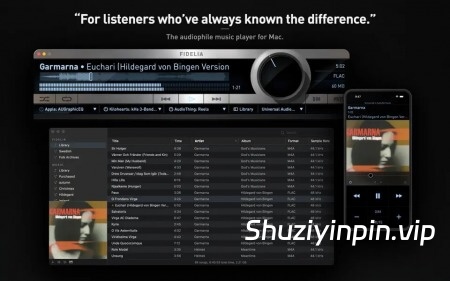
Fidelia 是专为 Mac 打造的发烧级音乐播放器。它以录音时的原始方式播放您的音乐——无压缩、无损音质、无任何妥协。2.0 版本:完全重构。内置母带级 DSP。
Fidelia 2.0 附带三个 DSP 处理器,这些处理器通常作为独立插件售价数百美元,而现在已免费集成到播放器中。
HeadSpace——频率相关的耳机处理
耳机听感并不自然。您的左耳应该听到右侧扬声器的声音,反之亦然——但使用耳机时,这种情况不会发生。HeadSpace 通过模拟真实头部声学特性的频率相关串音处理来纠正这一点:低音在 90% 处串音,中音在 50% 处串音,高音在 15% 处串音。最终呈现的效果是,声音仿佛来自房间里的扬声器,而不是两个扬声器贴着您的耳朵。
Pro Dither——心理声学噪声整形
当音频在不同位深度之间转换时,抖动决定了噪声底限是消失还是变得可听见。 Fidelia 使用 9 阶心理声学噪声整形器,并根据 ISO 226 等响曲线进行调谐——与 Pro Tools 和 Logic 授权的抖动处理器所采用的方法相同。噪声基底降至听觉阈值以下。这是内置的母带级抖动。
参考采样率转换
如果您的音色库采样率为 96 kHz,而您的 DAC 运行在 48 kHz,则转换至关重要。Fidelia 使用线性相位重采样和最小相位引擎,与 Reaper、Audacity 和专业母带处理软件所用的引擎相同。Fidelia 包含这两个引擎,并提供五个高质量预设和精细的高级控制。
比特完美模式和独占模式
在比特完美模式下,源比特直接发送到您的 DAC——不进行任何处理,也不进行任何转换。独占模式将输出设备锁定到 Fidelia,完全绕过操作系统混音器。与专用发烧级硬件的行为相同。3
个 Audio Unit 插件插槽
将 Mac 上安装的任何 Audio Unit 插件加载到三个效果插槽之一中。均衡器、混响、压缩、空间处理器——应有尽有。无需离开 Fidelia 即可启用、禁用和打开插件 GUI。预设状态跨会话保存。其他任何独立音乐播放器都无法做到这一点。
专为大型音乐库打造
2.0 版本新增批量查找专辑封面功能。选择未标记的专辑,选择“在线查找专辑封面”,Fidelia 即可查找、下载并嵌入整个选定专辑的专辑封面。如果您愿意,也可以将图片拖放到“正在播放”面板上,一次性标记整个专辑。对于大型音乐库,这可以节省数小时的清理时间。
其他功能:
• 完全重建的无缝播放功能——无间隙,无曲目边界咔嗒声
• 多通道输出路由(最多 48 个通道),适用于多输出接口
• 支持 AIFF、WAV、FLAC、Apple Lossless、AAC 和 CAF 格式转换
• DSD 导入(DSF → Apple Lossless 24/176.4 kHz)和 Monkey’s Audio 导入(APE → Apple Lossless)——您的整个音乐库,尽在一处
• Music.app 音乐库同步
• 5 种播放器尺寸,包括迷你播放器
• 完全可自定义的键盘快捷键
• 播放器-音乐库窗口停靠——音乐库紧贴播放器并跟随其移动
支持的格式
– 无损:WAV、AIFF、FLAC、Apple Lossless (ALAC)、CAF
– DSD:DSF(导入后转换为 Apple Lossless 24 位/176.4 kHz)
– 有损:MP3、AAC、OGG Vorbis、Opus
– 也支持:AC3、Sound Designer II、AU/SND、Wave64
APE 文件在导入时会以源采样率和位深度转换为 Apple Lossless。DSD 文件 (DSF) 在导入时会转换为 Apple Lossless 24 位/176.4 kHz——发烧级无损转换。
Fidelia Remote——Fidelia 的 iOS 配套应用——可在 App Store 免费下载。
支持的操作系统:
• macOS 14.0 或更高版本
• Apple Silicon 或 Intel Core 处理器
Fidelia is the audiophile music player for Mac. It plays your music the way it was recorded — with no compression, no quality loss, and no compromise. Version 2.0: Completely rebuilt. Mastering-grade DSP built in.
Fidelia 2.0 ships with three DSP processors that audio engineers pay hundreds of dollars for as standalone plugins — built into the player at no extra cost.
HeadSpace — Frequency-Dependent Headphone Processing
Headphones are unnatural. Your left ear should hear your right speaker, and vice versa — but with headphones, that doesn’t happen. HeadSpace corrects this with frequency-dependent crossfeed modeled on real head acoustics: bass crosses at 90%, mids at 50%, highs at 15%. The result is a soundstage that sounds like speakers in a room, not two drivers against your ears.
Pro Dither — Psychoacoustic Noise Shaping
When audio is converted between bit depths, dithering determines whether the noise floor disappears or becomes audible. Fidelia uses a 9th-order psychoacoustic noise shaper tuned to ISO 226 equal-loudness contours — the same approach used by the dither processors licensed by Pro Tools and Logic. The noise floor drops below the threshold of hearing. This is mastering-grade dither, built in.
Reference Sample Rate Conversion
If your library is at 96 kHz and your DAC runs at 48 kHz, that conversion matters. Fidelia uses linear-phase resampling and minimum-phase engines, the same used by Reaper, Audacity, and professional mastering suites. Fidelia includes both engines, with five quality presets and fine-grained advanced controls.
Bit-Perfect & Exclusive Mode
In bit-perfect mode, source bits go directly to your DAC — no processing, no conversion. Exclusive mode locks the output device to Fidelia, bypassing the OS mixer entirely. Same behavior as dedicated audiophile hardware.
3 Audio Unit Plugin Slots
Load any Audio Unit plugin installed on your Mac into one of three effect slots. EQ, reverb, compression, spatial processors — anything. Enable, disable, and open plugin GUIs without leaving Fidelia. Preset state saves across sessions. No other standalone music player does this.
Built for Large Libraries
Version 2.0 adds batch artwork lookup. Select your untagged albums, choose Find Artwork Online, and Fidelia finds, downloads, and embeds the artwork for the entire selection. If you prefer, drag images onto the Now Playing panel to tag a whole album in one drop. For a large ripped library, that’s hours of cleanup gone.
Everything Else
• Gapless playback rebuilt from the ground up — no gaps, no clicks at track boundaries
• Multi-channel output routing (up to 48 channels) for multi-output interfaces
• Format conversion to AIFF, WAV, FLAC, Apple Lossless, AAC, CAF
• DSD import (DSF → Apple Lossless 24/176.4 kHz) and Monkey’s Audio (APE → Apple Lossless) — your whole library, in one place
• Music.app library sync
• 5 player sizes including Mini Player
• Fully customizable keyboard shortcuts
• Player-library window docking — the library snaps to the player and follows it
Supported Formats
– Lossless: WAV, AIFF, FLAC, Apple Lossless (ALAC), CAF
– DSD: DSF (imported and converted to Apple Lossless 24-bit/176.4 kHz)
– Lossy: MP3, AAC, OGG Vorbis, Opus
– Also supported: AC3, Sound Designer II, AU/SND, Wave64
APE files are converted to Apple Lossless at source sample rate and bit depth on import. DSD files (DSF) are converted to Apple Lossless 24-bit/176.4 kHz on import — audiophile-grade, lossless conversion.
Fidelia Remote — the iOS companion app for Fidelia — is free on the App Store.
Supported Operation System:
• macOS 14.0 or later
• Apple Silicon or Intel Core processor
![[Live全新键盘鼠标控制功能工具] killihu Alec v1.0 [WiN, MacOSX]](https://www.shuziyinpin.vip/wp-content/uploads/2026/09/killihu-Alec.png)
![[多用途文件格式转换器] FMJ-Software Awave Studio v12.16.0 Incl Patched and Keygen-R2R [WiN]](https://www.shuziyinpin.vip/wp-content/uploads/2024/12/awmains.png)
![[原声木吉他] Ample-Guitar M v4.1.0 [WiN, MacOSX]](https://www.shuziyinpin.vip/wp-content/uploads/2026/09/ample-sound-ample-guitar-m.jpg)
![[现场演出工具] Steinberg VST Live Pro v3.0.60 [WiN, MacOSX]](https://www.shuziyinpin.vip/wp-content/uploads/2025/05/18042446_steinberg-vst-live-pro.jpg)
![[A/D限幅器] Pulsar Modular P22 Rail v1.0.0 [WiN, MacOSX]](https://www.shuziyinpin.vip/wp-content/uploads/2026/09/pulsar-modular-p22-rail.jpeg)
![[加法合成器] Melatonin Sine Machine v27.4.9 U2B-MORiA [MacOSX]](https://www.shuziyinpin.vip/wp-content/uploads/2026/04/melatonin-sine-machine-.png)

评论0