
Team V.R | 17 July 2026 | WiN: 187 MB | MAC: 103 MB
安装方法:只需安装,免激活版本。
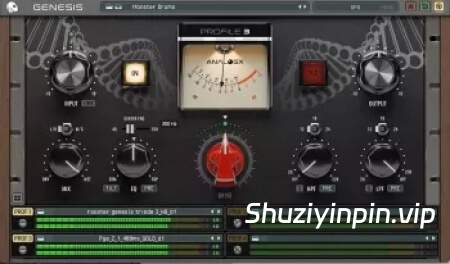
AnalogX Genesis——您工作室的核心
Genesis 不仅仅是一个插件,更是 AnalogX 生态系统的核心。
Genesis 专为我们的高品质建模系列而打造,能够呈现传奇录音棚硬件的温暖、深度和非线性特性——从复古调音台和压缩器到磁带机和前置放大器,无所不包。
有了 Genesis,每个扩展包都能成为您 DAW 中的全新设备。加载它,调整音色,让您的混音充满真实的模拟特性。
GPU 混音如何改变一切?
升级到 GPU 不仅仅意味着性能的提升,更意味着无限的可能性。以下是基于 GPU 的 Genesis Pro 为您的工作流程带来的全新体验。
实时神经网络处理能力
以极低的 CPU 占用率和超低的延迟运行数百个 AnalogX 的高品质模拟(NAM Profile)。
混合工作流程的自由
只需轻触按钮即可在 CPU 和 GPU 实例之间切换,在 CPU 上录音,在 GPU 上混音?——一切由您掌控!
模拟级混音
构建庞大的、受 SSL、Neve 和 API 启发的调音台设置,并在您的 DAW 中即时使用磁带风格的求和链。
创意 CPU 余量
让您的 CPU 轻松运行。让您的大型合成器、混响器和虚拟乐器流畅运行,而 GPU 则负责处理繁重的计算任务。
超快的渲染速度
以极快的速度渲染整个神经网络会话,同时保持混音的一致性并最大限度地减少等待时间。
系统要求
硬件
Mac
• Apple Silicon M1 / M2 / M3 / M4 / M5 (Pro / Max / Ultra)
• 最低 16 GB 内存(建议 32 GB)
• macOS (13.0) 或更高版本
注意:在 macOS 上的 Cubase 或 Nuendo 中关闭 ASIO Guard 时不兼容。
Windows
支持的 GPU:
NVIDIA
• RTX 2000 系列
• RTX 3000 系列
• RTX 4000 系列
• RTX 5000 系列
(最低 8 GB 显存)
AMD
• RX 6000 系列
• RX 7000 系列
• RX 9000 系列
(最低 8 GB 显存)
驱动程序注意事项
请确保直接从制造商网站安装最新的 NVIDIA 或 AMD 官方驱动程序。
不支持通过 Windows 更新提供的驱动程序。
最佳音色表,实现精准的增益稳定
CAL 输入校准,可即时将电平匹配到配置文件中
双功能自动增益按钮,支持 audiolove.me LUFS 匹配和峰值匹配模式
输入/输出链接,实现电平匹配的驱动调整
改进的增益衰减表,用于压缩和饱和
通过新增的 DC 按钮消除直流干扰
扩展的 GPU 音频集成,现支持 NAM A2、NAM A1 和 NAM A1 Custom (XSTD)
采用先进的单 AMD、NVIDIA 和 Metal 处理器,取代之前的 GPU 处理器
改进的 GPU 主机缓冲区和整体 GPU 稳定性
GPU 负载不可用时,清晰的 CPU 回退指示
现支持真立体声加载
全新的 HQ v2 建模支持改进的模拟行为
更快更流畅的库浏览、自动索引、点击加载工作流程以及更佳的预设处理
多项性能和稳定性改进
错误修复和通用 DAW 兼容性修复
提升内部重采样质量
audiolove.me 的用户界面更流畅,CPU 使用率更低
修复了 Windows 和 macOS 主机上的大量崩溃和许可问题
AnalogX Genesis – The Heart of Your Studio
Genesis is more than just a plugin – it’s the core of the AnalogX ecosystem.
Built to power our High-Quality Modelling Tier, Genesis delivers the warmth, depth, and non-linear behaviour of legendary studio hardware — from vintage consoles and compressors to tape machines and preamps.
With Genesis, every expansion pack becomes a new piece of gear in your DAW. Load it, dial in the tone, and bring your mixes to life with authentic analog character.
Why GPU Mixing Changes Everything
The jump to GPU isn’t just about performance, it’s about possibilities. Here’s what a GPU based Genesis Pro unlocks in your workflow.
Real-Time Neural Power
Run hundreds of AnalogX’s high-quality emulations, or NAM Profiles with minimal CPU drag per instance and super low latency.
Hybrid Workflow Freedom
Switch between CPU and GPU instances at the touch of a button, track on CPU, mix on GPU? – you choose!
Analog-Scale Mixing
Build huge SSL, Neve, and API inspired console setups, complete with tape-style summing chains instantly available right inside your DAW.
Creative CPU Headroom
Let your CPU breathe. Keep your heavy synths, reverbs, and virtual instruments running flawlessly while the GPU handles the heavy lifting.
Super-Fast Bounce Times
Render entire neural sessions much faster with full mix consistency and minimal wait time.
System Requirements
Hardware
Mac
• Apple Silicon M1 / M2 / M3 / M4 / M5 (Pro / Max / Ultra)
• Minimum 16 GB RAM (32 GB Recommended)
• macOS (13.0) or later
Note: Not compatible with ASIO Guard OFF in Cubase or Nuendo on macOS.
Windows
Supported GPUs:
NVIDIA
• RTX 2000 Series
• RTX 3000 Series
• RTX 4000 Series
• RTX 5000 Series
(Minimum 8 GB VRAM)
AMD
• RX 6000 Series
• RX 7000 Series
• RX 9000 Series
(Minimum 8 GB VRAM)
Driver Notice
Please ensure the latest official NVIDIA or AMD drivers are installed directly from the manufacturer’s website.
Drivers supplied via Windows Update are not supported.
Sweet Spot meterinq for accurate qain staqinq
CAL input calibratoin for instant level matchinq into profiles
Dual-actoin Auto Gain button with audiolove.me LUFS matchinq and peak matchinq modes
Input and Output Link for level-matched drive adjustments
Improved Gain Reductoin meterinq for compressoin and saturatoin
DC removal via the new DC button
Expanded GPU Audoi inteqratoin, now supportinq NAM A2, NAM A1, and NAM A1 Custom (XSTD)
State-of-the-art sinqle AMD, NVIDIA, and Metal processors replace the prevoius GPU qeneratoin of processors
Improved GPU Host Buffer and overall GPU stability
Clear CPU fallback indicator if GPU loadinq is unavailable
True Stereo loadinq now supported
Brand new HQ v2 modellinq support for improved analoq behavoiur
Faster and improved library browsinq, auto indexinq, click-to-load workflow, and better preset handlinq
Multiple performance and stability improvements
Buq fixes and qeneral DAW compatibility fixes
Improved internal resamplinq guality
Smoother UI performance with audiolove.me lower CPU use
Numerous crash and licensinq fixes across Windows and macOS hosts
![[SWAM物理建模弦乐合集] Audio Modeling SWAM String Sections v1.6.4-V.R [WiN, MacOSX]](https://www.shuziyinpin.vip/wp-content/uploads/2026/10/SWAM-String-Sections.png)
![[三振荡器复古厚重低音合成器] Safari Audio Super Keys Super Chunk v2.1.0 Incl Keygen-R2R [WiN]](https://www.shuziyinpin.vip/wp-content/uploads/2026/10/Safari-Audio-Super-Keys-Super-Chunk.png)
![[实时音高探索与声音重塑插件包] Sync Audio Complete Bundle 13.10.2026-ItUsed [WiN]](https://www.shuziyinpin.vip/wp-content/uploads/2026/10/Sync-Audio-Complete-Bundle.jpg)
![[APU系列响度插件合集] APU Software Plugins Pack 2026.10.16-BLiZZARD [WiN]](https://www.shuziyinpin.vip/wp-content/uploads/2026/09/apu-software-plugins-pack.jpeg)
![[现场演出多功能管理器] Audio Modeling Camelot v2.5.4-V.R [WiN, MacOSX]](https://www.shuziyinpin.vip/wp-content/uploads/2026/10/audio-modeling-camelot.png)

评论0