
BUBBiX | 24 August 2026 | 44 MB
Mac:Team Flare | 26 June 2026 | 119 MB
安装方法:只需安装,免激活版本。
市面上有很多功能强大的均衡器插件。那么,我们为什么还要开发 MPEQ-1 的插件版本呢?
作为硬件设备,传奇的 MPEQ-1 拥有许多数字均衡器都无法企及的功能。尽管多年来一直有人呼吁我们将其移植到插件领域,但我们始终没有行动——因为我们认为,如果要做,就必须为数字世界带来真正意义上的创新。正如硬件 MPEQ-1 在模拟领域开创先河一样,插件也必须在数字领域做到前所未有的突破。
而这正是我们通过 MPEQ-1 超参数饱和均衡器插件所实现的。
这款插件拥有硬件的所有功能:可变的波形、极其灵活的滤波器、宽范围的 Q 值控制以及独特的 Vari-Phase 模式。我们精心重现了原版的所有经典元素。
但这款插件更进一步。每个均衡频段现在都拥有独立的饱和度电路——让您可以逐频段地添加丰富的谐波色彩。提升高频至饱和状态,同时精雕细琢中低频,保持低频干净。增强军鼓的基频,使其饱满动听,同时保持高频清晰。这种控制方式前所未有。
这是一种全新的均衡器——一旦你体验过,就很难再回到过去。
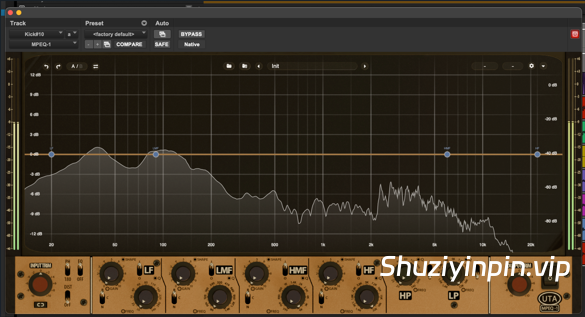
MPEQ-1 插件的功能和控制与硬件相同,并在此基础上进行了一些重要的改进。我们新增了一个全新的失真部分;你可以控制每个频段的失真量和失真风格。此外,我们还添加了一个精美的实时分析仪 (RTA),具有极高的低频分辨率。你可以直接在 RTA 上使用熟悉的数字参数控件来控制均衡频段,也可以通过下方硬件的图形界面进行控制。
变更日志
MPEQ-1 的所有重大变更都记录在此文件中。
[1.0.3] — 2026-08-19
新增功能
– 频段控制面板:集中编辑所选频段的所有设置
– 频段独奏:通过耳机按钮或 Alt+1-4 单独聆听单个频段
– 撤销/重做、A/B 对比、复制、旁通、面板和频段选择的键盘快捷键
– 鼠标和键盘叠加层列出所有手势和快捷键
– 仅网格视图,提供紧凑且以曲线为中心的布局
– 失真光晕现在跟随频段的实际形状,显示驱动的落点
– 可调节分析仪底噪,范围从 -60 dB 到 -130 dB
– 改进的电平表,带有削波 LED 和峰值读数
– 重新设计的设置面板、控制栏和视图图标
– 在仅均衡器视图中添加了主失真开关
– 面板控件上的工具提示
– 微调现在使用 Ctrl/Cmd + 拖动或滚轮在每个旋钮上进行
– 自动化通道显示开关名称而不是数字,并跟随开关方向
– 在 macOS 上打开可视化工具时更加流畅,并且更低CPU 使用率总体错误修复
– EQ 曲线现在在整个频谱范围内与其节点完全对齐
– 在小数 UI 缩放比例下渲染更清晰、更平滑
– 右键菜单现在会随插件 UI 大小缩放
– dB 轴锁定现在会记住每个实例并保存到您的会话中,而不是每次重新打开插件时都重置
– Pro Tools:预设现在可以正确调用开关位置和视图状态,并且宿主程序的自动化快捷方式不再更改网格条按钮[1.0.2] — 2026-07-08新增
功能
– 全新的 2 倍图形,带来清晰的 Retina/HiDPI 渲染效果
– 更新的旋钮设计
– 改进的紧凑视图:更清晰的控制条和迷你电平表,布局更优化
– DRIVE 旋钮响应更迅速、更准确 – 更
流畅、更高效的 UI 渲染
– 更干净的增益变化 — 不再有拉链噪音
– 更快、更灵敏的自动 dB 范围
– 锁定 dB 刻度以实现一致的计量
– 添加了失真主开关和失真面板可见性控制错误修复
– 修复了旋转乐队时音量突然增大的问题DRIVE旋钮响应速度提升
– 修复了开始或停止播放时偶尔出现的咔嗒声/爆音(传输边缘的短暂输出去咔嗒声淡入淡出,离线导出时跳过)
– 高通/低通滤波器Q值现在在调用时能够正确恢复
– 修复了调用时UI顶部被截断的问题
– 修复了均衡器网格悬停读数的问题
– 修复了播放开始时和跨越模块边界时出现的咔嗒声(增益渐变)
– 调整了旋钮/节点滚动和拖动灵敏度
– Windows CI 和许可修复[1.0.1] — 2026-06-22
新增功能
– 添加了频谱分析仪、EQ 响应曲线和动态 EQ 网格
– 改进了频谱分析仪的渲染
– 提高了 Pro Tools UI 的渲染性能错误修复
– 修复了 Pro Tools 中重采样缓冲区溢出崩溃的问题
– 修复了 AVX/Rosetta 问题
– 修复了 A/B 比较问题
– 修复了表头衰减问题
– 修复了线程安全和释放后使用问题
– 现在,当鼠标悬停在内部/上方控件上时,工具提示会正确更新[1.0.0] — 2026-05-31
– 初始版本。
There are a lot of powerful EQ plugins out there. So why did we build the plugin version of the MPEQ-1?
As hardware, the legendary MPEQ-1 does things that even most digital EQs can’t do. But despite years of requests to bring it into the plugin world, we held off—because we felt that if we were going to do it, it had to bring something truly new to the digital world. The same way the hardware MPEQ-1 was unprecedented in the analog realm, the plugin had to be unprecedented in the digital one.
That’s what we’ve achieved with the MPEQ-1 Super-Parametric Saturation Equalizer Plugin.
The plugin does everything the hardware does: the variable shape, the exceptionally versatile filters, the wide-range Q control, the unique Vari-Phase mode. We’ve painstakingly recreated everything that made the original iconic.
But the plugin goes even further. Each EQ band now has its own dedicated saturation stage—letting you add rich harmonic coloration on a band-by-band basis. Boost your highs into saturation while carving the low mids and leaving the low end clean. Push a snare’s fundamental until it sings while keeping the top end clean. This kind of control is truly unprecedented.
It’s a new kind of EQ—and once you’ve worked with it, you’ll find it hard to go back.
The features and controls of the MPEQ-1 plugin are the same as the hardware, with some important additions. We’ve added an all-new distortion section; for each band, you can control the amount and style of distortion. We’ve also added a beautiful RTA with extremely fine low end resolution. EQ bands can be controlled directly on the RTA using familiar digital parameter controls, or via the graphic recreation of the hardware below.
Changelog
All notable changes to MPEQ-1 are documented in this file.
[1.0.3] — 2026-08-19What’s new
– Band control panel: one place to edit everything about the selected band
– Band solo: listen to a single band on its own via the headphones button or Alt+1-4
– Keyboard shortcuts for undo/redo, A/B compare, copy, bypass, panels and band select
– Mouse & Keys overlay listing every gesture and shortcut
– Grid-only view for a compact, curve-focused layout
– Distortion glow now follows the band’s actual shape, showing where the drive lands
– Adjustable analyser floor, from -60 dB down to -130 dB
– Improved level meters with clip LEDs and peak readouts
– Redesigned settings panel, control bar and view icons
– Master distortion switch added to the EQ-only view
– Tooltips on the faceplate controls
– Fine adjust is now Ctrl / Cmd + drag or wheel on every knob
– Automation lanes show switch names instead of numbers, and follow the direction of the switch
– Much smoother on macOS with the visualiser open, and lower CPU use overallBug fixes
[1.0.2] — 2026-07-08
– The EQ curve now lines up exactly with its nodes across the whole spectrum
– Sharper, less smeared rendering at fractional UI scales
– The right-click menu now scales with the plugin’s UI size
– The dB-axis lock is now remembered per instance and saved with your session, instead of resetting every time the plugin is reopened
– Pro Tools: presets now recall the switch positions and view state correctly, and the host’s automation shortcut no longer changes grid bar buttonsWhat’s new
– Sharp Retina/HiDPI rendering with new 2x graphics
– Updated knob designs
– Improved compact view: crisper control bar and mini meter, refined layout
– Snappier, more accurate DRIVE knob response
– Smoother, more efficient UI rendering
– Cleaner gain changes — no more zipper noise
– Faster, snappier auto dB range
– Locked dB scale for consistent metering
– Added distortion master switch and distortion panel visibility controlBug fixes
[1.0.1] — 2026-06-22
– Fixed loud volume bursts when turning a band’s DRIVE knob quickly
– Fixed occasional clicks/pops when starting or stopping playback (short output declick fade at transport edges, skipped during offline bounce)
– HPF/LPF Q now restores correctly on recall
– Fixed UI being cut off at the top on recall
– Fixed EQ grid hover readout
– Fixed clicks on playback start and across block boundaries (gain ramping)
– Tuned knob/node scroll and drag sensitivity
– Windows CI and licensing fixesWhat’s new
– Added spectrum analyzer, EQ response curve, and dynamic EQ grid
– Spectrum analyzer rendering improvements
– Improved Pro Tools UI render performanceBug fixes
[1.0.0] — 2026-05-31
– Fixed resampled buffer overflow crash in Pro Tools
– AVX/Rosetta fixes
– A/B compare fixes
– Meter decay fix
– Thread-safety and use-after-free fixes
– Tooltips now update correctly when hovering inner/upper controls– Initial release.
![[距离模拟器] 194dB Audio Distance Simulator v1.0.0-itUsed [WiN]](https://www.shuziyinpin.vip/wp-content/uploads/2026/10/Distance-Simulator.png)
![[复音合成器] Arturia MiniFreak V v5.0.1 [WiN, MacOSX]](https://www.shuziyinpin.vip/wp-content/uploads/2024/06/dcd713da-4f30-4bd5-b834-8e757fa6c1ef-1024x688.png)
![[低频增强插件] 194dB Audio Low End Max v1.1.2-V.R [WiN, MacOSX]](https://www.shuziyinpin.vip/wp-content/uploads/2026/10/Low-End-Max.png)
![[SnowTec 全套效果器合集] SnowTec Full Bundle v2026.10.08-itUsed [WiN]](https://www.shuziyinpin.vip/wp-content/uploads/2026/09/SnowTec-Full-Bundle-v2026.png)
![[键盘音色合集插件] Arturia Analog Lab V Pro v5.12.6–V.R [WiN]](https://www.shuziyinpin.vip/wp-content/uploads/2024/09/13122395_arturia-analog-lab-v-pro.png)
![[音频混音处理插件捆绑包] NICO BARAN PLUGINS 2026-R2R [WiN]](https://www.shuziyinpin.vip/wp-content/uploads/2026/10/NICO-BARAN-PLUGINS.png)

评论0