
P2P | August 2026 | 16 MB
BLiZZARD | August 2026 | 15 MB
安装方法:安装之后,使用注册机激活。
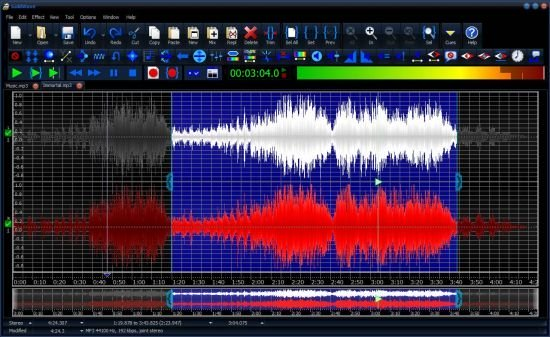
GoldWave 是一款备受好评的专业数字音频编辑器,可将您的电脑或移动设备变成触手可及的录音室。从最简单的录音和编辑到最复杂的音频处理、修复、增强和转换,GoldWave 都能轻松胜任。凭借 25 年来数百万次的下载量,GoldWave 已成为一款广受欢迎、值得信赖的可靠程序。
播放您所有喜爱的歌曲,
观看实时视觉效果,在快进或快退的同时聆听音频,改变播放速度,以全新的方式欣赏音乐,或通过听音学习歌曲,或转录口述内容。
录制任何音源,
您可以选择麦克风、线路输入、流媒体音频或您听到的(环回)内置输入。连接唱盘录制 LP 唱片,连接卡座录制磁带,连接接收器录制广播,或连接高端 USB 麦克风录制您自己的音乐、演讲或报告。设置定时器,在特定日期和时间开始录音。使用电平激活录音功能,当信号高于或低于给定电平时,录音将自动继续或暂停。
使用所有熟悉的命令编辑音频,
包括剪切、复制、粘贴、修剪、替换和覆盖。GoldWave 的快速虚拟编辑功能意味着您可以在几秒钟内对大型音频文件进行切片、分割和合并。只需点击几下即可混合和淡入淡出歌曲。将音频组合起来,用于播客、广播广告、PowerPoint 演示文稿,或为舞蹈节目、花样滑冰、体操和健美操配乐。
应用 40 多种不同的音频效果。
使用均衡器调整低音或高音。使用自动增益均衡音量。使用旁白轻松淡入淡出背景音乐。使用审查器将脏话替换为哔哔声或其他声音。添加回声、混响、镶边效果等等。改变您的声音音调或使其听起来机械化,用于独特的电子游戏扩展。在处理效果之前实时预览它们。大多数效果都包含常用设置的预设,因此您无需成为音频专家。
重新制作老式黑胶唱片或磁带录音。
使用降噪和爆音/咔嗒声滤波器来净化音频,去除嗡嗡声、嘶嘶声、噼啪声和咔嗒声。使用频谱滤波器精确控制频率和音调。消除偏移和长时间静音。
通过实时可视化分析音频。
查看频谱图、条形图、波形图、电平表和其他实用图表。在录音和播放过程中即时查看任何音频问题。通过视觉方式隔离高音啸叫或低音隆隆声,使滤波更加轻松。演示工程和数学概念,例如滤波器、傅里叶变换和信号处理。分析人声、鸟鸣、鲸歌、引擎噪音和其他有趣的声音。
包含一系列强大的工具。
使用 CD 读取器工具直接从音频 CD 复制音频。使用文件合并工具合并多个文件。使用表达式评估器工具生成您自己的声音和效果。使用效果链编辑器工具将效果串联起来以加快处理速度或创建新效果。使用提示点工具为文件中的位置添加书签,或将长文件分割成由提示点定义的片段。使用语音转换器工具创建网站、书籍和其他文本文件的音频版本,以便您在做其他事情时收听它们。对着麦克风口述以转录文本。校对您的文章。
只需点击几下即可处理数百个文件。
使用批量处理来处理和转换您的整个歌曲库:匹配不同歌曲的音量级别、增强低音、修剪开头和结尾的静音、转换为 MP3 等等。支持 iTunes、m4a、wav、wma、mp3、ogg、aiff、au、vox、FLAC 甚至原始二进制数据。只需点击几下即可处理整个文件夹和子文件夹,并保留完整的层级结构。高级用户可以充分利用命令行处理的强大功能和灵活性。
高度可配置:
几乎可以为程序中的任何功能分配自定义快捷键。非常适合手指灵活的用户或视力障碍人士。按照您想要的方式排列窗口、工具栏、效果栏和控件。更改波形和部分视觉效果的颜色。创建您自己的效果预设。添加插件以获得更多功能。
GoldWave is a highly rated, professional digital audio editor that turns your computer or mobile device into a recording studio at your finger tips. Do everything from the simplest recording and editing to the most sophisticated audio processing, restoration, enhancements, and conversions. With millions of downloads over 25 years, GoldWave is a widely used, trusted and dependable program.
Play all your favourite songs
Watch real-time visuals. Listen to the audio while fast-forwarding or rewinding. Change the playback speed to hear your music in a whole new way, or to learn a song by ear, or transcribe dictation.
Record any source
Select the microphone, line-in, streaming audio or what you hear (loopback) built-in inputs. Connect a turntable to record LPs, a cassette deck to record tapes, a receiver to record radio, or a high-end USB microphone to record your own music, speeches, or reports. Set a timer to start recording at a certain day and time. Use level activated recording to continue and pause recording automatically whenever the signal is above or below a given level.
Edit audio with all the familiar commands
Includes Cut, Copy, Paste, Trim, Replace, and Overwrite. GoldWave’s fast virtual editing means you can slice, dice, and merge large audio files in seconds. Mix and Crossfade songs together with just a few clicks. Combine audio for podcasts, radio spots, PowerPoint presentations, or music for dance programs, figure skating, gymnastics, and aerobics.
Apply over 40 different audio effects
Adjust bass or treble with the Equalizer. Even out volume levels with Auto Gain. Easily fade in and out background music with Voice Over. Replace profanity with beeps or other sounds with Censor. Add echoes, reverbs, flangers, and much more. Change the pitch of your voice or make it sound mechanical for unique video game expansions. Preview effects real-time before processing them. Most effects include presets for commonly used settings so you don’t have to be an audio expert.
Remaster old vinyl or tape recordings
Use Noise Reduction and Pop/Click filters to clean up the audio and take out the buzz, hiss, crackle, and clicks. Use the Spectrum Filter for precise control over frequency and tone. Remove offsets and long silences.
Analyze audio with real-time visuals
View spectrograms, bar graphs, waveforms, level meters, and other useful graphs. Instantly see any audio problems during recording and playback. Isolate that high pitch whine or low rumble by sight, making filtering much easier. Demonstrate engineering and mathematical concepts, such as filters, Fourier transforms, and signal processing. Analyze human speech, bird song, whale song, engine noise, and other interesting sounds.
Includes a collection of powerful tools
Copy audio directly from an audio CD with the CD Reader tool. Join many files together with the File Merger tool. Generate your own sounds and effects using the Expression Evaluator tool. Chain together effects for faster processing or create new effects using the Effect Chain Editor tool. Bookmark places within the file using the Cue Points tool, or split a long file into pieces defined by cue points. Create audio versions of websites, books, and other text documents with the Speech Converter tool so you can listen to them while doing other things. Dictate into a microphone to transcribe the text. Proofread your writing.
Process hundreds of files in a few clicks
Use Batch Processing to process and convert your complete library of songs: match volume levels of different songs, boost the bass, trim leading and trailing silences, convert to MP3, and much more. Supports iTunes, m4a, wav, wma, mp3, ogg, aiff, au, vox, FLAC, and even raw binary data. Entire folders and subfolders can be processed with just a few clicks and the entire hierarchy preserved. Advanced users can take advantage of the power and flexibility of command line processing.
Very configurable
Assign your own keystrokes for almost any function in the program. Perfect for anyone with fast fingers or visual impairments. Arrange the windows, tool bars, effect bars, and controls the way you want. Change colours of the waveform and some of the visuals. Create your own presets for effects. Add plug-ins for more functionality.
![[视频编辑软件] CyberLink PowerDirector Ultimate 2027 v25.0.1005.1 [WiN]](https://www.shuziyinpin.vip/wp-content/uploads/2026/08/CyberLink-PowerDirector.2027.png)
![[达芬奇调色工具] Blackmagic Design DaVinci Resolve Studio 21.1.1 Multilingual-R2R [WiN]](https://www.shuziyinpin.vip/wp-content/uploads/2026/06/DaVinci-Resolve-Studio-v21.0.0.47.png)
![[可视化图形音乐编辑工具] Cycling ’74 Max v9.2.0-bobdule [WiN]](https://www.shuziyinpin.vip/wp-content/uploads/2025/05/1730589948_1433002159.webp)
![[终极音乐制作套装] BandLab Cakewalk Sonar v32.10.0.003 Incl Keygen-R2R [WiN]](https://www.shuziyinpin.vip/wp-content/uploads/2024/08/580094fe-6f7b-407b-b44e-556a90bdadd4-1024x683.png)
![[更新:西贝柳斯 制谱工具] AVID Sibelius Ultimate v2026.9 +Trial Reset [WiN, MacOSX]](https://www.shuziyinpin.vip/wp-content/uploads/2025/05/Avid-Sibelius-Ultimate-for-Mac-Free-Download.png)
![[更新:水果全插件版+附加组件+FLEX Pack] Image-Line FL Studio Producer Edition v26.1.7.5653-Audiowarez [WiN]](https://www.shuziyinpin.vip/wp-content/uploads/2026/07/FL-Studio-26.png)

评论0