
P2P | August 2026 | 61.7 MB
安装方法:只需安装,免激活版本!
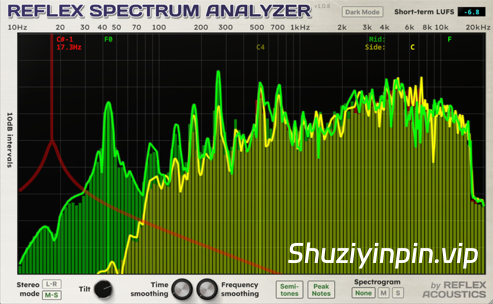
这款分析器专为低频细节而设计。Reflex Spectrum Analyzer 具备此类插件的标准功能,例如立体声对比以及倾斜和平滑显示。这款插件的亮点在于其能够展现灵敏且细腻的低音信息。
传统的分析器使用快速傅里叶变换 (FFT) 算法,其频率分布往往偏向高频,导致低频分辨率较差。虽然可以通过增大 FFT 采样窗口来弥补,但这会降低高频响应速度。
Reflex Spectrum Analyzer 通过在整个频谱范围内进行多次 FFT 分析来解决这一难题,每次分析都采用不同的采样率和窗口大小,从高频的约 12 毫秒到低频的约 340 毫秒不等。
最终得到的频谱幅度图以简洁的方式显示在半音对数刻度上,覆盖 10Hz 至 20kHz 的 11 个八度音程。
尽管信息论的限制使得我们无法同时在时域和频域中以高分辨率可视化音频,但 Reflex 让您更接近这一目标。
功能包括
– 132 个半音间隔的频带,范围从 10Hz 到 20kHz
– 90dB 量程
– 可调节频率和时间平滑度
– 左右声道和中侧声道立体声模式
– 短期(例如 3 秒)LUFS 显示
– 可调节频谱倾斜度(每倍频程 0、3dB、4.5dB 或 6dB)
– 峰值频率以色度标尺显示(计算时未考虑倾斜度)
– 可调节 GUI 大小
– 可选深色模式
– 点击/拖动频谱显示以试听特定频率(垂直位置控制滤波器宽度)
– 双击显示以使用新数据重置时间平滑度
– 通过侧链输入连接第二个信号以比较频谱(如果使用插件的 AU 格式,还需点击“侧链比较”)。
An analyzer designed for low-end detail. The Reflex Spectrum Analyzer includes the standard features you’d expect from this category of plugin—such as stereo comparison and the ability to tilt and smooth the display. Where this plugin stands out is its ability to show responsive and granular bass information.
Traditional analyzers using the Fast Fourier Transform (FFT) algorithm tend to produce frequency bins that are skewed towards the upper frequencies, resulting in poor resolution in the low end. This can be compensated by using a larger FFT sampling window, but at the expense of slowed response in the top end.
The Reflex Spectrum Analyzer addresses this challenge by using multiple FFT analyses across the frequency spectrum, with different sample rates and window sizes, ranging from ~12ms in the high end to ~340ms for low frequencies.
The combined frequency amplitude spectrum is displayed in a streamlined fashion on a semitone log scale covering 11 octaves from 10Hz to 20kHz.
While the laws of information theory prevent us from visualizing audio at high resolution in both the time and frequency domains simultaneously, Reflex brings you closer to what’s possible.
Features
– 132 semitone-spaced frequency bands from 10Hz to 20kHz
– 90dB range
– Adjustable smoothing across frequency and time
– Left-Right and Mide-Side stereo modes
– Short-term (i.e. 3-second) LUFS display
– Adjustable spectrum tilt (0, 3dB, 4.5dB or 6dB per octave)
– Peak frequencies displayed on a chromatic scale (calculated without tilt)
– Adjustable GUI size
– Optional Dark Mode
– Click/drag over the spectrum display to audition specific frequencies (vertical position controls filter width)
– Double-click the display to reset time smoothing with fresh data
– Connect a second signal via sidechain input to compare spectra (if using the AU format of the plugin, also click “Sidechain Compare”)
![[完整版:吉他放大器模拟插件] Overloud TH-U Premium v2.1.1-V.R [WiN,MacOSX]](https://www.shuziyinpin.vip/wp-content/uploads/2025/02/52680ead0975b268f2a6c594727038d9-1024x769.jpeg)
![[双引擎硬件多重效果器插件] TC Electronic M-One XL v2.0.9 ROM [WiN, MacOSX]](https://www.shuziyinpin.vip/wp-content/uploads/2026/10/TC-Electronic-M-One-XL-v2.0.9-ROM.png)
![[打击乐合成器] Liljeholmen DSP TRUMSYNT-KIT v1.0.0 Incl Patched and Keygen REPACK-R2R [WiN]](https://www.shuziyinpin.vip/wp-content/uploads/2026/10/TRUMSYNT-KIT.jpg)
![[BFD3鼓组插件+核心库] BFD Drums BFD3 v3.5.1.5-R2R [WiN]](https://www.shuziyinpin.vip/wp-content/uploads/2026/04/bfd-drums-bfd3.jpeg)
![[智能自动增益 经典唱片模拟效果插件] Tone Empire Cryptone v2.0.1 U2B-MORiA [MacOSX]](https://www.shuziyinpin.vip/wp-content/uploads/2026/10/Cryptone-2.png)
![[MPC风格虚拟鼓机] Apisonic Audio Speedrum 2 v2.4.0 Regged / v2.3.2-R2R [WiN, MacOSX, LiNUX]](https://www.shuziyinpin.vip/wp-content/uploads/2026/10/apisonic-audio-speedrum-2.jpeg)

评论0