
关联资源
[ADPTR效果器插件包] ADPTR Audio-Plugin Alliance Effects Bundle 2024.4-TCD [WiN]
[ADPTR效果器插件包] Plugin Alliance ADPTR Everything Bundle 2024.04.24-HCiSO [MacOSX]
Team R2R | 31 Aug 2026 | 40.1MB
安装方法:若要运行 .r2rwm 文件,您需要安装“TEAM.R2R.System.v1.5.2-R2R”(下载包内已提供)。
独一无二的混音参考和分析插件
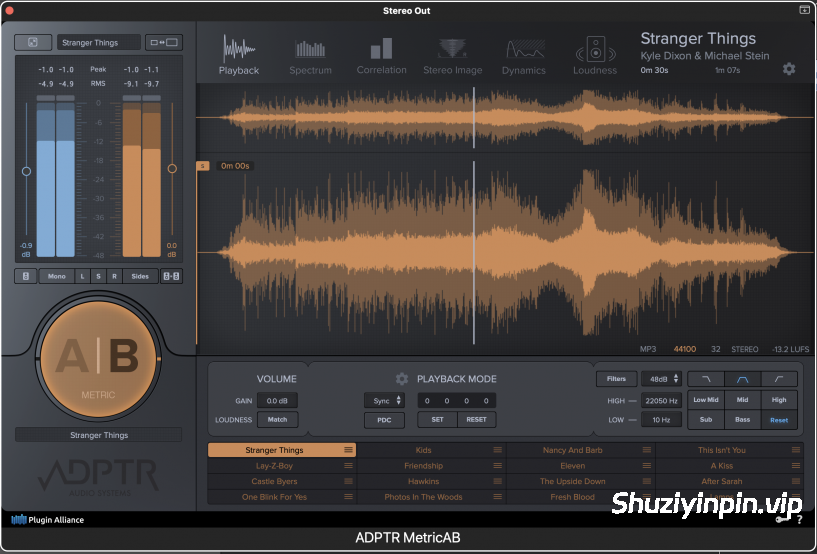
Metric AB 旨在让专业的参考混音检查变得快速、准确且流畅。加载多个参考音轨,并在它们和你的混音之间即时切换,智能电平匹配功能可消除响度偏差,确保比较的准确性。
无需再将音轨导入 DAW 会话或不断调整监听链。Metric AB 可让你的参考音轨井然有序、触手可及,从而让你专注于真正能提升混音效果的数据和决策。精准的
A/B 对比:
通过电平匹配播放和无缝切换,即时将你的混音与无限数量的参考音轨进行比较。
匹配音色和响度:
在几秒钟内调整 EQ 平衡和感知电平,以便你能够公平地评估混音并做出自信的决策。
所见即所得:
深度计量、立体声分析和频谱工具可准确显示你的混音的真实水平。
即时响度匹配和播放选项:
准确的比较始于准确的响度。将最多 16 个参考音轨拖放到 Metric AB 中。一次性匹配你的混音和每个参考音轨的响度。提供四种不同的响度匹配模式供你选择。消除响度偏差,几秒钟内即可进行精准的 A/B 对比。
将参考音轨播放与您的 DAW 同步。设置提示标记,在不同歌曲段落的开头播放参考音轨,并在锁定、提示、同步和手动播放模式之间进行选择,以更改播放行为,从而适应您的工作流程。
The one of a kind mix referencing and analysis plugin
Metric AB is designed to make professional reference mix checking fast, accurate, and frictionless. Load multiple reference tracks and switch between them and your mix instantly, with smart level matching to remove loudness bias and keep comparisons accurate.
No more importing tracks into your DAW session or constant fiddling with your monitoring chain. Metric AB keeps your references organized and accessible, so you can focus on the data and decisions that actually improve your mix.
Precision A/B referencing
Instantly compare your mix to unlimited references with level-matched playback and seamless switching.
Match tone and loudness
Align EQ balance and perceived level in seconds so you can judge your mix fairly and make confident decisions.
See what you hear
Deep metering, stereo analysis, and spectrum tools reveal exactly how your mix truly stacks up.
Instant loudness matching and playback options
Accurate comparisons start with accurate loudness. Drag and drop up to 16 reference tracks into Metric AB. Match the loudness of your mix and every reference track at once. There are four different loudness-matching modes to choose from. Eliminate loudness bias and conduct accurate A/B comparisons in seconds.
Sync reference track playback with your DAW. Set cue markers to play references at the beginning of different song sections, and choose between Latch, Cue, Sync, and Manual playback modes to change playback behavior to suit your workflow.
![[APU系列响度插件合集] APU Software Plugins Pack 2026.10.16-BLiZZARD [WiN]](https://www.shuziyinpin.vip/wp-content/uploads/2026/09/apu-software-plugins-pack.jpeg)
![[现场演出多功能管理器] Audio Modeling Camelot v2.5.4-V.R [WiN, MacOSX]](https://www.shuziyinpin.vip/wp-content/uploads/2026/10/audio-modeling-camelot.png)
![[音频母带处理应用程序] Atomic Audio Deadline Mini v1.0.0 [MacOSX]](https://www.shuziyinpin.vip/wp-content/uploads/2026/10/atomic-audio-deadline-mini.png)
![[一体化通道条] Satori Channel v1.0.2 [WiN]](https://www.shuziyinpin.vip/wp-content/uploads/2026/10/Satori-Channel-.jpg)
![[单音合成器] Nerve Audio The-One v1.0.2 [WiN]](https://www.shuziyinpin.vip/wp-content/uploads/2026/10/Nerve-Audio-The-One.png)
![[智能母带处理优化器] Softube Weiss MM-1 Mastering Maximizer v2.5.9-R2R [WiN]](https://www.shuziyinpin.vip/wp-content/uploads/2026/10/softube-weiss-mm-1-mastering-maximizer.png)

评论0