
FREE | WiN MAC | 12.6 MB
安装方法:
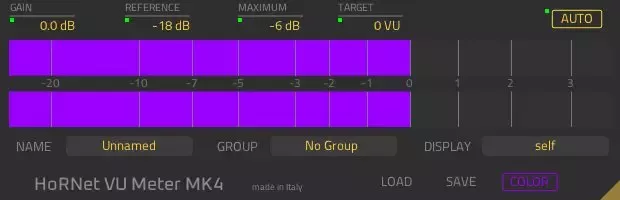
HoRNet VU Meter MK4 是一款数字 VU 表插件,具备自动增益设置和分组功能。全新的图形用户界面 (GUI) 可缩放,并经过优化,占用空间更小,让您可以专注于电平表条。除了 GUI 之外,VU Meter MK4 还允许您为音轨和分组命名,将每个参数更改发送到 VU Meter MK4 的任何实例(不仅限于同一分组中的实例),并在不关闭 GUI 和选择新音轨的情况下显示项目中任何其他实例的电平。
VU Meter MK4 具有校准设置,允许您将 0VU 点设置为最适合您的 A/D 转换器的电平(默认设置为 -18dBFS,但您应该查看 A/D 转换器的规格并将校准设置为指定的内部动态余量)。这是因为每个 A/D 转换器都有一个模拟前端,如果您录制的电平过高(接近 0dBFS),则可能会使模拟电路过载。
VU表MK4能够自动调节其内部增益,使信号峰值达到您所需的电平(-3至+3 VU之间)。对于瞬态较强的声音,自动增益可能会过度提升音轨,导致削波失真。为了避免这种情况,我们设置了最大峰值上限,以防止信号超过设定值。
分组功能允许您将多个VU表实例分组(例如您的鼓组),只需单击一下即可将自动增益、参考电平和颜色设置应用于同一组中的每个实例。选择任何参数的“发送到全部”选项,即可将该值复制到项目中的所有其他VU表MK4,即使它们不属于同一组。
功能:
– 符合VU表规格(300毫秒启动和释放时间)。
– VU峰值保持。
– 红色闪烁削波指示器。
– 参考电平可设置为-60至0 dBFS。
– 输入增益范围为-30dB至+30dB。
– 条形颜色可自由选择。
– 立体声自动增益调节,提供 6 种不同的设置。
– 峰值保护(峰值不会超过设定的限值)。
– 自动增益和电平表设置可以针对整个组或每个实例同时进行设置。
– 八个不同的可分配组。
– 立体声显示。
– 每个实例都可以命名。
– 组名称可自由编辑。
– 每个插件实例都可以显示其他所有已命名实例的值。
– 支持 Mac OS X(10.7 及更高版本)和 Windows(Vista 及更高版本)。
– macOS 提供 64 位插件,Windows 提供 32 位和 64 位插件。
– 支持 Audio Units、VST、VST3 和 AAX 格式。
Digital VU meter with automatic gain. The HoRNet VU Meter MK4 is a digital VU meter plugin with automatic gain setting and grouping functions, the new GUI is now scalable and has been optimised to take less space than the previous version and let you focus on the meter bars. In addition to the GUI VU Meter MK4 also allows you to give names to your tracks and groups, send every parameter change to any instance of VU Meter MK4 (not just the ones in the same group) and display the level of any of the other instances in the project without closing the GUI and choosing a new track.
VU Meter MK4 has a calibration setting that will allow you to set the 0VU point to the best level for your A/D converters (by default is set to -18dBFS but you should read the spec of your A/D and set the calibration to the specified internal headroom). This is because every A/D converter has an analog front-end and if you record too hot (close to 0dBFS) you risk to overload that analog stage.
VU Meter MK4 is able to auto adjust its internal gain to make the signal peak at your desired level (between -3 and +3 VU). With transient heavy sounds it may happen that auto gain boosts too much your tracks and drive them into clipping, to avoid this we have provided a max. peak ceiling that will prevent your signal from going higher than the set value.
The grouping function allows you to group instances of vu meters together (say your Drums group) and apply auto gain, reference and color settings to every instance belonging to the same group with just one click, choosing the “Send to all” option of any parameter, you can copy that value to every other VU Meter MK4 in your project, even iff they don’t belong to the same group.
Features:
– VU Meter spec. conformity (300ms attack and release time).
– VU Peak hold.
– RED Blink clipping indicator.
– reference level settable from -60 to 0 dBFS.
– input gain from -30dB to +30dB.
– bar color freely selectable.
– Stereo automatic gain adjustment with 6 different settings.
– Peak protection between (no peak can exceed the set limit).
– Auto Gain and meter setting can be set to whole group or to every instance at once.
– Eight different assignable groups.
– Stereo display.
– Every instance can be named.
– Groups names freely editable.
– Ever instance of the plugin can display the value of every other named instance.
– Mac OS X (10.7 and later) and Windows (Vista and later) support.
– 64-bit plugins for macOS, 32 and 64-bit for Windows.
– Audio Units, VST, VST3 and AAX format.
![[现场演奏乐器] Beatsurfing Druw v1.0.1 VST Incl. Keymaker-RLTS [WiN]](https://www.shuziyinpin.vip/wp-content/uploads/2026/10/beatsurfing-druw.jpg)
![[ PAA 音频套装] PAA Audio Bundle v2026.10 Patched Incl. Keygen-MOCHA [WiN]](https://www.shuziyinpin.vip/wp-content/uploads/2026/10/PAA-Bundle.jpg)
![[环绕延迟插件] The Cargo Cult Slapper Bundle v3.0.19 [MacOSX]](https://www.shuziyinpin.vip/wp-content/uploads/2024/12/the-cargo-cult-slapper-bundle.png)
![[更新:康泰克采样器] Native Instruments Kontakt 8 v8.14.0 U2B-MORiA [MacOSX]](https://www.shuziyinpin.vip/wp-content/uploads/2026/06/Native-Instruments-Kontakt-8.png)
![[复音合成器] Arturia MiniFreak V v5.1.1-V.R [WiN]](https://www.shuziyinpin.vip/wp-content/uploads/2024/06/dcd713da-4f30-4bd5-b834-8e757fa6c1ef-1024x688.png)
![[立体声工具] Thimeo Stereo Tool v11.05 [MacOSX]](https://www.shuziyinpin.vip/wp-content/uploads/2024/09/R-C-1024x684.png)

评论0