
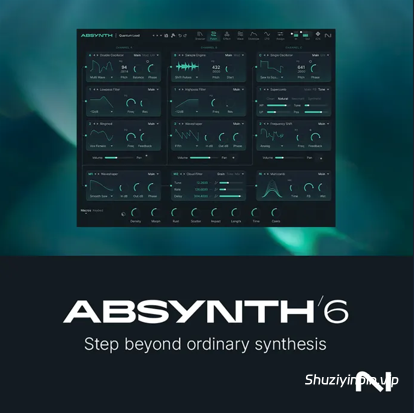
Team V.R | 17 October 2026 | WiN: 2.47 GB | MAC: 2.62 GB
安装方法:只需安装,免激活版本。
aax 尚未修复,因为它无法在 PT 12,5 audiooutopia 中加载。
别具一格的设计
Absynth 6 标志着这款传奇半模块化合成器的回归。它专为变化万千、灵动飘逸的音色而生,邀请您打造完全属于自己的独特声音。它既拥有足以驾驭复杂声音设计的强大功能,又足够直观易上手,即使是新手也能轻松掌握。Absynth 6 为电影配乐、氛围音乐和电子音乐制作开辟了独特而鲜活的音色空间。
超越普通合成
Absynth 6 的核心是一个混合引擎,它融合了颗粒合成、FM 合成、波表合成和减法合成,并配备深度调制和一系列创意效果。其三个振荡器通道赋予您结构化的不可预测性,以及无限的探索空间——完美适用于那些不断演变、变化和带来惊喜的声音。
发现全新声音
预设探索器让您无需滚动浏览名称,即可凭感觉找到声音。在声音世界中自由穿梭,音调之间的关系以可视化的方式呈现,引领您发现意想不到的惊喜,并更快地获得结果。
超越 ADSR
Absynth 6 的 68 点包络系统提供循环、断点曲线、延音阶段和时间同步过渡——以及专用的调制 LFO。这些灵活的形状让您能够打造不断演变的纹理和节奏律动,远超标准的 ADSR 包络。
变异预设
借助变异器,灵感触手可及。使用它将不同的预设变形为全新的预设,瞬间生成新的变体。将它们雕琢成你喜爱的声音——同时保留更改时间线,以便快速调用和完善你最喜欢的音色。
质感炼金术:
使用 Absynth 标志性的颗粒效果转换音色。Aetherizer 可以将任何声音转化为闪烁的氛围,而 Cloud Filter 则添加频谱运动和色彩。它们共同创造出在混音中栩栩如生的环境律动。
从灵感火花到音景:
Absynth 6 将灵光乍现的瞬间转化为复杂的音色。其半模块化引擎、重新设计的采样工具和庞大的音色库,让你瞬间将想法转化为氛围。
三通道振荡器:
半模块化引擎包含三个振荡器通道,结合了减法合成、FM 调制、波表合成、颗粒采样和波形变形,并通过强大的滤波器、调制器和效果器进行路由,从而创造出丰富而复杂的音色。
采样编辑器:
Absynth 6 中改进的采样编辑器让你能够简化对循环点、播放模式和波形变形的控制——这些功能在软合成器中很少如此深入地集成。它支持基于采样的精准声音设计,速度和灵活性无与伦比。
Absynth 6 内置超过 2000 个预设
其中 Factory Library 新增了 350 多个全新预设。您可以随机化宏参数,即时生成全新的预设——而且它完全向下兼容,您设计过的所有音色都可以无缝导入。
环绕式音效,让您身临其境。
Absynth 6 支持高达八声道的环绕声格式,包括四声道、5.1 声道和八声道,让您可以在 360° 空间中放置和移动声音,并可选配 LFE 路由。每种效果都可以在声场中占据其独特的位置——从旋转的 Aetherizer 颗粒到沉浸式的频谱云。
版本说明 6.2.0 2026-10-12
新增
* 聚焦模式:点击通道标题即可聚焦该通道,并在其下方打开扩展编辑器
* 聚焦模式下,波形、包络、LFO、宏和键盘编辑器可在侧边栏中选择
* 编辑器锁定:防止通道条中的操作更新编辑器
* 音色聚焦:将您从编辑器中的项目跳转到其在音色中的目标位置,包括“使用对象”、“包络”、“宏”和“表情”列表
* 通道标题包含独奏、变异和编辑菜单
* 通道编辑菜单包含复制通道、粘贴通道、变异通道、重试变异、加载子预设和保存子预设
* 通道、源模块、插入模块、效果器、波形和包络的子预设
* 加载子预设对话框包含工厂库和用户库、搜索、收藏夹、文件夹、重新扫描和在桌面显示。选择子预设即可加载以进行试听;取消按钮恢复之前的设置
* 将子预设加载并保存到源模块、插入模块和效果模块的“编辑”菜单,以及波形编辑器和包络编辑器的“变换”菜单
* 波形和包络子预设的嵌入式图形预览
* 全局通道标题,用于进入全局通道的聚焦模式
* 所有页面底部均带有宏旋钮和屏幕键盘。在聚焦模式下,其控件集成到宏编辑器和键盘编辑器中
* 底部带有复音自动/单音自动、弯音轮、调制轮和保持控件
* 带有八度按钮和力度/压力显示的屏幕键盘
* 屏幕键盘支持计算机键盘输入
* 键盘编辑器,音符刻度直接显示在琴键上方,绘制时显示数值
* 带有单次和多次分配模式的分配按钮,以及列出所有可用参数的分配菜单
* 可用、已分配和不可用参数的分配模式指示器。点击已分配的参数即可将其重新分配给选定的源
* 宏旋钮上以及宏列表中宏名称旁边的 MPE 指示器
* LFO 编辑器中的目标焦点视图,显示目标在各个模块中的分配位置
* 包络列表状态,包括包络开/关和目标模块激活/非激活
* 音频调制器的跟随/触发开关
已改进
* 宏可以通过拖放重新排序,并支持撤销和重做
* 可以通过双击页脚中的名称来重命名宏
* 宏旋钮在悬停时显示其值;未分配的宏会以灰色显示
* 分配列表支持多选、批量删除以及将分配移动到另一个宏,同时保留深度、反转和平滑设置
* “分配”页面新增与宏编辑器相同的列表编辑功能;“添加”按钮更名为“分配”。
* “波形”和“包络”页面的“编辑”和“变换”菜单合并为一个“变换”菜单。
* “复制通道”和“粘贴通道”功能从源模块的“编辑”菜单移至通道的“编辑”菜单。
* “独奏”功能现在在所有通道上保持一致的高亮显示。
* 旧版 Absynth 模板文件可以作为子预设加载。
* 重命名:主通道更名为全局通道,宏控制 X 更名为宏 X,模板更名为子预设。
Weird by design
Absynth 6 marks the return of a legendary semi-modular synthesizer. Built for textures that transform and breathe, it invites you to shape sounds that are entirely your own. Deep enough for complex sound design, and intuitive enough for newcomers, it opens up distinctive, living sounds for cinematic cues, ambient soundscapes, and electronic productions.
Beyond ordinary synthesis
At the core of Absynth 6 is a hybrid engine that combines granular, FM, wavetable, and subtractive synthesis with deep modulation and a suite of creative effects. Its three oscillator channels give you structured unpredictability and endless room for exploration – perfect for sounds that evolve, shift, and surprise.
Discover new sounds
The Preset Explorer helps you find sounds by feel instead of scrolling through names. Navigate a sonic landscape where relationships between tones appear visually, leading you to unexpected discoveries and faster results.
Go beyond ADSR
Absynth 6’s 68-point envelope system offers looping, breakpoint curves, sustain stages, and time-synced transitions – plus dedicated modulation LFOs. These flexible shapes let you craft evolving textures and rhythmic motion that goes far beyond standard ADSR envelopes.
Mutate presets
With the Mutator, inspiration is only ever a few clicks away. Use it to morph different presets into entirely new ones, generating new variants in moments. Sculpt them into sounds you love – all while keeping a timeline of changes so you can quickly recall and refine your favorites.
Textural alchemy
Transform textures with Absynth’s signature granular effects. The Aetherizer turns any sound into shimmering atmospheres, while the Cloud Filter adds spectral motion and coloration. Together they create ambient motion that feels alive within your mix.
From spark to soundscape
Absynth 6 turns quick bursts of inspiration into complex sounds. Its semi-modular engine, reimagined sample tools, and huge library let you move from idea to atmosphere in moments.
Three-channel oscillators
The semi‑modular engine features three oscillator channels that combine subtractive synthesis, FM, wavetable synthesis, granular sampling, and wave‑morphing, routed through powerful filters, modulators, and effects to create rich, complex timbres.
Sample editor
The revamped sample editor in Absynth 6 gives you streamlined control over loop points, playback modes, and wave-morphing – capabilities rarely found so deeply integrated in soft synths. It allows for precise sample‑based sound design with unmatched speed and flexibility.
Over 2000 presets
Absynth 6 delivers over 2000 presets with more than 350 brand-new additions to the Factory Library. Randomize macro parameters to generate entirely new presets on the fly – and with full backward compatibility, every patch you’ve ever designed can be imported seamlessly.
Sound that surrounds you
With support for up to eight-channel surround formats, including Quadraphonic, 5.1, and Octaphonic, Absynth 6 lets you place and move sound in 360° space, with optional LFE routing. Each effect can occupy its own position in the field – from swirling Aetherizer grains to immersive spectral clouds.
Release Notes 6.2.0 2026-10-12
ADDED
* Focus Mode: click a channel header to focus that channel and open an expanded editor below it
* Wave, Envelope, LFO, Macro, and Keyboard Editors in Focus Mode, selected from the Sidebar
* Editor Lock: prevents interactions in the channel strip from updating the editor
* Patch Focus: takes you from an item in an editor to its destination in the patch, in the Used By, Envelope, Macro, and Expression lists
* Channel headers with Solo, Mutate, and an Edit menu
* Channel Edit menu with Copy Channel, Paste Channel, Mutate Channel, Retry Mutate, Load Subpreset, and Save Subpreset
* Subpresets for channels, source modules, insert modules, effects, waveforms, and envelopes
* Load Subpreset dialog with Factory and User libraries, search, favorites, folders, Rescan, and Show on desktop. Selecting a subpreset loads it for auditioning; Cancel restores the previous settings
* Load Subpreset and Save Subpreset to the Edit menus of source modules, insert modules, and the effect module, and to the Transform menus of the Wave and Envelope Editors
* Embedded graphical previews for wave and envelope subpresets
* Global channel header, for entering Focus Mode on the Global channel
* Footer with macro knobs and an on-screen keyboard on all pages. In Focus Mode, its controls are integrated into the Macro Editor and the Keyboard Editor
* Poly AT / Mono AT, Pitch Bend, Mod Wheel, and Hold controls to the footer
* On-screen keyboard with octave buttons and a velocity and pressure display
* Computer keyboard input for the on-screen keyboard
* Keyboard Editor with Note Scale displayed directly above the keys, and a value display while drawing
* Assign button with single and multi assign modes, and an Assign menu listing all available parameters
* Assign mode indicators for available, assigned, and unavailable parameters. Clicking an assigned parameter reassigns it to the selected source
* MPE indicator on macro knobs and next to macro names in the macro lists
* Target Focus view in the LFO Editor, showing where a target is assigned across modules
* Envelope list states for envelope on/off and target module active/inactive
* Follow / Trigger switch for the Audio Modulators
IMPROVED
* Macros can be reordered by drag and drop, with undo and redo
* Macros can be renamed by double-clicking their name in the footer
* Macro knobs show their value on hover; macros without assignments are drawn dimmed
* Assignment lists support multi-select, bulk remove, and moving assignments to another macro while keeping Depth, Invert, and Smooth
* The Assign page gains the same list editing as the Macro Editor; the Add button is renamed Assign
* The Edit and Transform menus of the Wave and Envelope pages are merged into a single Transform menu
* Copy Channel and Paste Channel moved from the source module Edit menu to the channel Edit menu
* Solo now highlights consistently on all channels
* Legacy Absynth template files can be loaded as subpresets
* Renamed: Main channel to Global channel, Macro Control X to Macro X, Templates to Subpresets
![[终极吉他和贝斯低音调音增强器] AtlasDSP DI Crank v2.0.0 [WiN, MacOSX]](https://www.shuziyinpin.vip/wp-content/uploads/2026/10/AtlasDSP-DI-Crank.jpg)
![[音频混音器] MacMix Studio v2.3-MacKed [MacOSX]](https://www.shuziyinpin.vip/wp-content/uploads/2026/10/MacMix-Studio.png)
![[人声处理工具] Sonido Fresh Fresh Vocal 3 RETAiL [WiN, MacOSX]](https://www.shuziyinpin.vip/wp-content/uploads/2026/10/Fresh-Vocal-3.png)
![[色彩操纵器] blepfx prisma schnitzelPommes x64 [WiN]](https://www.shuziyinpin.vip/wp-content/uploads/2026/10/blepfx-prisma-schnitzelpommes.png)
![[FL Studio插件管理器] FL Studio Plugin Organizer v4.3 [WiN, MacOSX]](https://www.shuziyinpin.vip/wp-content/uploads/2026/08/FL-Studio-Plugin-Organizer-v4.1-300x266.jpeg)
![[Big Man Labs音频插件捆绑包] Big Man Labs Bundle 2026.10 [WiN]](https://www.shuziyinpin.vip/wp-content/uploads/2026/10/Big-Man-Labs-Bundle.png)

评论0