
Win:SEnki | 23 January 2026 | 6.3 MB
Win(Mac):Team R2R | 05 November 2022 | 23.62 MB
安装方法:
谐波失真插件、模拟波形整形、深度调制选项
概述
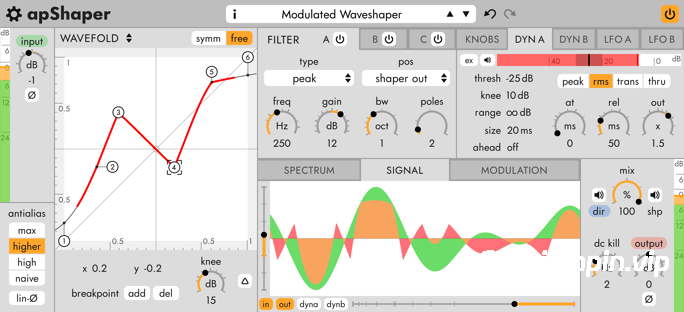
apulSoft apShaper 是一款音频效果插件,可为音频信号添加谐波失真。它结合了波形整形器、三个滤波器频段和多种调制选项——两个低频振荡器 (LFO)、两个动态检测器(带侧链选项)以及用户可配置的旋钮。
apShaper 可以模拟多种类型的失真,包括磁带和电子管饱和、波形折叠和模拟比特压缩。
三个滤波器频段提供高质量的滤波,而不会压缩高频。可变斜率低通滤波器类型提供传统滤波无法实现的平滑斜率——非常适合对施加大量失真的信号进行柔和的整形。多种模拟经典电路的音调控制滤波器类型可实现经典的低音/中音/高音音调整形。
无数字失真
apShaper 使用复杂的算法来减少数字失真的一大问题——不必要的非谐波噪声。它使用积分进行模拟波形整形。失真应用于音频信号的连续模型。与传统的过采样相比,这种方法能更有效地减少数字失真,尤其是在传输曲线不平滑的情况下(例如硬削波/波形折叠/比特压缩)。
主要功能
• 演示版!下载并体验演示模式。
• 五种高品质波形整形引擎:谐波、电子管、饱和、阶跃、波形折叠。
• 极低的混叠。
• 三种多类型滤波器可在波形整形前后应用。
• 内置四种吉他放大器音色堆叠模拟。
• 多种饱和软拐点类型:磁带、经典、失真、超饱和和削波。
• 阶跃引擎允许连续调整比特数。
• 波形折叠引擎提供对称和非对称的用户可编辑断点。
• 可变斜率低通滤波器非常适合与谐波失真产品配合使用。
• 直通通道可以独立滤波,并与整形后的声音进行干湿混合。
• 在频谱显示上图形化编辑滤波器参数。
• 可缩放的频谱和 f0 同步波形显示。
• 内置输入/输出电平表。
• 直流偏移消除滤波器。
• 调制系统,最多可设置 16 条独立增益的调制规则。
• 内部调制源:两个低频振荡器 (LFO)、两个动态检测器和三个用户自定义旋钮。
• 动态检测器侧链输入。
• 通过调制系统进行 MIDI 输入。
• 低至 6 个采样点的处理延迟(最小相位模式)可实现实时演奏。
• 所有操作均支持无限次撤销/重做。
• 插件格式:macOS(Intel/ARM 64 位)和 Windows(32/64 位 Intel)平台支持 AudioUnits/AAX/VST/VST3 格式。
• 内置系统级预设管理功能,支持预设文件的导入和导出,兼容不同平台和宿主软件,采用 XML 文件格式。
• 提供明亮和暗色调配色方案,并支持用户自定义配色方案。
Harmonic distortion plugin, analog modelled waveshaping, deep modulation options
Overview
apulSoft apShaper is an audio effect plugin to add harmonic distortion to audio signals. It combines a waveshaper with three filter bands and various modulation options – two LFOs, two dynamics detectors (with sidechain option), and user-configurable knobs.
apShaper can simulate multiple types of distortion, including tape and tube saturation, wave folding, and analog bit crushing.
The three filter bands offer high-quality filtering without high-frequency squeezing. The variable-slope low-pass filter type provides smooth slopes not possible with traditional filtering – ideal to gently shape signals with large amounts of distortion applied. Multiple tone control filter types modelled after classic circuits allow classic bass/mid/treble tone shaping.
Distortion without digital artifacts
apShaper uses sophisticated algorithms to reduce the big problem of digital distortion – unwanted nonharmonic noise. It performs analog waveshaping using integration. The distortion is applied to a continuous model of the audio signal. This reduces digital artifacts more than traditional oversampling could, especially if the transfer curve is not smooth (hard clipping/wavefolding/bitcrushing).
Main Features
• Demo version! Download and try in demo mode.
• Five high-quality waveshaping engines: harmonic, tube, saturation, steps, wavefold.
• Extremely low aliasing.
• Three multi-type filters can be applied before and/or after waveshaping.
• Four types of guitar amp tone stack simulations included.
• Multiple types of saturation soft-knee: tape, classic, distortion, hyper and clip.
• The steps engine allows continous adjustments of the number of bits.
• The wavefold engine provides symmetrical and asymmetrical user-editable breakpoints.
• The variable-slope low-pass filter type is ideal to use with harmonic distortion products.
• The direct channel can be independently filtered and dry/wet mixed with the shaped sound.
• Graphical editing of filter parameters on the spectrum display.
• Zoomable frequency spectrum and f0-synced waveform displays.
• Built-in input/output meters.
• dc offset removal filter.
• Modulation system with up to 16 modulation rules with independent gains.
• Internal modulation sources: two LFOs, two dynamics detectors and three user-definable knobs.
• Side-chain input for the dynamics detector.
• Midi input using the modulation system.
• A low processing latency of 6 samples (minimal phase mode) allows real-time performance.
• Unlimited undo/redo for all actions.
• Plugin formats: AudioUnits/AAX/VST/VST3 on macOS (intel/arm 64-bit) and Windows (32/64-bit intel)
• Built-in system-wide preset management with import and export of preset files, compatible across platforms and hosts using a xml file format.
• Bright & dark color schemes and support for user defined color schemes.
Note: I messed up my installer script. Enable the VST & VST3 option in the installer, and the VST3 file will be where your specified VST path is.
![[简易采样加载插件] AtlasDSP Replacer v1.0 [WiN, MacOSX]](https://www.shuziyinpin.vip/wp-content/uploads/2026/10/AtlasDSP-Replacer.png)
![[全球最佳 DJ 软件] Serato DJ Pro Suite v5.0.0-V.R [WiN, MacOSX]](https://www.shuziyinpin.vip/wp-content/uploads/2025/11/Serato-DJ-Pro-Suite-v4.0.0-1024x633.png)
![[自动削波修复插件] Leit Audio UnClip v1.0.0 VST3 AU [WiN, MacOSX, LiNUX]](https://www.shuziyinpin.vip/wp-content/uploads/2026/10/Leit-Audio-UnClip.png)
![[完整版:最好的合成器之一] Native Instruments Absynth v6.2.1 [WiN, MacOSX]](https://www.shuziyinpin.vip/wp-content/uploads/2026/10/Absynth-v6.2.0.png)
![[现场演奏乐器] Beatsurfing Druw v1.0.1 VST Incl. Keymaker-RLTS [WiN]](https://www.shuziyinpin.vip/wp-content/uploads/2026/10/beatsurfing-druw.jpg)
![[ PAA 音频套装] PAA Audio Bundle v2026.10 Patched Incl. Keygen-MOCHA [WiN]](https://www.shuziyinpin.vip/wp-content/uploads/2026/10/PAA-Bundle.jpg)

评论0