
关联资源
[18个红岩音频插件包] Red Rock Sound All Plug-ins Bundle v2026.01.06-Repack-SEnki [WiN]
SEnki | 19 February 2026 | 5.4 MB
安装方法:
安装即可……
如果您喜欢开发者的作品,请支持他们。
-SEnki UwU
一款专为现代环境优化的顶级压缩器。
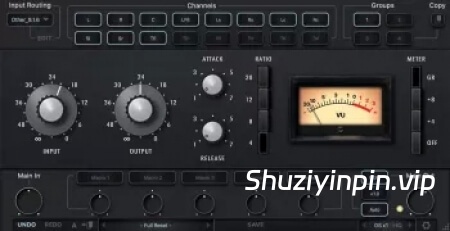
11FF 沉浸式压缩器/限制器
11FF 压缩器/限制器由我们与 NICHOLAY MIX 合作开发。
我们大多数人都是音乐家和/或录音工程师。我们热爱录音过程,并且
当听到录制精美的音轨时,我们会深受启发。我们开发 11FF 的目标是
打造一款我们自己也乐于使用的压缩器/限制器——一款能够唤起那种
聆听以最自然、最富有灵感的方式录制的音乐时所感受到的惊艳效果的压缩器/限制器。
我们对硬件原件和我们的模拟版本进行了仔细的并排比较,以确保 11FF 插件在声音特性方面与物理原型完全一致。
专为快速高效地处理沉浸式混音环境中的中/侧声道、立体声以及对象和背景(固定声道)而设计。
输入路由面板
分组
该模块允许您从四个可用压缩机中选择一个。压缩器是串联排列的,这样你可以处理不同压缩器设置的通道。
例如:第一个限制器只是中音通道,第二个限制器只是侧声道,第三个限制器是左右声道。对于多声道模式:第一个限制器仅为左右声道,第二个限制器为中声道,第三个限制器为低频效果器,依此类推。
你可以为方便使用重命名频道组按钮。要重命名所选频道组按钮,右键点击该按钮。
要开启压缩器的独奏(收听),请双击选中的通道组号。
频道组单人模式会发出黄色光,退出单人模式时,请再次双击。对于双通道模式,只有一台设备可以是单声道模式。对于多声道模式,可以单独使用一个或多个单元。
要绕过选定的压缩器处理,请按选定的通道组编号一键+shift。在旁通模式下,按钮会发红光。
你也可以把所有压缩器设置复制到另一个通道组。作方法是选择你想复制设置的频道组,然后点击复制按钮,再选择你想复制设置的频道组。
输入路由
输入路由允许你从44种常见通道设置中选择,从立体声到7.1.4和9.1.6。只需在输入路由模块中选择适合你轨道的通道设置即可。
你也可以创建自己的输入路由配置文件。共有16个独立频道。
点击输入路由选择显示旁的编辑按钮。长按Shift键,选择想要的频道数量。按顺序命名所选频道。然后点击保存并命名个人资料。
通道
在本模块中,你可以选择(激活)压缩器将在所选通道组中处理的通道。
A prime compressor, optimized for modern times.
11FF Immersive Compressor / Limiter
The 11FF Compressor/Limiter was developed in collaboration with NICHOLAY MIX.
Most of us are musicians and/or sound engineers. We love the recording process and are
truly inspired when tracks are recorded beautifully. Our goal in developing the 11FF was to
create a compressor/limiter that we ourselves would enjoy using—one that would evoke that
wow factor that comes from listening to music recorded in its most natural, inspired form.
We made a careful side-by-side comparison of the hardware original and our emulation to
ensure the 11FF plug-in works indistinguishably from its physical prototype in terms of sound
character.
Designed for fast and efficient work on mid/side, stereo and the objects, the beds (fixed
channels) of immersive mixing environments.
INPUT ROUTING PANEL
Groups
This module allows you to select an Compressor from four available. The Compressor are arranged in series, this allows you to process channels with different compressor settings.
For example: the first Limiter is only the mid channel, the second Limiter is only the side channel, the third Limiter is the left and right channel. For multi-channel modes: the first Limiter is only the left and right channels, the second Limiter is the center channel, the third Limiter is the LFE, etc.
You can rename Channel Group Buttons for ease of use. To rename the selected Channel Group button, right- click on the button.
In order to turn on the solo (listen) of the Compressor, double-click on the selected Channel Group number.
The Channel Group solo mode glows yellow, to exit solo mode, double-click again. For two-channel modes, only one unit can be solo mode. For multi-channel modes, one or more units can be soloed.
To bypass selected Compressor processing, press the selected Channel Group number one click + shift. In bypass mode, the button will glow red.
You can also copy all Compressor settings to another Channel Group. To do this, select the Channel Group from which you want to copy the settings, then click on the copy button, then select the Channel Group to which you want to copy the settings.
Input Routing
Input Routing lets you choose between 44 common channel setups, starting from Stereo up to 7.1.4 and 9.1.6. Simply select in the input routing module the channel setup that fits your track.
You can also create your own input routing profiles. 16 independent channels are available.
Click on the edit button next to the input routing selection display. Hold down the shift button and select the desired number of channels. Name selected channels in order. Then click save and name the profile.
Channels
In this module, you can select (activate) the channels that the Compressor will process in selected Channel Group.
SEnki
![[混合式FM合成器] MAP Audio Rhino3 v1.3.3 Incl Patched and Keygen-R2R [WiN]](https://www.shuziyinpin.vip/wp-content/uploads/2026/10/MAP-Audio-Rhino3.jpg)
![[八单元创意采样器+工厂库] MAP Audio PAM v1.8.3 Incl Patched and Keygen-R2R [WiN](1.35GB)](https://www.shuziyinpin.vip/wp-content/uploads/2026/06/MAP-Audio-PAM.png)
![[完整版:吉他放大器模拟插件] Overloud TH-U Premium v2.1.1-V.R [WiN,MacOSX]](https://www.shuziyinpin.vip/wp-content/uploads/2025/02/52680ead0975b268f2a6c594727038d9-1024x769.jpeg)
![[双引擎硬件多重效果器插件] TC Electronic M-One XL v2.0.9 ROM [WiN, MacOSX]](https://www.shuziyinpin.vip/wp-content/uploads/2026/10/TC-Electronic-M-One-XL-v2.0.9-ROM.png)
![[打击乐合成器] Liljeholmen DSP TRUMSYNT-KIT v1.0.0 Incl Patched and Keygen REPACK-R2R [WiN]](https://www.shuziyinpin.vip/wp-content/uploads/2026/10/TRUMSYNT-KIT.jpg)
![[BFD3鼓组插件+核心库] BFD Drums BFD3 v3.5.1.5-R2R [WiN]](https://www.shuziyinpin.vip/wp-content/uploads/2026/04/bfd-drums-bfd3.jpeg)

评论2