
关联资源
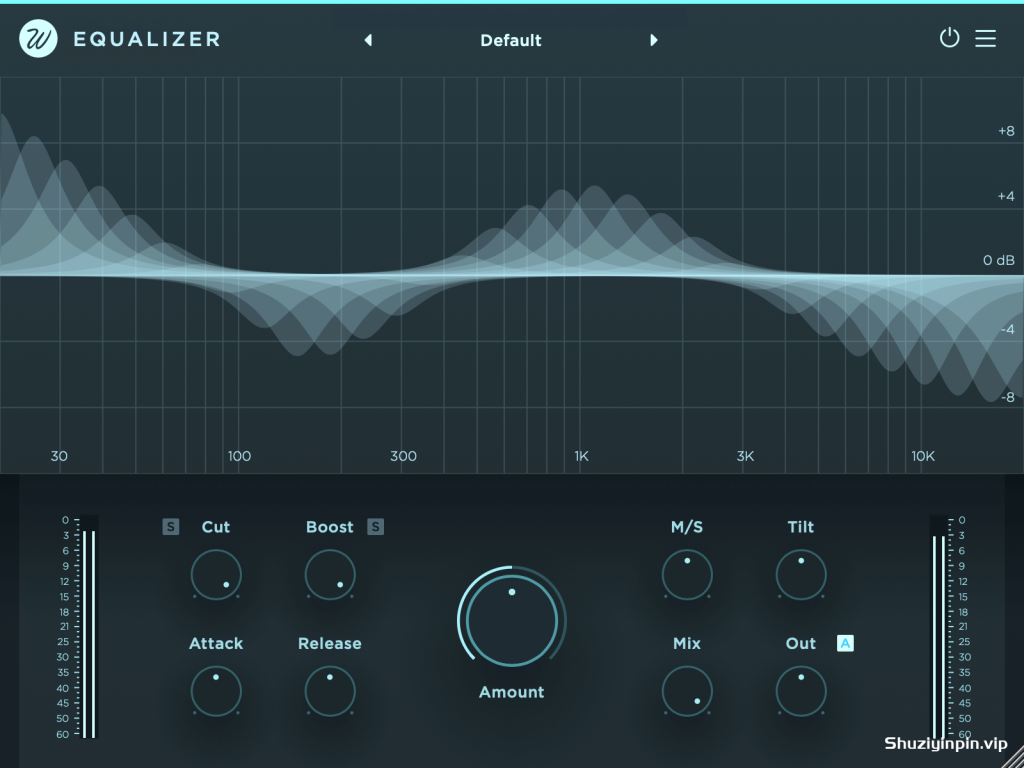
[自动智能EQ均衡器] Wavesfactory Equalizer v1.0.2 [MacOSX]
Team R2R | 27 May 2026 | 9.5 MB
安装方法:您需要安装“TEAM.R2R.System.v1.4.2-R2R”(下载包内已提供)。
均衡器能够智能动态地平衡音轨,
调整信号音色,使其听起来更自然。
它能增强不足之处,减弱过强部分。零延迟。
动态音色塑造器
均衡器能够分析您的音轨,并智能地决定在哪些位置应用校正(提升或衰减),使其听起来更加自然悦耳。它会根据输入信号持续进行均衡调整,从而优化您的音轨,实现以往无法达到的效果。
均衡器显著简化了混音流程。您可以将其作为混音的起点,平衡各个音轨的音量,从而减少后续阶段所需的处理量。它还可以用于主总线,对整个混音或母带进行最终调整。1.0.2
版本新增功能:均衡器现在支持侧链输入和高品质 (HQ) 模式,该模式会在每个采样点更新内部滤波器。由于此功能非常消耗 CPU 资源,因此还包含一个“仅离线”模式,该模式会在离线渲染期间自动启用高品质模式,并在播放期间禁用该模式。
Equalizer intelligently and dynamically balances your tracks.
It shapes the tone of your signal to make it sound more natural.
It enhances deficiencies and attenuates excesses. Zero latency.
Dynamic tone shaper
Equalizer analyzes your tracks and intelligently decides where to apply corrections (boosts or cuts) to make them sound more natural and pleasing to the ear. It refines your tracks by performing constant EQ changes based on the input signal, giving results previously impossible to get.
Equalizer significantly streamlines the mixing process. Use it as a starting point in a mix to even out the balance of the tracks, thereby reducing the amount of processing required in later stages. It can also be used on the master bus to make final adjustments to the entire mix or master.
New in version 1.0.2: Equalizer now features a sidechain input and an HQ mode that updates the internal filters at each sample. Since this is very CPU-intensive, the feature also includes an ‘Offline Only’ mode, which automatically enables HQ during offline rendering and disables it during playback.
![[复古混合模拟着色插件] NK Productions ALA-101 Hybridization v1.5.2 Incl Patched and Keygen-R2R [WiN]](https://www.shuziyinpin.vip/wp-content/uploads/2026/10/nk-productions-ala-101-hybridization.jpg)
![[NK Productions 插件包] NK Productions All Plugins Bundle v2026.10-R2R [WiN]](https://www.shuziyinpin.vip/wp-content/uploads/2026/08/AEQ-Series_STD-300x211.png)
![[模块化多效果器路由器] MAP Audio MFX v1.1.0 Incl Patched and Keygen-R2R [WiN]](https://www.shuziyinpin.vip/wp-content/uploads/2026/10/MAP-Audio-MFX.jpg)
![[混合式FM合成器] MAP Audio Rhino3 v1.3.3 Incl Patched and Keygen-R2R [WiN]](https://www.shuziyinpin.vip/wp-content/uploads/2026/10/MAP-Audio-Rhino3.jpg)
![[八单元创意采样器+工厂库] MAP Audio PAM v1.8.3 Incl Patched and Keygen-R2R [WiN](1.35GB)](https://www.shuziyinpin.vip/wp-content/uploads/2026/06/MAP-Audio-PAM.png)
![[完整版:吉他放大器模拟插件] Overloud TH-U Premium v2.1.1-V.R [WiN,MacOSX]](https://www.shuziyinpin.vip/wp-content/uploads/2025/02/52680ead0975b268f2a6c594727038d9-1024x769.jpeg)

评论0