
特别推荐
[水果全插件版+附加组件+FLEX Pack] FL Studio Producer Edition v26.1.1 Build 5547 RePack [WiN]
P2P | 13 July 2026 | 34 MB
安装方法:只需安装,尽情享受!
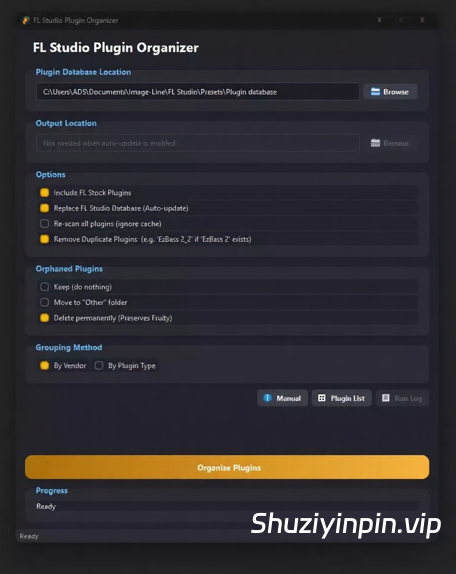
FL Studio Plugin Organizer 是一款适用于 Windows 的桌面应用程序,可自动将您的 FL Studio 插件浏览器整理到整齐有序的文件夹中。您无需每次打开 FL Studio 时都滚动浏览冗长杂乱的列表,所有插件都可以按照您想要的方式进行分组——按供应商(FabFilter、Xfer、Native Instruments 等)或按类型(合成器、鼓组、混响、均衡器等)。
功能:
批量项目迁移——FLP Modifier 替换流程的升级版。您可以定义一条或多条规则(例如“将所有插件 X 的实例替换为这个 .fst 预设”),并一次性对整个项目文件夹运行这些规则,而无需逐个打开项目。此功能专为“插件被卸载、购买后被重命名或停产,导致数十个旧项目损坏”的情况而设计。
FLP 修改器 — 直接打开 FL Studio 项目 (.flp) 并进行编辑,无需启动 FL Studio。您可以删除插件实例、音频通道或混音器效果,或者将其替换为 .fst 预设文件中保存的状态。这是批量项目迁移(第 15 节)对整个库执行的操作的单项目版本。
缩略图生成器 — 捕获插件的 UI 屏幕截图,并将其永久保存到 FL Studio 数据库中。捕获后,缩略图会显示在 FL Studio 浏览器中插件条目的旁边,这比通用图标更有用,方便您记住插件的外观或从几个类似的插件中选择要加载的插件。
智能插件卸载程序 — 安全地移除第三方插件,并在执行任何操作之前预览将要删除的文件。它支持三种移除策略:官方供应商卸载程序(直接从应用程序启动)、Waves Central(用于 Waves 插件)和直接文件移除(用于其他所有插件,并提供逐个文件的预览)。卸载程序树状结构会显示每个已安装的插件及其格式、安装日期、总大小和二进制文件路径。以多种格式安装的插件(例如,同时安装了旧版 VST2 和 VST3)会用专门的“重复格式”指示器标记,并且可以通过专门的“问题”筛选器一次性找到所有此类插件。如果插件的 .nfo 条目在磁盘上不再有匹配的二进制文件,
则会以红色高亮显示,以便您准确了解哪些插件已过时。
自定义分组工作区 — 创建您自己的命名插件文件夹,并从内置浏览器将任何插件拖入其中。
自定义分组始终优先于自动按供应商/类型排序,因此您精心设计的布局永远不会在后续的“整理”运行中被覆盖。分组(包括空分组)会立即保存并显示在工作区摘要栏中,以便您始终了解已注册的插件。
以及更多……
🆕 v3.3 新增功能:
批量项目迁移——FLP Modifier 替换流程的扩展。您可以定义一条或多条
规则(例如“将所有插件 X 实例替换为此 .fst 预设”),并
一次性遍历整个项目文件夹运行这些规则,而无需逐个打开项目。此功能专为“
插件被卸载、购买后被重命名或已停止开发,导致数十个旧
项目损坏”的情况而设计。
FL Studio Plugin Organizer is a desktop application for Windows that automatically sorts your FL
Studio plugin browser into neat, structured folders. Instead of scrolling through a long,
unorganized list every time you open FL Studio, you can have all your plugins grouped exactly
the way you want — by vendor (FabFilter, Xfer, Native Instruments…) or by type (Synth, Drums,
Reverb, EQ…)
FEATURES:
Batch Project Migration — the scale-up of FLP Modifier’s Replace flow. Define one or more
rules (“swap every instance of Plugin X for this .fst preset”) and run them across an entire
projects folder in a single pass, instead of opening each project one at a time. Built for the “a
plugin got uninstalled, renamed after buying it, or discontinued, and now dozens of old
projects are broken” scenario.
FLP Modifier — Open an FL Studio project (.flp) directly and edit it without launching FL Studio delete a plugin instance, an audio channel, or a mixer effect, or swap one for the state saved in an .fst preset file. This is the single-project version of what Batch Project Migration (Section 15) does for an entire library.
Thumbnail Generator — captures UI screenshots for your plugins and saves them permanently into the FL Studio database. Once captured, the thumbnail shows up in FL Studio’s browser next to the plugin entry much more useful than a generic icon when you’re trying to remember what a plugin looks like or which of several similar plugins you want to load.
Smart Plugin Uninstaller — safely removes third-party plugins and previews exactly which files
will be deleted before anything is touched. It supports three removal strategies: official vendor
uninstallers (launched directly from the app), Waves Central (for Waves plugins), and direct file
removal (for everything else, with per-file preview).
The uninstaller tree shows every installed plugin with its format, install date, total size, and
binary path. Plugins installed in more than one format (e.g. a legacy VST2 alongside VST3) are
flagged with a dedicated Duplicate Format indicator, and a dedicated Issues filter lets you find
them all at once. Plugins whose .nfo entry no longer has a matching binary on disk are
highlighted in red so you know exactly what’s stale.
Custom Groups Workspace — Create your own named plugin folders and drag any plugin into them from the built-in browser.
Custom groups always take priority over automated Vendor/Type sorting, so your curated layout is never overwritten on subsequent Organize runs. Groups — including empty ones — are saved instantly and shown in the workspace summary strip so you always know what’s registered.
and more ….
🆕 What’s New in v3.3
Batch Project Migration — the scale-up of FLP Modifier’s Replace flow. Define one or more
rules (“swap every instance of Plugin X for this .fst preset”) and run them across an entire
projects folder in a single pass, instead of opening each project one at a time. Built for the “a
plugin got uninstalled, renamed after buying it, or discontinued, and now dozens of old
projects are broken” scenario.
![[DJ混音器] Virtual DJ Studio 9.1.2 [WiN]](https://www.shuziyinpin.vip/wp-content/uploads/2026/10/vdj9-420.png)
![[苹果简单实用的网络防火墙工具] Radio Silence 3.4 [MacOSX]](https://www.shuziyinpin.vip/wp-content/uploads/2024/11/2a284542-0321-49cc-9ab6-2b0c54606f58.png)
![[可视化图形音乐编辑工具] Cycling ’74 Max v9.2.0-bobdule [WiN]](https://www.shuziyinpin.vip/wp-content/uploads/2025/05/1730589948_1433002159.webp)
![[语音降噪平衡控制应用] Voice Ready v1.0.2 [WIN]](https://www.shuziyinpin.vip/wp-content/uploads/2026/10/Voice-Ready.png)
![[StoryVox Pro 语音克隆器] StoryVox Pro v1.0.18 [WiN]](https://www.shuziyinpin.vip/wp-content/uploads/2026/08/StoryVox-Pro-Voice-Cloner.jpg)
![[非常好用的Mac苹果康泰克音色标准非标准批量入库工具] Add Library for macOS v7 [MacOSX]](https://www.shuziyinpin.vip/wp-content/uploads/2024/06/1697688753966.png)

评论0