
P2P | 18 July 2026 | 64.47 MB
安装方法:
让任何声音都更近。
录制的吉他音色和音量可能都恰到好处,但却显得柔和而疏离。人声可能清晰,但却始终感觉不到真正临场感。循环乐段可能与编曲契合,但周围仍然留有过多的空间感或距离感。提高推子音量可以增大这些声音,但并不一定能让它们更近。
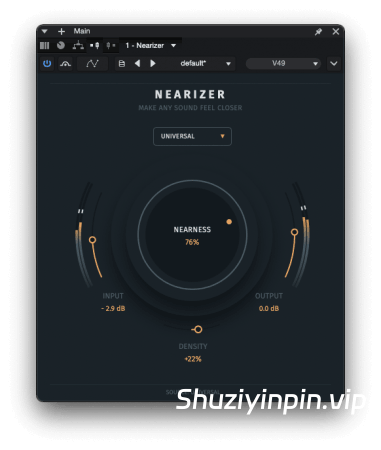
NEARIZER FX是一款近场插件,旨在让乐器、人声和整体混音更加突出,并让它们听起来更贴近听众。
它将动态、频谱、立体声和谐波处理整合在一个聚焦的流程中。Nearizer 并非简单地将距离视为音量或均衡问题,而是同时处理声音的起音、空间感、临场感、密度和立体声聚焦。
近场度控制着感知距离。
在较低设置下,它能增加微妙的聚焦感和直接性。调高近场度,声源会变得更加直接、清晰,并且不会淹没在周围环境中。原本遥远或空旷的声音仿佛被拉出房间,放置在更靠近听众的位置。
密度则单独控制着声音的厚重感。
保持较低密度可以获得更干净、更开阔的声音。当音源需要更多厚度、饱和度和临场感时,可以增加此设置。这样,您可以让音轨更加突出,而不会使其变得沉重或过度处理。Nearizer
包含 10 个音源配置文件:
通用、人声、鼓、贝斯、原声、电声、键盘、合成器、合成垫和混音。
这些并非简单的 EQ 预设。每个配置文件都会改变多个处理阶段的响应,因此人声、鼓、贝斯、合成垫和其他音源会根据其自然需要的方式进行处理,从而更好地突出。
它不仅仅是增强音量,也不是去混响插件。
Nearizer 并非简单地增强临场感、缩小立体声像或去除混响。
它基于多种使音源听起来遥远的因素进行工作,包括起音、房间平衡、密度、频谱聚焦和立体声信息。音源配置文件会针对不同类型的素材调整整个处理链,而不是应用不同的 EQ 曲线。
Nearizer 的设计目的并非去除所有混响或重建完全干声的录音。相反,它有助于原始声音突出,同时保持其自然特性和氛围。
在以下示例中,请注意音源是否变得更加直接、集中且在物理上更近,而不仅仅是声音更大或更亮。
功能:
适用于人声、鼓组、吉他、贝斯、合成器、键盘、合成器音垫和完整混音的近距离处理;
“近距离”控制,可调节感知距离、直接性和混音前置焦点;
独立的“密度”控制,可调节声音的饱满度、饱和度和泛音权重;
10 种音源配置文件:通用、人声、鼓组、贝斯、原声、电声、键盘、合成器、合成器音垫和混音;
多级动态、频谱、立体声和泛音处理;
无需简单地提高音量即可将远处和空旷的声音拉近;
专用的混音配置文件,可进行微妙的总线和全轨处理;
效果增强时自动进行电平补偿;
支持 DAW 自动化;
插件格式:
macOS:VST3、AU、AAX;
Windows:VST3;
兼容性:
Windows 8、10、11(64 位);
macOS 10.14 及更高版本;
兼容 Apple Silicon 和 Intel 芯片。
Make Any Sound Feel Closer
A recorded guitar can have the right tone and level, yet remain soft and detached. A vocal can be clear but never feel truly upfront. A loop can fit the arrangement while still carrying too much room or distance around it. Raising the fader makes these sounds louder, but it does not necessarily bring them closer.
NEARIZER FX is a proximity plugin designed to bring instruments, vocals and complete mixes forward and make them feel closer to the listener.
It combines dynamic, spectral, stereo and harmonic processing in one focused chain. Instead of treating distance as a simple volume or EQ problem, Nearizer works on the attack, room impression, presence, density and stereo focus together.
Nearness controls perceived distance.
At lower settings, it adds subtle focus and directness. Turn it further and the source becomes more immediate, more defined and less buried in its surroundings. A distant or roomy sound can feel as if it has been pulled out of the room and placed closer to the listener.
Density controls the weight of the result separately.
Keep it low for a cleaner and more open sound. Increase it when the source needs more body, saturation and physical presence. This lets you bring a track forward without automatically making it heavy or overly processed.
Nearizer includes 10 Source Profiles:
Universal, Vocal, Drums, Bass, Acoustic, Electric, Keys, Synth, Pad and MIX.
These are not simple EQ presets. Each profile changes the response of multiple processing stages, so vocals, drums, bass, pads and other sources are treated according to how they naturally need to move forward.
Not Just Louder. Not a De-Reverb Plugin.
Nearizer does not simply boost presence, narrow the stereo image or remove reverb.
It works on several cues that make a source feel distant, including attack, room balance, density, spectral focus and stereo information. The Source Profiles adjust the entire processing chain for different types of material, rather than applying a different EQ curve.
Nearizer is not designed to remove all reverb or reconstruct a completely dry recording. Instead, it helps the original sound move forward while keeping its natural character and ambience.
In the examples below, listen for the source becoming more immediate, focused and physically closer, not simply louder or brighter.
Features:
Proximity processing for vocals, drums, guitars, bass, synths, keys, pads, and full mixes
NEARNESS control for perceived distance, directness, and front-of-mix focus
Separate DENSITY control for body, saturation, and harmonic weight
10 Source Profiles: Universal, Vocal, Drums, Bass, Acoustic, Electric, Keys, Synth, Pad, and Mix
Multi-stage dynamic, spectral, stereo, and harmonic processing
Brings distant and roomy sounds forward without simply increasing volume
Dedicated Mix profile for subtle bus and full-track processing
Automatic level compensation as the effect increases
DAW automation support
Plugin Format:
macOS: VST3, AU, AAX
Windows: VST3
Compatibility:
Windows 8, 10, 11 (64-bit)
macOS 10.14 and later
Apple Silicon and Intel compatible
![[专业DJ演奏工具] Algoriddim djay Pro 5.6.10-TNT [MacOSX]](https://www.shuziyinpin.vip/wp-content/uploads/2024/10/14122315_algoriddim-djay-pro.png)
![[完整版:最好的合成器之一] Native Instruments Absynth v6.2.0-V.R [WiN, MacOSX]](https://www.shuziyinpin.vip/wp-content/uploads/2026/10/Absynth-v6.2.0.png)
![[终极吉他和贝斯低音调音增强器] AtlasDSP DI Crank v2.0.0 [WiN, MacOSX]](https://www.shuziyinpin.vip/wp-content/uploads/2026/10/AtlasDSP-DI-Crank.jpg)
![[音频混音器] MacMix Studio v2.3-MacKed [MacOSX]](https://www.shuziyinpin.vip/wp-content/uploads/2026/10/MacMix-Studio.png)
![[人声处理工具] Sonido Fresh Fresh Vocal 3 RETAiL [WiN, MacOSX]](https://www.shuziyinpin.vip/wp-content/uploads/2026/10/Fresh-Vocal-3.png)
![[色彩操纵器] blepfx prisma schnitzelPommes x64 [WiN]](https://www.shuziyinpin.vip/wp-content/uploads/2026/10/blepfx-prisma-schnitzelpommes.png)

评论0