
CTHuLHU | 19 July 2026 | 5.96 MB
安装方法:
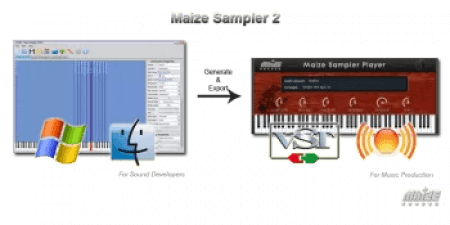
您是否梦想过将您的采样发布为 VST 和 Audio Unit 虚拟乐器?Maize Sampler 2 让这一切变得轻松又经济实惠。只需几分钟,您的乐器即可供世界各地的音乐家使用。 Maize Sampler 2 是一款跨平台工具,专为音频开发者打造,用于创建基于采样的虚拟乐器。 功能包括: 更新日志 2.10.6 Have you ever dreamed publishing your samples as a VST and Audio Unit virtual instrument? With Maize Sampler 2, this is easy and affordable. In minutes, your instruments will be ready to be used by musicians all over the world. Maize Sampler 2 is a cross-platform tool for sound developers to create sample-based virtual instruments. Features: Changelog 2.10.6
– 独立的 Windows 和 macOS 编辑器应用程序。
– 原生支持 Apple Silicon。
– 按键/控制器/MIDI 通道分组选择。
– 磁盘流式传输/内存读取模式。
– 复音/单音/连奏音色模式,带滑音时间。
– LFO、ADSR 包络和内置混响效果。
– 循环/随机重叠采样触发。
– 加载 EXS24 采样器格式。
– 采样循环、扼流圈、释放触发。
– 大型采样映射区域和采样表视图。
– 导出 .mse 紧凑型乐器文件。
– 生成可自定义名称的 VST2、VST3 和 Audio Unit 播放器插件。
– Mac 版播放器已完成签名和公证。
– 所见即所得播放器 GUI 编辑器
– 播放器 UI 上的自定义旋钮、推子、电平表和按钮。
– 导出乐器时启用序列号复制保护。
– 支持最多 32 个音频输出通道。
– 修复了一些可能导致播放器崩溃或故障的不稳定问题。
– 修复了编辑器中映射选项被禁用的问题。
– 更新了 macOS 的编辑器图标,使其与 macOS 26 的风格一致。
– 修复了宿主程序打开播放器 GUI 时可能出现的音频故障。
– 修复了在 Mac 上加载乐器时发生的崩溃问题。
– 修复了复制保护问题。
– 修复了播放器不显示到期天数的错误。
– 提高了组调音参数的精度。
– 修复了 Windows 系统下“关于”框刻度和序列号输入的问题。
– 允许在属性面板中移除和重新排序组。
– 修复了编辑器中可能发生的一些崩溃问题。
– 支持文件名带有 @2x 后缀的高分辨率图像。
– 改进了编辑器中的保存和导出等待屏幕。
– 修复了连奏重触发问题。
– 修复了自定义旋钮渲染问题。
– 升级到 JUCE 7 框架。
– 除了编组辅助输出外,现在还可以将音频路由到主输出。
– 修复了 MIDI CC 编组选择错误。
– 修复了连奏模式 ADSR 的问题。
– 允许播放器中的键盘具有动态键位大小。
– 修复了电平表绘制错误。
– Standalone Windows and macOS editor application.
– Native Apple Silicon support.
– Group selections by key / controller / MIDI channel.
– Disk-streaming / Memory reading mode.
– Poly / Mono / Legato voice mode with glide time.
– LFO, ADSR envelope and built-in reverb effect.
– Round-robin / Random overlapped sample trigger.
– Load EXS24 sampler format.
– Sample loop, Choke cluster, Release trigger.
– Big sample mapping area and sample table view.
– Export .mse compact instrument file.
– VST2, VST3 and Audio Unit player plug-in generation with customized names.
– Fully signed and notarized players on Mac.
– What you see is what you get player GUI editor
– Custom knobs, faders, meters and buttons on player UI.
– Serial number copy protection on exported instruments.
– Support up to 32 audio output channels
– Fixed some unstablities that could lead to crash to glitch in the player.
– Fixed the problem that mapping options are disabled in the editor.
– Updated the editor icon for macOS to match macOS 26 style.
– Fixed an audio glitch that could happen when the host is opening the GUI of the player.
– Fixed a crash on mac when loading instrument
– Fixed a problem with copy protection
– Fixed a bug that the player is not showing expiring days
– Added more precision to group tune parameter
– Fixed a problem with about box scale and serial number input on Windows
– Allow group remove and reorder in property panel
– Fixed some crash that may happen in the editor
– Support high resolution image with @2x affix in filename.
– Better saving and exporting waiting screen in editor.
– Fixed a legato retrigger problem.
– Fixed a custom knob rendering problem.
– Upgraded to JUCE 7 framework.
– Route audio to main output in addition to group aux.
– Fixed a MIDI cc group selection bug.
– Fixed a legato mode ADSR problem.
– Allow the keyboard in player has dynamic key size.
– Fixed a bug with level meter drawing.
![[完整版:最好的合成器之一] Native Instruments Absynth v6.2.0-V.R [WiN, MacOSX]](https://www.shuziyinpin.vip/wp-content/uploads/2026/10/Absynth-v6.2.0.png)
![[终极吉他和贝斯低音调音增强器] AtlasDSP DI Crank v2.0.0 [WiN, MacOSX]](https://www.shuziyinpin.vip/wp-content/uploads/2026/10/AtlasDSP-DI-Crank.jpg)
![[人声处理工具] Sonido Fresh Fresh Vocal 3 RETAiL [WiN, MacOSX]](https://www.shuziyinpin.vip/wp-content/uploads/2026/10/Fresh-Vocal-3.png)
![[色彩操纵器] blepfx prisma schnitzelPommes x64 [WiN]](https://www.shuziyinpin.vip/wp-content/uploads/2026/10/blepfx-prisma-schnitzelpommes.png)
![[Big Man Labs音频插件捆绑包] Big Man Labs Bundle 2026.10 [WiN]](https://www.shuziyinpin.vip/wp-content/uploads/2026/10/Big-Man-Labs-Bundle.png)
![[最响亮的母带峰值限制器] Xilentch XMLimiter 2 v2.0.0-MOCHA [WiN, MacOSX]](https://www.shuziyinpin.vip/wp-content/uploads/2026/10/Xilentch-XMLimiter-2.jpg)

评论0