
L O S T | 22 October 2026 | 153 MB
安装方法:只需安装,免激活版本。
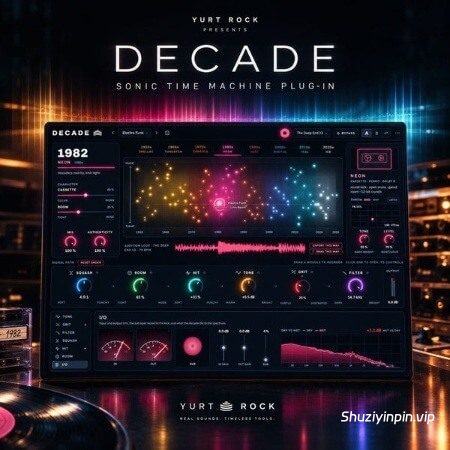
Choose a year. Hear your drums age. Decade puts eight decades of drum sound on a single timeline. Move the puck from 1950 to now and the whole chain follows — the console, the room, and the format the record was heard on. This isn’t a preset browser with era names on it. The year is the instrument.
How it works
Put it on your drums. A loop, a full bus, a single snare, or the whole mix.
Pick a year. Drag left and right along the timeline. Tone, saturation, filtering, compression, transient shaping and room all move together to what that year actually did — 1974 and 1979 are genuinely different, not the same “seventies” patch.
Set the room. Drag up and down. Dead and close at the bottom, big at the top: the bottom of 1980 is a gated but small room, the top is the full cathedral.
Decide how far to lean. ERA blends the whole decade treatment against a flat rack. MIX brings your dry kit back underneath. Both are one knob.
Three layers, one control
The console — eight modules in the order a studio would have them: input, tone, grit, filter, squash, hit, room, output. Every value is drivable by hand, and re-orderable by dragging.
The room — size, decay, gate, pre-delay and damping, scaled by where you sit on the vertical axis.
The medium — the format the listener actually heard, which is the strongest era cue there is. Acetate and tube radio in the fifties, vinyl through the sixties and seventies, cassette in the eighties, CD in the nineties, MP3 in the two-thousands, streaming now. It follows the year by default, or lock it and put a modern kit on 1967 vinyl.
What’s inside
120 presets across eight decades — each one sits on the map where it belongs, so you can see the era before you hear it
Six playback formats — wow, flutter, crackle, rumble, dropouts, bit reduction, disc skip, spectral holes and loudness normalisation, each modeled for its own era rather than as one generic “lo-fi” knob
A real rack — take any parameter off the map and set it yourself, then hand it back with a click. Re-order the signal path by dragging.
Live analysis — your dry signal drawn against the processed one, so you can see exactly what the decade took away, plus the measured tail after every hit
Session-friendly — saves with your DAW project, works fully offline after activation, use on up to 3 machines
Compatibility
Formats: VST3, AU and AAX (Ableton Live, Logic Pro, Pro Tools, FL Studio, Cubase, Studio One, Reaper, and more)
Platform: macOS 11+ (Apple Silicon & Intel) and Windows 10+ (64-bit)
Use it on: a drum bus, a single drum, a loop, or a full mix
![[终极低音增强器] AtlasDSP DI Hell v2.0 [WiN, MacOSX]](https://www.shuziyinpin.vip/wp-content/uploads/2026/10/AtlasDSP-DI-Hell.jpg)
![[13 款模拟风格插件] Riverflux Audio Relic v0.4.1 VST3 CLAP AU [WiN, MacOSX, LiNUX]](https://www.shuziyinpin.vip/wp-content/uploads/2026/10/Riverflux-Audio-Relic.png)
![[音调平衡控制母带处理工具] iZotope Tonal Balance Control v3.4.0-V.R [WiN]](https://www.shuziyinpin.vip/wp-content/uploads/2026/03/izotope-tonal-balance-control-3.png)
![[降噪修复分离平衡工具插件包] iZotope RX 12 Audio Editor Advanced v12.1.0 [WiN, MacOSX]](https://www.shuziyinpin.vip/wp-content/uploads/2026/05/iZotope-RX-12-Audio-Editor-Advanced-v12.0.0-U2B.png)
![[臭氧母带处理插件] iZotope Ozone 12 Advanced v12.2.0-VR [WiN]](https://www.shuziyinpin.vip/wp-content/uploads/2025/09/Ozone-12-v12.0.2.png)
![[创意混音和母带处理可视化工具合集] Orra Audio Plugins Bundle 2026.10 Incl. Keygen-MOCHA [WiN]](https://www.shuziyinpin.vip/wp-content/uploads/2026/10/Orra-Audio.png)

评论0