
Win:SEnki | 23 January 2026 | 9.9 MB
Win(Mac):Team R2R | 05 November 2022 | 34.55 MB
安装方法:
实时瞬态检测、灵活的采样和合成引擎、具有复杂调制功能的多层音色库
概述:
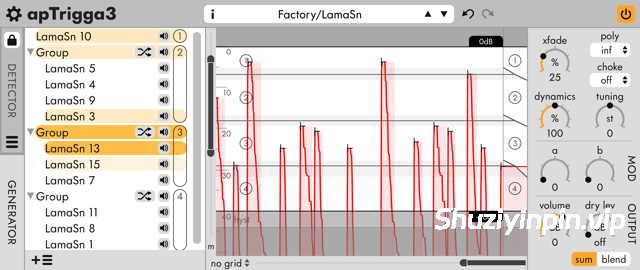
apulSoft apTrigga3 是一款音频插入效果插件,用于检测输入信号上的触发事件,并以此添加或替换声音。它拥有强大的采样管理功能、灵活的合成器层(包含多个包络)以及一个调制部分(可对大多数参数进行逐采样调制)。输入层使用采样器引擎处理输入音频,并将 apTrigga3 转换为打击乐音效处理器。
apTrigga3 具有一个输入滤波器部分,内置频率分析器和可配置的滤波器频段,用于塑造输入信号。
该插件具有多种播放模式,可以按顺序、随机或同时播放各个层。用户可以直接在 apTrigga3 中完成基本的采样编辑。可以从输入端录制采样,快速捕获来自麦克风或合成器的多个采样。
使用 apTrigga3 可以替换或混合单个乐器通道上的鼓声。低延迟模式适用于实时使用,而高延迟模式则可在混音期间实现采样级的瞬态匹配。
主要功能
• 演示版!下载并体验演示模式。
• 通过分析输入信号触发采样和合成器音色。
• 可调节触发延迟(0毫秒/2毫秒/50毫秒/500毫秒)。
• 触发信号和事件显示,动态设置位于顶部。
• 跨实例的开/闭镲扼流功能。
• 每个预设可包含无限数量的图层,并可通过拖放进行组织和分组。
• 输入滤波器部分具有无限的滤波器频段、频率分析器和滤波器响应显示。
• 内置采样和合成器引擎,并具有用户可自定义的调制规则。
• 采样精确的包络,用于音量、滤波器和用户可自定义参数,并具有无限数量的曲线段。
• 新增:输入图层使用采样器引擎处理插件输入。
• 每个图层一个多模多极滤波器。
• 直接在波形编辑器中裁剪采样。
• 通过 MIDI 音色更改消息切换预设。
• 录制来自插件输入的采样,以快速捕获动态多重采样。
• 所有操作均支持 10 步撤销/重做。
• 插件格式:支持 macOS 和 Windows 系统上的 32 位和 64 位宿主软件的 AudioUnits/AAX/VST/VST3 格式。
• 内置系统级预设管理功能,支持导入和导出预设文件(包含所有采样),兼容所有平台和宿主软件。
• 提供明亮和暗色调配色方案,并支持用户自定义配色方案。
Real-time transient detection, flexible sample and synth engine, multi-layer patches with complex modulation
Overview
apulSoft apTrigga3 is an audio insert effect plugin to detect trigger events on its input signal which are used to add or replace sounds. It has extensive sample management features, flexible synthesizer layers with multiple envelopes and a modulation section with per sample modulation of most parameters. Input layers process the input audio using the sampler engine and transform apTrigga3 into a percussive sound effects processor.
apTrigga3 features an input filter section with built-in frequency analyzer and configurable filter bands to shape the input signal.
The plugin has various playback modes to play layers in sequence, randomly or at the same time. Basic sample edits can be done right inside apTrigga3. Samples can be recorded from the input to quickly capture multi-samples from microphones or synthesizers.
Use apTrigga3 to replace or mix drum sounds on single-instrument channels. Low latency modes are suitable for real-time use while higher latency modes enable sample-accurate transient matching during mixdown.
Main Features
• Demo version! Download and try in demo mode.
• Trigger samples and synth sounds by analyzing the input signal.
• Adjustable trigger latency (0ms/2ms/50ms/500ms).
• Trigger signal & event display with dynamics settings on top.
• Cross-instance choke functionality for open/closed hihats.
• Unlimited number of layers per preset that can be organized and grouped using drag & drop.
• Input filter section with unlimited filter bands, frequency analyzer and filter response display.
• Built-in sample and synth engines with user-definable modulation rules.
• Sample accurate envelopes for volume, filter and a user-definable parameter with an unlimited number of curved sections.
• New: Input layers process the plugin input using the sampler engine.
• One multimode multipole filter per layer.
• Crop samples directly in the waveform editor.
• Preset switching by midi patch change messages.
• Record samples from the plugin input to quickly capture dynamic multisamples.
• 10-step undo/redo for all actions.
• Plugin formats: AudioUnits/AAX/VST/VST3 for 32-bit and 64-bit hosts on macOS and Windows
• Built-in system-wide preset management with import and export of preset files with all samples included, compatible across platforms and hosts.
• Bright & Dark color schemes and support for user defined color schemes.
Note: I messed up my installer script. Enable the VST & VST3 option in the installer, and the VST3 file will be where your specified VST path is.
![[简易采样加载插件] AtlasDSP Replacer v1.0 [WiN, MacOSX]](https://www.shuziyinpin.vip/wp-content/uploads/2026/10/AtlasDSP-Replacer.png)
![[全球最佳 DJ 软件] Serato DJ Pro Suite v5.0.0-V.R [WiN, MacOSX]](https://www.shuziyinpin.vip/wp-content/uploads/2025/11/Serato-DJ-Pro-Suite-v4.0.0-1024x633.png)
![[自动削波修复插件] Leit Audio UnClip v1.0.0 VST3 AU [WiN, MacOSX, LiNUX]](https://www.shuziyinpin.vip/wp-content/uploads/2026/10/Leit-Audio-UnClip.png)
![[完整版:最好的合成器之一] Native Instruments Absynth v6.2.1 [WiN, MacOSX]](https://www.shuziyinpin.vip/wp-content/uploads/2026/10/Absynth-v6.2.0.png)
![[现场演奏乐器] Beatsurfing Druw v1.0.1 VST Incl. Keymaker-RLTS [WiN]](https://www.shuziyinpin.vip/wp-content/uploads/2026/10/beatsurfing-druw.jpg)
![[ PAA 音频套装] PAA Audio Bundle v2026.10 Patched Incl. Keygen-MOCHA [WiN]](https://www.shuziyinpin.vip/wp-content/uploads/2026/10/PAA-Bundle.jpg)

评论0