
Win:SEnki | 23 January 2026 | 6.3 MB
Win(Mac):Team R2R | 05 November 2022 | 21.57 MB
安装方法:
模块化均衡器插件,卓越音质,无限调制可能性
概述
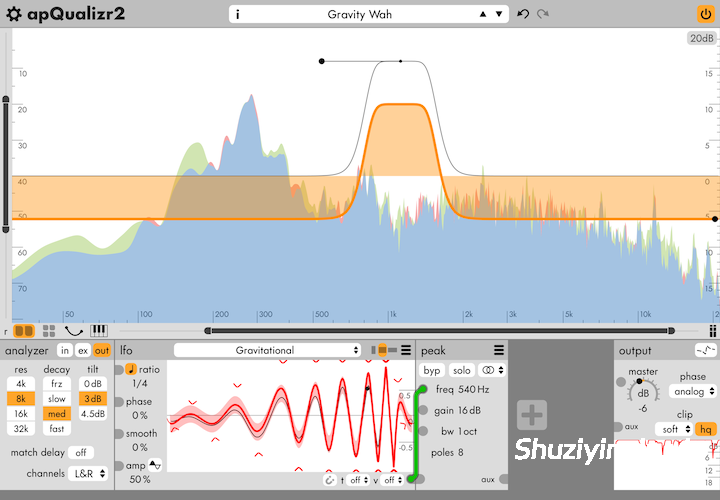
apulSoft apQualizr2 是一款均衡器音频插件。滤波器频段可在频率分析器显示屏上进行图形化编辑。模块托盘支持对各种滤波器参数进行基于模块的调制。
apQualizr2 可用于所有标准均衡应用。凭借内置的动态和超灵活的 LFO 模块,它可以创建调制和动态效果。内置的 MIDI 模块可对大多数功能进行 MIDI 控制。
滤波器技术
apQualizr2 的滤波器基于一种独特的方法,可在整个频谱范围内匹配理想的频率响应曲线。适用的滤波器类型具有可调节的陡度(可调节的极点/斜率数量),并且可以单独切换到中侧处理。
滤波器具有 ++ 极点模式,在该模式下斜率变得极其陡峭:一个半音即可覆盖完整的增益变化。频谱倾斜和可变斜率低通/高通滤波器允许连续的倾斜/斜率值和调制。apQualizr2 包含相位校正引擎,可实现最小相位、模拟相位、混合相位和线性相位。
主要功能
• 演示版!下载并体验演示模式。
• 高品质可变极点滤波器,完美模拟全频段。
• 4 种相位校正引擎:极简、模拟、混合和线性。
• 图形化编辑滤波器参数。
• 无限数量的滤波器频段。
• 特殊的 ++ 滤波器模式,适用于极其陡峭的斜率。
• 可缩放的基于 FFT 的频率分析器,显示在滤波器曲线下方。
• 相位响应图。
• 频段独奏功能:按住 Alt 键即可随时独奏鼠标附近的频率。
• 滤波器参数可通过可配置的模块网络进行调制。
• 包含的模块:LFO、动态、示波器、混音、分割、旋钮、MIDI 输入、侧链。
• 使用双击区域和从求和曲线拖动创建,快速设置均衡器。
• LFO 多段曲线编辑器,具有无限的控制点和宿主时间同步功能。
• 停止模式可将 LFO 模块转换为灵活的传递函数/信号整形器。
• 使用侧链模块支持侧链。
• 交互式钢琴标尺。
• 每个滤波器频段的中侧/左右处理。
• 梳状滤波器。
• 采用我们独创的匹配变换的全通滤波器,谐振可调。
• 具有连续可调斜率的频谱倾斜滤波器。
• 连续可变斜率的高通和低通滤波器。
• 具有峰值、并行带通和陷波频段的谐波滤波器组。
• 使用辅助输出支持并行处理。
• 输出削波器,带有增益衰减图和高质量抗锯齿功能。
• 所有操作均支持无限次撤销/重做。
• 插件格式:macOS(Intel/ARM 64 位)和 Windows(32/64 位 Intel)上的 AudioUnits/AAX/VST/VST3。
• 内置系统级预设管理,支持预设文件的导入和导出,兼容不同平台和宿主程序,采用易于阅读的 XML 文件格式。
• 可从各种应用程序(包括 AutoEq 和 REW)导入均衡器配置文本文件。
• 提供明亮和暗色调配色方案,并支持用户自定义配色方案。
Modular equalizer plugin, fantastic sound quality, countless modulation possibilities
Overview
apulSoft apQualizr2 is an equalizer audio plugin. Filter bands can be graphically edited on top of a frequency analyzer display. The module tray enables module-based modulation of various filter parameters.
apQualizr2 can be used for all standard EQ applications. It can create modulation and dynamics effects thanks to the included dynamics and super-flexible LFO modules. The built-in midi module provides midi control of most things.
Filter Technology
apQualizr2 filters are based on a unique method to match ideal frequency response curves over the entire frequency spectrum. Applicable filter types have adjustable steepness (adjustable number of poles/slopes) and can be individually switched to mid-side processing
Filters have a ++ poles mode where slopes get extremely steep: the full gain change is covered within one semitone. Spectral tilt and variable-slope low- and highpass filters allow continuous tilt/slope values and modulation. apQualizr2 includes phase correction engines to achieve minimal, analog, mixed and linear phase.
Main Features
• Demo version! Download and try in demo mode.
• High quality variable-poles filters modeled perfectly over the full frequency spectrum.
• 4 phase correction engines: minimal, analog, mixed and linear.
• Graphical editing of filter parameters.
• Unlimited number of filter bands.
• Special ++ filter mode for extremely steep slopes.
• Zoomable FFT-based frequency analyzer displayed beneath the filter curves.
• Phase reponse graph.
• Frequency band solo feature: hold alt to solo frequencies in mouse proximity at any time.
• Filter parameters can be modulated by a configurable network of modules.
• Modules included: LFO, dynamics, scope, mix, split, knobs, midi in, sidechain.
• Quick eq setup using double-click zones and create-on-drag from the sum curve.
• LFO multi-segment curve editor with unlimited control points and host time sync.
• The stop-mode turns the LFO module into flexible transfer-function/signal-shaper.
• Sidechain support using the sidechain module.
• Interactive piano ruler.
• Mid-side / left-right processing per filter band.
• Comb filter.
• All pass filters with adjustable resonance using our original matching transform.
• Spectral tilt filter with continuously adjustable slope.
• Continuously variable slope high and low pass filters.
• Harmonic filterbanks with peak, parallel bandpass, and notch bands.
• Parallel processing support using the aux output.
• Output clipper with gain reduction graph and high quality antialiasing.
• Unlimited undo/redo for all actions.
• Plugin formats: AudioUnits/AAX/VST/VST3 on macOS (intel/arm 64-bit) and Windows (32/64-bit intel)
• Built-in system-wide preset management with import and export of preset files, compatible across platforms and hosts using a human-readable xml file format.
• Import of equalizer config text files from various applications (including AutoEq and REW).
• Bright & dark color schemes and support for user defined color schemes.
Note: I messed up my installer script. Enable the VST & VST3 option in the installer, and the VST3 file will be where your specified VST path is.
![[简易采样加载插件] AtlasDSP Replacer v1.0 [WiN, MacOSX]](https://www.shuziyinpin.vip/wp-content/uploads/2026/10/AtlasDSP-Replacer.png)
![[全球最佳 DJ 软件] Serato DJ Pro Suite v5.0.0-V.R [WiN, MacOSX]](https://www.shuziyinpin.vip/wp-content/uploads/2025/11/Serato-DJ-Pro-Suite-v4.0.0-1024x633.png)
![[自动削波修复插件] Leit Audio UnClip v1.0.0 VST3 AU [WiN, MacOSX, LiNUX]](https://www.shuziyinpin.vip/wp-content/uploads/2026/10/Leit-Audio-UnClip.png)
![[完整版:最好的合成器之一] Native Instruments Absynth v6.2.1 [WiN, MacOSX]](https://www.shuziyinpin.vip/wp-content/uploads/2026/10/Absynth-v6.2.0.png)
![[现场演奏乐器] Beatsurfing Druw v1.0.1 VST Incl. Keymaker-RLTS [WiN]](https://www.shuziyinpin.vip/wp-content/uploads/2026/10/beatsurfing-druw.jpg)
![[ PAA 音频套装] PAA Audio Bundle v2026.10 Patched Incl. Keygen-MOCHA [WiN]](https://www.shuziyinpin.vip/wp-content/uploads/2026/10/PAA-Bundle.jpg)

评论0