
Team R2R | 13 October 2026 | 52.4 MB
安装方法:安装并注册,若要运行 .r2rwm 文件,您需要安装“TEAM.R2R.System.v1.5.3-R2R”(点击下载)。
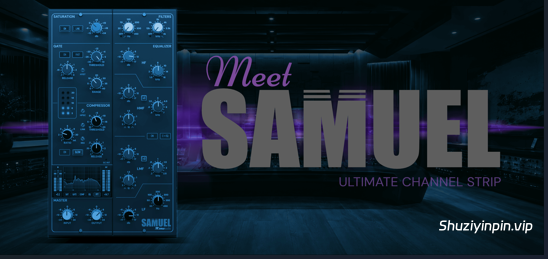
两个低频搁架和两个高音分频器,始终位于信号路径中:在中心设置下,频段不会增加任何频率,因此无需手动开关频段。低频搁架的频率范围为 30 至 450 Hz,高频搁架的频率范围为 1.5 至 16 kHz;低中频覆盖 200 Hz 至 2.5 kHz,高中频覆盖 600 Hz 至 7 kHz,每个频段都有各自的 Q 值,范围从 0.5 到 3。两个范围按钮用于调节高音分频器的频率——÷3 将低中频下移至中低频,×3 将高中频提升至约 21 kHz——每个增益的调节范围为 ±17 dB。频段对增益和 Q 值的响应方式与调音台通道相同,低音和空气感保持了其深度。
高通和低通滤波器:
高通滤波器的频率范围为 20 至 350 Hz,低通滤波器的频率范围为 12 kHz 至 3 kHz。当滤波器处于关闭状态时,它将完全从信号路径中移除;每个旋钮下方的小 LED 指示灯会显示其工作状态。EQ ON 开关会关闭整个均衡器(包括滤波器),以便快速进行前后对比。
前置放大器饱和度——麦克风和线路:
位于通道条前端的前置放大器级。线路模式保持高频干净,并将温暖感融入低频;麦克风模式则提供更宽广、更明亮的音色。驱动范围为 -12 至 +24 dB,该级会将相同的电平输出,因此调高驱动值会改变音色,而不是音量——低于 0 时比单位增益更干净,高于 0 时谐波会增加。整个级采用过采样,因此谐波不会重叠到可听范围内。
门限器的工作方式类似于调音台的门限器:
阈值范围为 -30 至 +10 dB,衰减范围为 0 至 40 dB,释放时间范围为 0.1 至 4 秒,还有一个用于控制启动速度的 FAST 开关。 HYST 设置门限再次关闭的深度,使其低于开启点,从而避免衰减的嗵鼓或响亮的军鼓在阈值处产生杂音。左侧 LED 指示灯显示门限的衰减量。
反馈压缩器位于均衡器之前或之后。
该压缩器监听自身的输出,因此压缩比会随着压缩深度的增加而增大,从 1:1 一直到无限大 (LIM)。第二个型号 CHANNEL 位于压缩器 ON 按钮下方的 LED 指示灯上,只需单击一下即可切换:这是一个简单的前馈压缩器,适用于录音,对低音和明亮音源的处理效果干净,旋钮与第一个型号相同。RELEASE 的取值范围为 0.1 到 4 秒,旋钮顶部为 AUTO,此时释放时间跟随节目进行;SLOW 切换启动时间。HPSC 将侧链滤波至 250 Hz,以防止低频过度干扰混音;LINK 设置两个通道共享检测的程度;MIX 将干信号混合回主信号以进行并行压缩。C→EQ 交换压缩器和均衡器的顺序。 SC INT 将均衡器从音频路径中移除,并将其置于压缩器的侧链中——提升某个频段,压缩器便会对该频段做出响应,而不会改变音色,其功能涵盖频率相关的控制和齿音消除。没有补偿旋钮:OUTPUT 旋钮用于设置电平。
每个阶段都有相应的显示屏。
“主控”窗口显示输入和输出电平表及其峰值读数——单击即可重置;播放停止时,电平表也会清除——中间显示五个视图之一。“饱和度”显示前置放大器在当前输入电平下产生的谐波,“门限”绘制输入和输出电平随时间变化的阈值曲线,“压缩”显示压缩量,“均衡”显示您设置的曲线,“快速傅里叶变换”显示输出频谱。视图会随会话一起保存。“模式”设置面板中的“模式”可在“立体声”和“单声道”之间切换——“单声道”仅处理立体声轨道的左声道输入,并将其发送到两个输出。
零延迟及其相关工作流程。
就像模拟调音台的通道一样,因此既可用于工程中的各个轨道,也能处理实时输入信号。在混音导出阶段,设置面板中的“QUALITY”(质量)选项提供 HQ 和 ULTRA 两种模式,分别针对实时监听和离线渲染进行选择:在此模式下,饱和效果和总线(BUS)压缩器会采用更高的过采样率运行,即便在重度驱动下也能保持高频部分的纯净;此时会产生少量延迟,SAMUEL 会将其上报给宿主软件以进行延迟补偿(HQ 模式下为 32 个采样点)。“QUALITY”设置随工程文件保存,因此不会因切换预设而改变;使用“APPLY TO ALL”(应用于所有)功能可将该设置复制到所有已打开的 SAMUEL 实例中。输入(INPUT)和输出(OUTPUT)增益微调范围均为 ±24 dB。顶部工具栏包含:带 10 毫秒交叉淡入淡出效果的旁通(Bypass)功能、撤销与重做、初始化(INIT)、预设浏览器、A/B 对比(支持两者间设置复制)以及“保存”和“另存为”功能;插件窗口支持调整大小。
我们更新了密钥生成器,生成新的许可证,修复了静默输出的问题。在 SOMUEL 中,部分数据使用 ChaCha/Poly1305 加密。我们需要提供有效的密钥才能进行加密。
Two shelves and two bells, every one always in the signal path: at its centre setting a band adds exactly nothing, so there is no need to switch bands on and off. LF shelves from 30 to 450 Hz and HF from 1.5 to 16 kHz; LMF covers 200 Hz to 2.5 kHz and HMF 600 Hz to 7 kHz, each with its own Q from 0.5 to 3. Two range buttons move the bells — ÷3 takes LMF down into the low mids, ×3 lifts HMF up to about 21 kHz — and every gain runs ±17 dB. The bands answer gain and Q the way a console channel does, and the bass and the air keep their depth.
High- and low-pass filters
The high-pass runs from 20 to 350 Hz and the low-pass from 12 kHz down to 3 kHz. Parked at OFF, a filter drops out of the path entirely; the small LED under each knob tells you it is in. The EQ ON switch takes the whole equalizer out, filters included, for a quick before and after.
Preamp saturation — MIC and LINE
A preamp stage at the head of the strip. LINE keeps the top end clean and puts its warmth in the lows; MIC is the broader, brighter voicing. Drive runs from −12 to +24 dB, and the stage hands the same level back out, so turning it up changes the colour, not the volume — below 0 it is cleaner than unity, above it the harmonics grow. The whole stage runs oversampled, so the harmonics do not fold back into the audible range.
A gate that behaves like a console gate
THRESHOLD from −30 to +10, RANGE from 0 to 40 dB of attenuation, RELEASE from 0.1 to 4 s and a FAST switch for the attack. HYST sets how far below the opening point the gate closes again, so a decaying tom or a ringing snare does not chatter on the threshold. The left column of LEDs shows how much the gate is taking away.
A feedback compressor, before or after the EQ
The compressor listens to its own output, so the ratio steepens as the compression gets deeper, from 1:1 up to inf. (LIM). A second model, CHANNEL, is one click away on the LED under the compressor’s ON button: a simple feed-forward compressor for tracking, clean on bass and bright sources, with the same knobs. RELEASE runs from 0.1 to 4 s, with AUTO at the top of the knob, where the release follows the programme; SLOW switches the attack. HPSC filters the side chain up to 250 Hz so the low end does not pump the mix, LINK sets how much the two channels share their detection, and MIX blends the dry signal back in for parallel compression. C→EQ swaps the order of the compressor and the equalizer. SC INT takes the equalizer out of the audio path and puts it in the compressor’s side chain instead — boost a band there and the compressor reacts to that band without the tone changing, from frequency-dependent control to de-essing. There is no make-up knob: OUTPUT sets the level.
A display for every stage
The MASTER window shows input and output meters with peak readouts — click one to reset it; they also clear when playback stops — and one of five views in the middle. SAT shows which harmonics the preamp makes at the level coming in, GATE draws the input and output against the threshold over time, COMP shows the compression, EQ the curve you have set, and FFT the spectrum of the output. The view is saved with the session. MODE in the settings panel switches between STEREO and MONO — MONO processes only the left input of a stereo track and sends it to both outputs.
Zero latency, and the workflow around it
SAMUEL works without any latency by default, like a channel of an analogue desk, so it can sit on every track of a session and on a live input. For the mixdown, QUALITY in the settings panel offers HQ and ULTRA, chosen separately for realtime and for rendering: the saturation and the BUS compressor then run further oversampled, which keeps the top end clean even when they are driven hard, at a small latency that SAMUEL reports to the host for delay compensation (HQ: 32 samples). QUALITY is saved with the session, so a preset never changes it, and APPLY TO ALL copies it to every other open SAMUEL. INPUT and OUTPUT trim ±24 dB. The top bar carries bypass with a 10 ms crossfade, undo and redo, INIT, the preset browser, A > B with copy between the two, Save and Save As; the window is resizable.
We updated the keygen to generate new license which fixes silent output. In SOMUEL, some part of data is encrypted by ChaCha/Poly1305. We needed to provide the valid key to for it.
![[高频空气感增强插件] Bogren Digital A-Class v1.0.1 [WiN, MacOSX]](https://www.shuziyinpin.vip/wp-content/uploads/2026/10/bogren-digital-a-class.png)
![[16 款 Safari 插件全新升级包] Safari Audio Safari Pedals Everything V2 v2026.10.10 Incl Keygen-R2R [WiN]](https://www.shuziyinpin.vip/wp-content/uploads/2026/10/Safari-Pedals-Everything-V2-300x280.png)
![[完整版:最好的合成器之一] Native Instruments Absynth v6.2.0-bobdule [WiN]](https://www.shuziyinpin.vip/wp-content/uploads/2026/10/Absynth-v6.2.0.png)
![[节奏工作站+原厂音色+46个扩展] Native Instruments Maschine 3 v3.7.1-bobdule [WiN]](https://www.shuziyinpin.vip/wp-content/uploads/2024/11/353c92b1a12aaa28a86c088231eb7f4c-1024x649.jpeg)
![[零延迟调音台风格通道条] Lemur Audio SAMUEL v1.0.19 Incl Patched and Keygen-R2R [WiN]](https://www.shuziyinpin.vip/wp-content/uploads/2026/10/lemur-audio-samuel.jpg)
![[三维空间颗粒合成插件] Delta Sound Labs Stream Pro v2.0.13 Incl Patched and Keygen-R2R [WiN]](https://www.shuziyinpin.vip/wp-content/uploads/2026/10/delta-sound-labs-stream-pro.jpg)

评论0